

m_127899
-
Posts
285 -
تاريخ الانضمام
-
تاريخ اخر زياره
-
Days Won
1
عن العضو m_127899

اخر الزوار
2511 زياره للملف الشخصي








-

ملف إكسل لتوزيع المراقبين على قاعات الامتحان
m_127899 replied to m_127899's topic in منتدى الاكسيل Excel
برنامج توزيع المراقبين.rar -
السلام عليكم ورحمة الله وبركاته قمت بعمل ملف من إكسل لتوزيع المراقبين على قاعات الإمتحان كلمة السر 127899 إبدأ بورقة ورقة عند الوصول للورقة 3 ( التوزيع ) ينتهي الادخال اليدوي في ورقة التوزيع ابدأ بزر زر الورقة الثالثة تعبأ بالزر الأول ثم الثاني ( ممكن أن تنقر على أي خلية لمعرفة عدد أيام المراقبة ) في ورقة الجلسات بعد أن تنتهي من كتابة كل بياناتك قم بتظليل الخلايا الفارغة ( في الأعمدة x:ba ) وانقر على زر delete احتياطا الورقة الرابعة والخامسة تعبأ بالزر الثالث الملف يتسع ل 60 معلم ( مراقب ) و 30 ( جلسة اخنبار " في أيام محتلفة " ) و 30 ( قاعة اختبار ) الملف تم عمله بسرعة بناء على طلب أحد الإخوة قد أقوم ببعض التعديلات توزيع المراقبين.xlsm
-
جزاكم الله خيرا
-
Option Explicit ' Error handler subroutine Sub ErrorHandler(errorNum As Integer, errorDesc As String) ' Display error message MsgBox "Error: " & errorNum & " - " & errorDesc, vbExclamation ' Log the error if needed ' LogErrorToFile errorNum, errorDesc ' Exit the subroutine to stop further execution Exit Sub End Sub ' Subroutine to add a transaction Sub AddTransaction() On Error GoTo ErrorHandler Dim ws As Worksheet Set ws = ThisWorkbook.Sheets("Transactions") ' Check if worksheet exists If ws Is Nothing Then Call ErrorHandler(1004, "Worksheet 'Transactions' not found.") Exit Sub End If ' Check for empty fields If IsEmpty(ws.Range("TransactionDate").Value) Or _ IsEmpty(ws.Range("Description").Value) Or _ IsEmpty(ws.Range("Amount").Value) Or _ IsEmpty(ws.Range("TransactionType").Value) Then Call ErrorHandler(1001, "Please enter all data.") Exit Sub End If ' Check if amount is numeric and positive If Not IsNumeric(ws.Range("Amount").Value) Or ws.Range("Amount").Value <= 0 Then Call ErrorHandler(1002, "Please enter a valid positive amount.") Exit Sub End If ' Check transaction type If ws.Range("TransactionType").Value <> "Sale" And ws.Range("TransactionType").Value <> "Purchase" Then Call ErrorHandler(1003, "Please choose transaction type (Sale or Purchase).") Exit Sub End If Dim lastRow As Long lastRow = ws.Cells(ws.Rows.Count, 1).End(xlUp).Row + 1 With ws .Cells(lastRow, 1).Value = DateValue(.Range("TransactionDate").Value) .Cells(lastRow, 2).Value = .Range("Description").Value .Cells(lastRow, 3).Value = .Range("Amount").Value .Cells(lastRow, 4).Value = IIf(.Range("TransactionType").Value = "Sale", "Sale", "Purchase") End With MsgBox "Transaction added successfully!", vbInformation Exit Sub ErrorHandler: Call ErrorHandler(Err.Number, Err.Description) End Sub ' Subroutine to generate a report Sub PrintReport(reportType As String) On Error GoTo ErrorHandler Dim ws As Worksheet Set ws = ThisWorkbook.Sheets("Transactions") ' Check if worksheet exists If ws Is Nothing Then Call ErrorHandler(1004, "Worksheet 'Transactions' not found.") Exit Sub End If ' Check if "ReportDate" cell exists and is not empty If IsEmpty(ws.Range("ReportDate").Value) Then MsgBox "Please enter a date in the 'ReportDate' cell to generate a report.", vbExclamation Exit Sub End If Dim reportWs As Worksheet Set reportWs = ThisWorkbook.Sheets.Add(After:=ThisWorkbook.Sheets(ThisWorkbook.Sheets.Count)) reportWs.Name = "Report" reportWs.Cells.Clear ' Check if there's data in the "Transactions" worksheet If ws.Cells(ws.Rows.Count, 1).End(xlUp).Row = 0 Then MsgBox "There are no transactions to report. Please add transactions first.", vbExclamation Exit Sub End If Dim lastRow As Long lastRow = ws.Cells(ws.Rows.Count, 1).End(xlUp).Row Dim reportRow As Long reportRow = 1 ' Add report headers With reportWs .Cells(reportRow, 1).Value = "Date" .Cells(reportRow, 2).Value = "Description" .Cells(reportRow, 3).Value = "Amount" .Cells(reportRow, 4).Value = "Type" End With ' Add data to report For i = 2 To lastRow reportRow = reportRow + 1 With reportWs .Cells(reportRow, 1).Value = ws.Cells(i, 1).Value .Cells(reportRow, 2).Value = ws.Cells(i, 2).Value .Cells(reportRow, 3).Value = ws.Cells(i, 3).Value .Cells(reportRow, 4).Value = ws.Cells(i, 4).Value End With Next i MsgBox "Report generated successfully!", vbInformation Exit Sub ErrorHandler: Call ErrorHandler(Err.Number, Err.Description) End Sub
-
السلام عليكم ورحمة الله وبركاته فضلا ( أريد تعديل المعادلة في الملف التالي لكي تعمل ) في شيت بحث أسفل مربع الغياب أريد البحث عن الغياب كلما قمت بتغيير القوائم المنسدلة كما في الملف التالي ورقة عمل Microsoft Excel جديد (3).xlsx
-
Sub colorCells() Dim ws As Worksheet Dim lastRow As Long Dim lastColumn As Long Dim i As Long Dim j As Long Set ws = ActiveSheet ' تعيين الصفحة المفتوحة كـ ws ' تحديد عدد الصفوف والأعمدة في الصفحة lastRow = ws.Cells.Find("*", SearchOrder:=xlByRows, SearchDirection:=xlPrevious).Row lastColumn = ws.Cells.Find("*", SearchOrder:=xlByColumns, SearchDirection:=xlPrevious).Column ' تكرار الصفوف والأعمدة وتحديد اللون الذي تريده لكل خلية For i = 1 To lastRow For j = 1 To lastColumn Select Case j ' يمكنك تغيير هذه الأرقام والألوان لتناسب احتياجاتك Case 1 ws.Cells(i, j).Borders.LineStyle = xlContinuous ws.Cells(i, j).Borders.Color = RGB(255, 0, 0) ' اللون الأحمر Case 2 ws.Cells(i, j).Borders.LineStyle = xlContinuous ws.Cells(i, j).Borders.Color = RGB(255, 255, 0) ' اللون الأصفر Case 3 ws.Cells(i, j).Borders.LineStyle = xlContinuous ws.Cells(i, j).Borders.Color = RGB(0, 255, 0) ' اللون الأخضر Case 4 ws.Cells(i, j).Borders.LineStyle = xlContinuous ws.Cells(i, j).Borders.Color = RGB(0, 0, 255) ' اللون الأزرق Case 5 ws.Cells(i, j).Borders.LineStyle = xlContinuous ws.Cells(i, j).Borders.Color = RGB(255, 0, 255) ' اللون الأرجواني Case 6 ws.Cells(i, j).Borders.LineStyle = xlContinuous ws.Cells(i, j).Borders.Color = RGB(0, 255, 255) ' اللون الأزرق الفاتح End Select Next j Next i End Sub
- 1 reply
-
- 1
-

-
استخدام دالة ( RANDBETWEEN ) بشرط عدم التكرار في عمود
m_127899 replied to m_127899's topic in منتدى الاكسيل Excel
أخي المبدع سليم سلمت أيديك الذهبية -
m_127899 changed their profile photo
-
استخدام دالة ( RANDBETWEEN ) بشرط عدم التكرار في عمود
m_127899 replied to m_127899's topic in منتدى الاكسيل Excel
جزاااااااااااااااااااااااااااااااكم الله خير أحبتي وبارك الله فيكم ....ابداع ولكن هل يمكن استبدال الكودات بمعاملات اكسل المتوفرة ؟؟ -
السلام عليكم ورحمة الله وبركاته كيف يمكن استخدام دالة ( RANDBETWEEN ) في عمود يتكون من ( 14 صف ) بشرط عدم تكرار القيم من ( 1 - 14 ) في نفس العمود
-
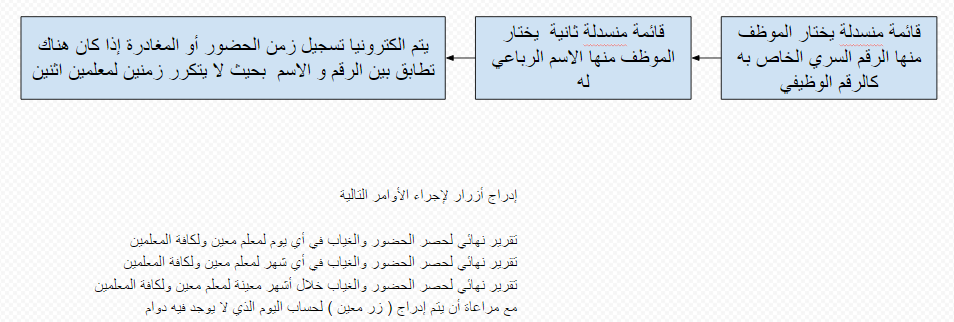
كيف يتم صناعة برنامج للحضور والمغادرة بهذه المواصفات
m_127899 replied to m_127899's topic in منتدى الاكسيل Excel
أرجو ممن لديه المعرفة المساعدة -
كيف يتم صناعة برنامج للحضور والمغادرة بهذه المواصفات المدرجة بالصورة الموجودة في الملف
-
جميع الصور السابقة في ملف واحد http://www.4shared.com/office/V-rAfezi/___.html?
-
جميع الصور في ملف واحد http://www.4shared.com/office/nAOG-XQM/___online.html?
-
لطفا وتفضلا منكم أخواني الأكارم هل يمكن أن تكون النسخة المحفوظة في درايف د مخفية تلقائيا للرفع
-
هل يمكن أنت تكون النسخة المحفوظة في درايف د مخفية تلقائيا للرفع