
Foksh
-
Posts
4510 -
تاريخ الانضمام
-
Days Won
195
نوع المحتوي
التقويم
المنتدى
مكتبة الموقع
معرض الصور
المدونات
الوسائط المتعددة
كل منشورات العضو Foksh
-
 ممكن تكتب الكود هنا 🙂
 -
تعديل واضافة كود عمل ماسح ضوئي مع برنامج (IrfanView)
Foksh replied to Ahmed_J's topic in قسم الأكسيس Access
سأتحقق من موضوع المكتبة واتابع معك كاضافه مني جرب هذا الملف المرفق واتمنى ايجاد الغايه فيه ولو حتى بجزء بسيط. وتذكر اني لا اقوم بتجربة المرفق ولا الأكواد لانني لست امام جهاز الكمبيوتر. 08 MS access - scan and attach documents -Scand and convert to PDF.accdb -
اكتب الكود في مصدر مربع النص الخاص بالتاريخ في التقرير ، بشرط أن لا يكون تنسيق المربع بالـ Format <> Short Date و يفضل ان يكون التنسيق فارغاً من أي صيغة. وإذا كان مصدر التقرير ناتج عن نموذج فضع الكود في مربع النص التابع له التاريخ ، واجعل مصدر الحقل في التقرير يكون نفس الحقل في النموذج. واعتذر لعدم وجود تطبيق كمرفق لأني لست أمام الكمبيوتر حالياً.
-
تعديل واضافة كود عمل ماسح ضوئي مع برنامج (IrfanView)
Foksh replied to Ahmed_J's topic in قسم الأكسيس Access
التجربة الثانية ولن نخسر شيء 😅 Private Sub CommandButton_Click() Dim scanner As WIA.CommonDialog Dim img As WIA.ImageFile Dim pdf As Object ' إنشاء مربع حوار الماسح الضوئي Set scanner = New WIA.CommonDialog Set img = scanner.ShowAcquireImage() ' تصدير الصورة إلى ملف PDF باستخدام مكتبة Adobe PDF Set pdf = CreateObject("AcroExch.PDDoc") pdf.Create pdf.AddPage pdf.Save ("C:\مسح.pdf") ' إغلاق المسح الضوئي Set scanner = Nothing End Sub -
تعديل واضافة كود عمل ماسح ضوئي مع برنامج (IrfanView)
Foksh replied to Ahmed_J's topic in قسم الأكسيس Access
من خلال البحث وجدت هذا الكود ، ولم أقم بتجربته لعدم وجود ماسح ضوئي عندي. Private Sub ScanAndSaveAsPDF_Click() Dim WIA_Devices As Object Set WIA_Devices = CreateObject("WIA.DeviceManager") If WIA_Devices.DeviceInfos.Count > 0 Then Dim WIA_Device As Object Set WIA_Device = WIA_Devices.DeviceInfos(1).Connect Dim WIA_ImageFile As Object Set WIA_ImageFile = WIA_Device.Items(1).Transfer Dim filePath As String filePath = "C:\Path\To\Save\ScannedDocument.pdf" WIA_ImageFile.SaveFile filePath ' إجراءات إضافية إذا كنت بحاجة، مثل فتح ملف PDF أو حفظ معلوماته في قاعدة البيانات Else MsgBox "لم يتم العثور على جهاز ماسح ضوئي." End If End Sub -
أخي وأستاذي الفاضل @شايب وإني فوق الإحترام الذي أكنه له كشخص فإني أساويه بإحترامي لرأيك ، وما كنت ولن أجرؤ على الإحراج ( وحاشا لله أن أقصده لأي شخص ) ، وما كان من الفيديو المقصود هو أن الويندوز يدعم فكرة الـ Downgrade بين معظم منتوجاته وأعتقدت للحظة أنها ثغرة كانت في الإصدارات القديمه أنها لا تقوم بكشف ما إذا كان هناك نسخة من نفس المنتج بإصدار آخر ، إلا أنها كشركة أنتبهت لذلك في العهد الحديث من تطبيقاتها ،، ليس إلا. كل الإحترام لشخصك الطيب أستاذي الشايب. (هو مجرد رأي ليس إلا)
-
تأكد من المجلد backup بنفس مسار قاعدة البيانات التي تم النسخ إليها , مع أن الملف يعمل جهاز آخر بعد تجربته . شرط آخر بعد الأول في حال وجود خطأ في أخذ النسخة ( لأي سبب كان ) فإن الرد سيكون ( حدث خطا ما ، لم يتم اخذ نسخه احتياطية ) واذا استمرت المشكلة في القاعدة الثانية أرسل منها جزء مرفق لمعالجة الخطأ
-
بما إنه أجنبي ، فربنا مسامحك ههههه
-
للأسف يا صديقي ، انا عندي على كمبيوتري في العمل ما يلي :- نظام تشغيل ويندوز 10 بنواة 64 نسخة من مايكروسوفت أوفيس 2016 بنواة 64 بواجهة أنجليزية ( تم تثبيته أولاً ) نسخة من مايكروسوفت أوفيس 2010 بنواة 32 و واجهة عربية أيضاً ( تم تثبيته بعد تثبيت السابق ) هذه نسخة الـ 64 بت أوفيس 2016 وفيما بعد نسخة 32 واجهة عربية أوفيس 2010
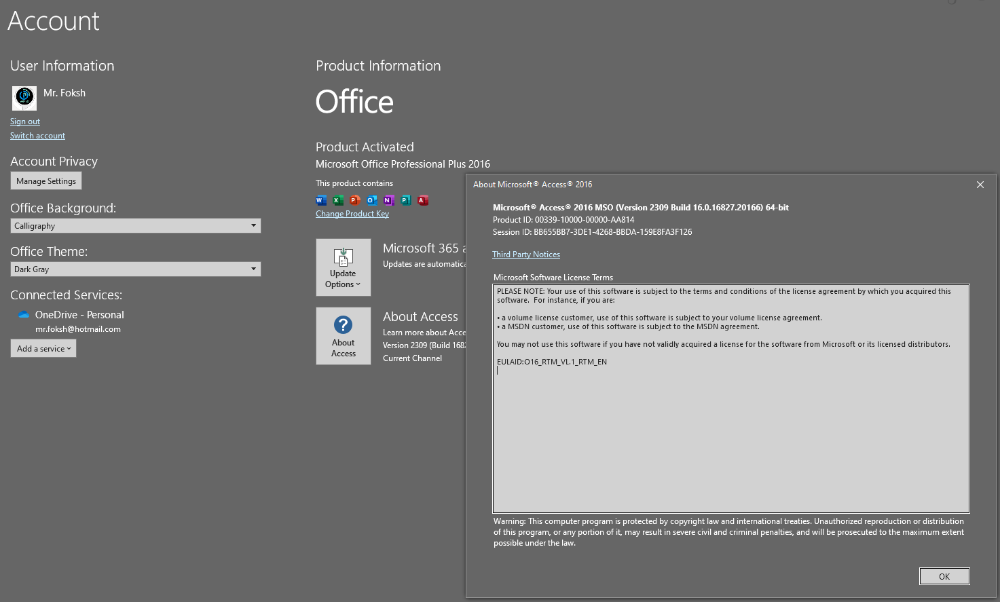
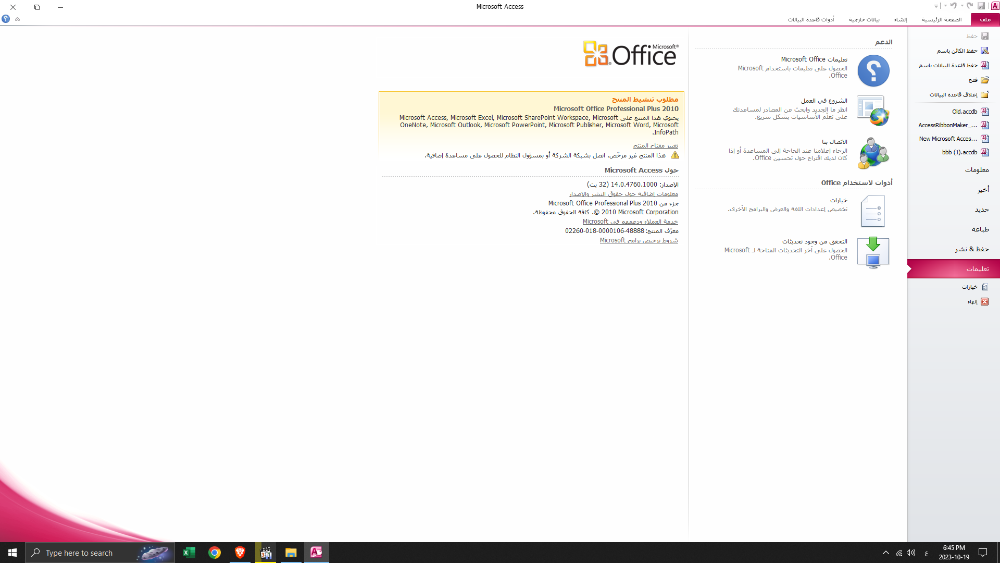
-
أوافق أخي @شايب معلوماته ، ولكني أعتقد ان الأمر لا ينطبق على نسخة الويندوز الـ 64 !! فعلى جهازي فعلياً ( نسختين أوفيس 32 = 2010 + 64 = 2016 ) ، على نسخة ويندوز 64 . وفي مشاركة أخرى للأستاذ @jjafferr ، واقتبس منها في هذه المشاركة :- بغض النظر عن نظام الويندور ( لا أعلم أن كان المقصود بكلامه هو 32 و 64 ، أو Win10 و Win7 ، .... الخ ) . لكن بالعودة للموضوع فأعتقد إنه نظام التشغيل الـ 64 هو أشمل وأوسع نظاقاً بالنسبة لقبوليته البرامج .
-
جرب فكرتي ، قد تعجبك 0.accdb
-
عمل جميل جداً ، ولكن لي نقطة وملاحظة صغيرة . لو جعلت المرفق يعمل على النظامين ( 64 / 32 ) لكان الجميل ازداد جمالا
-
اخي الكريم @sm44ms ، تم تعديل المشاركة بعد التجربة ، لأنه مع تجربة الكود يصبح ثقيل Try This.accdb وجرب هذا الكود لعمل وميض فلاش
-
التعديل الأخير للنسخ الإحتياطي اليومي ، بدون حذف النسخ القديمة ، تفضل Backup New.zip
-
أبدعت ، جزاك الله كل خير أستاذ @شايب هذه المعلومة ما خطرت في بالي للأسف
-
نعم صحيح ، ولكني قمت بتجربتها وكان هناك رسالة خطأ في جملة الكود hHook = SetWindowsHookEx(WH_CBT, AddressOf NewProc, lngModHwnd, lngThreadID) ما اضطرني إلى اقتراح الفكرة أعلاه إلا إذا كان هناك توضيح لنوع الخطأ وسببه .
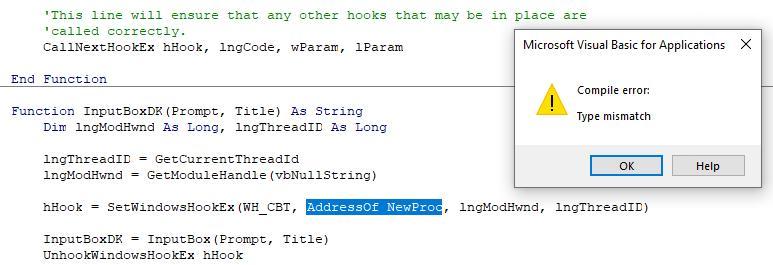
-
اخي الكريم ، في هذا النوع من الرسائل التي من النوع InputBox ، لا أعتقد إنه يمكن تغيير الـ Mask ليصبح ***** ( على حد علمي ومعرفتي ) ، ولكن يمكن الإستغناء عن الفكرة بعمل نموذج منفصل يعمل كإنه رسالة باسوورد .
-
الف سلامة عليك أخونا وأستاذنا @شايب ، وعافاك الله من كل مرض
-
اخوي الغالي ، المجموع بالفاتورة شغال 100% ، لم يتم التعديل عليه
-
مع إنك ما ذكرتش فكرة طرح الكمية ، لكن فين هو الحقل المسؤول عن الكمية ؟؟
-
تفضل بطريقة أخرى واستبدل كود الرسالة الأول والثاني حسب ترتيب الشروط لديك Pass.accdb
-
تخيل حصل الطارئ في الإثنين ( الفلاش والحاسوب ) هههههههههههه
-
شوف هذه الفكرة db1.mdb
-
بحث عن كود الصنف وان لم يجد تظهر رسالة بعدم الوجود
Foksh replied to الحلبي's topic in قسم الأكسيس Access
تفضل بحث منفرد.accdb -
تفضل أخي الكريم @moho58 ، وعذراً على التأخير بسبب العمل في التعديل جعلت النسخ الإحتياطي ينشئ مجلد بتاريخ اليوم في مجلد Backup ، ويقوم بتخزين النسخ الإحتياطية فيه حتى يصبح التاريخ اليوم التالي ، فيقوم بحذف المجلد بتاريخ يوم أمس وإنشاء مجلد جديد بتاريخ اليوم وحفظ النسخ فيه ,, وهكذا Backup New.zip