كل الانشطه
- الساعة الأخيرة
-
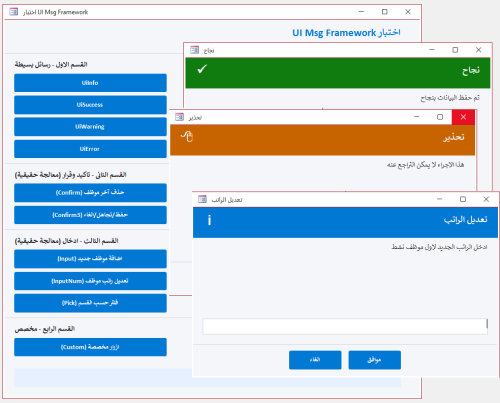
 اعرض الملف UiMsg Framework - نظام رسائل احترافي استبدال صندوق الرسائل فى الاكسس بنموذج رسائل احترافى بسطر واحد بس كل حاجة جاهزة مش محتاج تفكر في تصميم نموذج مش محتاج نموذج الرسائل يكون موجود اساسا مش محتاج تكتب كود كبير بعد كده لصندوق الرسائل استدعي الدالة وخلاص والنظام يعمل كل شئ النظام يقدم 4 أنواع رسائل جاهزة : { معلومة - نجاح - تحذير - خطأ } كل نوع بتصميمه ولونه وأيقونته معلومة : من خلال : UiInfo اللون : أزرق نجاح : من خلال : UiSuccess اللون : أخضر تحذير : من خلال : UiWarning اللون : برتقالي خطأ : من خلال : UiError اللون : أحمر 3 أنواع إدخال : { نص حر - رقم مع تحقق تلقائي - اختيار من قائمة } نص حر : من خلال : UiInput رقم مع تحقق تلقائي: من خلال : UiInputNum يرفض الحروف بدون ما تكتب سطر واحد اختيار من قائمة : من خلال : UiPick قرارات متعددة : { تأكيد نعم/لا - ثلاثة خيارات أزرار مخصصة بأسماء ترجعها النتيجة مباشرة } نعم / لا : من خلال : BlnUiConfirm يرجع True أو False مباشرة ثلاثة خيارات : من خلال :IntUiConfirm3 يرجع 1 أو 2 أو 0 أزرار مخصصة : من خلال :UiCustom يرجع اسم الزر اللي اتضغط مش رقمه دعم كامل للعربية والإنجليزية : { اتجاه النص RTL/LTR تلقائي - الأزرار والعناوين بالغتين من خلال معامل UiLangEn يكفي لتبديل كل شيء } أضف UiLangEn كآخر parameter وكل شيء يتبدل : اتجاه النص - الأزرار - العناوين الافتراضية ثيم موحد قابل للتخصيص : { ألوان الهيدر والأيقونات والأزرار كلها من UiTheme غير لون الـ Accent في مكان واحد وكل الرسائل تتغير } كل ألوان النظام مجمعة في UiTheme مناسب لأي مشروع قاعدة بيانات صغير أو كبير - عربي أو إنجليزي - مبتدئ أو محترف يبني نفسه : لا تثبيت ولا إعداد كل إجراء أو وظيفة واضحة الاسم - واضحة الـ return - واضحة الاستخدام اسم الوحدة النمطية : modUIMsgFramework كود الوحدة النمطية.. Option Explicit Option Compare Database Public Enum UiIcon UiIconInfo = 0 UiIconSuccess = 1 UiIconWarning = 2 UiIconError = 3 UiIconQuestion = 4 End Enum Public Enum UiMode UiModeAlert = 0 UiModeInput = 1 UiModeNumber = 2 UiModeList = 3 End Enum Public Enum UiLang UiLangAr = 0 UiLangEn = 1 End Enum Public Type UiParams strMessage As String strTitle As String strButtons As String strDefault As String strList As String strDetails As String strResult As String enuIcon As UiIcon enuMode As UiMode enuLang As UiLang End Type Public Type UiTheme lngAccent As Long lngHeader As Long lngBg As Long lngText As Long lngMuted As Long lngBorder As Long lngSuccess As Long lngWarning As Long lngError As Long lngInfo As Long lngQuestion As Long End Type Private Const STRFORMNAME As String = "frmUiMsg" Private Const STRMODNAME As String = "modUICore" Private Const MAX_BUTTONS As Integer = 5 Private Const FRM_W As Long = 9000 Private m_typParams As UiParams Public Function TypDefaultTheme() As UiTheme Dim typT As UiTheme typT.lngAccent = RGB(0, 120, 212) typT.lngHeader = RGB(32, 32, 38) typT.lngBg = RGB(245, 246, 250) typT.lngText = RGB(30, 30, 35) typT.lngMuted = RGB(120, 120, 130) typT.lngBorder = RGB(210, 212, 220) typT.lngSuccess = RGB(16, 124, 16) typT.lngWarning = RGB(200, 100, 0) typT.lngError = RGB(196, 43, 28) typT.lngInfo = RGB(0, 120, 212) typT.lngQuestion = RGB(104, 33, 122) TypDefaultTheme = typT End Function Private Function BlnFormExists(ByVal strName As String) As Boolean On Error Resume Next Dim objFrm As Object Set objFrm = CurrentProject.AllForms(strName) BlnFormExists = Not (objFrm Is Nothing) Set objFrm = Nothing On Error GoTo 0 End Function Private Sub LogError(ByVal strProc As String, _ ByVal lngNum As Long, _ ByVal strDesc As String) Debug.Print "[" & STRMODNAME & "." & strProc & "] " & _ "Err " & lngNum & ": " & strDesc & _ " @ " & Now() End Sub Public Function TypGetParams() As UiParams TypGetParams = m_typParams End Function Public Sub SetResult(ByVal strResult As String) m_typParams.strResult = strResult End Sub Private Sub ResetParams() Dim typEmpty As UiParams m_typParams = typEmpty End Sub Private Function StrDefaultTitle(ByVal enuIcon As UiIcon, _ ByVal enuLang As UiLang) As String If enuLang = UiLangAr Then Select Case enuIcon Case UiIconSuccess: StrDefaultTitle = "تم بنجاح" Case UiIconWarning: StrDefaultTitle = "تحذير" Case UiIconError: StrDefaultTitle = "خطأ" Case UiIconQuestion: StrDefaultTitle = "تأكيد" Case Else: StrDefaultTitle = "معلومة" End Select Else Select Case enuIcon Case UiIconSuccess: StrDefaultTitle = "Success" Case UiIconWarning: StrDefaultTitle = "Warning" Case UiIconError: StrDefaultTitle = "Error" Case UiIconQuestion: StrDefaultTitle = "Confirm" Case Else: StrDefaultTitle = "Information" End Select End If End Function Private Function StrValidateButtons(ByVal strBtns As String) As String Dim arrB() As String Dim intCnt As Integer Dim intI As Integer Dim strOut As String arrB = Split(strBtns, ",") intCnt = UBound(arrB) + 1 If intCnt > MAX_BUTTONS Then LogError "StrValidateButtons", 0, _ "تجاوز الحد الأقصى للأزرار (" & intCnt & "). سيتم اقتصارها على " & MAX_BUTTONS intCnt = MAX_BUTTONS End If For intI = 0 To intCnt - 1 If Len(strOut) > 0 Then strOut = strOut & "," strOut = strOut & Trim(arrB(intI)) Next intI StrValidateButtons = strOut End Function Private Function BlnBuildMsgForm() As Boolean On Error GoTo ErrHandler Dim typT As UiTheme Dim objFrm As Object Dim objCtl As Object Dim strTemp As String Dim intI As Integer Dim lngLeft As Long typT = TypDefaultTheme() Const HDR_H As Long = 900 Const ICON_L As Long = 200 Const ICON_T As Long = 150 Const ICON_W As Long = 600 Const ICON_H As Long = 600 Const TITLE_L As Long = 900 Const TITLE_T As Long = 200 Const TITLE_W As Long = 7800 Const TITLE_H As Long = 500 Const MSG_L As Long = 300 Const MSG_T As Long = 1050 Const MSG_W As Long = 8400 Const MSG_H As Long = 1400 Const DET_L As Long = 300 Const DET_T As Long = 2500 Const DET_W As Long = 8400 Const DET_H As Long = 700 Const INP_L As Long = 300 Const INP_T As Long = 3300 Const INP_W As Long = 8400 Const INP_H As Long = 450 Const DIV_T As Long = 4050 Const BTN_T As Long = 4250 Const BTN_W As Long = 1550 Const BTN_H As Long = 550 Const FRM_H As Long = 5000 Set objFrm = CreateForm strTemp = objFrm.Name With objFrm .Caption = "" .ScrollBars = 0 .RecordSelectors = False .NavigationButtons = False .DividingLines = False .BorderStyle = 1 .AutoCenter = True .PopUp = True .Modal = True .Width = FRM_W .Section(0).Height = FRM_H .Section(0).BackColor = typT.lngBg End With Set objCtl = CreateControl(strTemp, acRectangle, acDetail) With objCtl .Name = "recHeader": .Left = 0: .Top = 0 .Width = FRM_W: .Height = HDR_H .BackColor = typT.lngHeader: .BackStyle = 1 .BorderStyle = 0: .SpecialEffect = 0 End With Set objCtl = CreateControl(strTemp, acRectangle, acDetail) With objCtl .Name = "recIcon": .Left = ICON_L: .Top = ICON_T .Width = ICON_W: .Height = ICON_H .BackColor = typT.lngInfo: .BackStyle = 1 .BorderStyle = 0: .SpecialEffect = 0 End With Set objCtl = CreateControl(strTemp, acLabel, acDetail) With objCtl .Name = "lblIcon": .Caption = "i" .Left = ICON_L: .Top = ICON_T .Width = ICON_W: .Height = ICON_H .FontSize = 20: .FontBold = True .ForeColor = vbWhite: .BackStyle = 0: .TextAlign = 2 End With Set objCtl = CreateControl(strTemp, acLabel, acDetail) With objCtl .Name = "lblTitle": .Caption = "" .Left = TITLE_L: .Top = TITLE_T .Width = TITLE_W: .Height = TITLE_H .FontSize = 14: .FontBold = True .ForeColor = vbWhite: .BackStyle = 0: .TextAlign = 1 End With Set objCtl = CreateControl(strTemp, acLabel, acDetail) With objCtl .Name = "lblMessage": .Caption = "" .Left = MSG_L: .Top = MSG_T .Width = MSG_W: .Height = MSG_H .FontSize = 11: .ForeColor = typT.lngText .BackStyle = 0: .TextAlign = 1 End With Set objCtl = CreateControl(strTemp, acLabel, acDetail) With objCtl .Name = "lblDetails": .Caption = "" .Left = DET_L: .Top = DET_T .Width = DET_W: .Height = DET_H .FontSize = 9: .ForeColor = typT.lngMuted .BackStyle = 0: .Visible = False End With Set objCtl = CreateControl(strTemp, acTextBox, acDetail) With objCtl .Name = "txtInput" .Left = INP_L: .Top = INP_T .Width = INP_W: .Height = INP_H .FontSize = 11 .BorderColor = typT.lngBorder: .BackColor = vbWhite .Visible = False End With Set objCtl = CreateControl(strTemp, acComboBox, acDetail) With objCtl .Name = "cboList" .Left = INP_L: .Top = INP_T .Width = INP_W: .Height = INP_H .FontSize = 11 .BorderColor = typT.lngBorder: .BackColor = vbWhite .RowSourceType = "Value List" .LimitToList = True: .AllowValueListEdits = False .Visible = False End With Set objCtl = CreateControl(strTemp, acLine, acDetail) With objCtl .Name = "linDivider": .Left = 0: .Top = DIV_T .Width = FRM_W: .Height = 0 .BorderColor = typT.lngBorder: .BorderWidth = 1 End With For intI = 1 To MAX_BUTTONS lngLeft = 200 + ((intI - 1) * 1760) Set objCtl = CreateControl(strTemp, acCommandButton, acDetail) With objCtl .Name = "btn" & intI: .Caption = "btn" & intI .Left = lngLeft: .Top = BTN_T .Width = BTN_W: .Height = BTN_H .FontSize = 10: .FontBold = True .BackColor = typT.lngAccent: .ForeColor = vbWhite .BorderStyle = 0: .Visible = False .OnClick = "=ProcBtnClick(" & intI & ")" End With Next intI DoCmd.Save acForm, strTemp DoCmd.Close acForm, strTemp, acSaveYes DoCmd.Rename STRFORMNAME, acForm, strTemp BlnBuildMsgForm = True Set objCtl = Nothing: Set objFrm = Nothing Exit Function ErrHandler: LogError "BlnBuildMsgForm", Err.Number, Err.Description BlnBuildMsgForm = False Set objCtl = Nothing: Set objFrm = Nothing End Function Private Function BlnInjectMsgCode() As Boolean On Error GoTo ErrHandler Dim objMdl As Object Dim strCode As String Dim strOldCode As String DoCmd.OpenForm STRFORMNAME, acDesign, , , , acHidden Set objMdl = Forms(STRFORMNAME).Module If objMdl.CountOfLines > 0 Then strOldCode = objMdl.Lines(1, objMdl.CountOfLines) objMdl.DeleteLines 1, objMdl.CountOfLines End If strCode = StrFormCodeHeader() & _ StrFormCodeApplyIcon() & _ StrFormCodeApplyLang() & _ StrFormCodeSetupBtns() & _ StrFormCodeFillList() & _ StrFormCodeOpen() & _ StrFormCodeBtn() & _ StrFormCodeUnload() objMdl.AddFromString strCode If objMdl.CountOfLines < 10 Then If Len(strOldCode) > 0 Then objMdl.DeleteLines 1, objMdl.CountOfLines objMdl.AddFromString strOldCode End If LogError "BlnInjectMsgCode", 0, "AddFromString أنتج كوداً فارغاً، تم استعادة الكود القديم" BlnInjectMsgCode = False GoTo Cleanup End If DoCmd.Save acForm, STRFORMNAME DoCmd.Close acForm, STRFORMNAME, acSaveYes BlnInjectMsgCode = True Cleanup: Set objMdl = Nothing Exit Function ErrHandler: LogError "BlnInjectMsgCode", Err.Number, Err.Description BlnInjectMsgCode = False Set objMdl = Nothing End Function Private Function StrFormCodeHeader() As String Dim s As String s = "Option Explicit" & vbCrLf s = s & "Option Compare Database" & vbCrLf & vbCrLf s = s & "Private mintMode As Integer" & vbCrLf s = s & "Private mintLang As Integer" & vbCrLf & vbCrLf StrFormCodeHeader = s End Function Private Function StrFormCodeApplyIcon() As String Dim s As String s = "Private Sub ProcApplyIcon(ByVal intIcon As Integer)" & vbCrLf s = s & " Select Case intIcon" & vbCrLf s = s & " Case 1" & vbCrLf s = s & " Me.recHeader.BackColor = RGB(16,124,16)" & vbCrLf s = s & " Me.recIcon.BackColor = RGB(16,124,16)" & vbCrLf s = s & " Me.lblIcon.Caption = Chr(252)" & vbCrLf s = s & " Me.lblIcon.FontName = ""Wingdings""" & vbCrLf s = s & " Case 2" & vbCrLf s = s & " Me.recHeader.BackColor = RGB(200,100,0)" & vbCrLf s = s & " Me.recIcon.BackColor = RGB(200,100,0)" & vbCrLf s = s & " Me.lblIcon.Caption = Chr(56)" & vbCrLf s = s & " Me.lblIcon.FontName = ""Wingdings""" & vbCrLf s = s & " Case 3" & vbCrLf s = s & " Me.recHeader.BackColor = RGB(196,43,28)" & vbCrLf s = s & " Me.recIcon.BackColor = RGB(196,43,28)" & vbCrLf s = s & " Me.lblIcon.Caption = Chr(251)" & vbCrLf s = s & " Me.lblIcon.FontName = ""Wingdings""" & vbCrLf s = s & " Case 4" & vbCrLf s = s & " Me.recHeader.BackColor = RGB(104,33,122)" & vbCrLf s = s & " Me.recIcon.BackColor = RGB(104,33,122)" & vbCrLf s = s & " Me.lblIcon.Caption = Chr(63)" & vbCrLf s = s & " Me.lblIcon.FontName = ""Wingdings""" & vbCrLf s = s & " Case Else" & vbCrLf s = s & " Me.recHeader.BackColor = RGB(0,120,212)" & vbCrLf s = s & " Me.recIcon.BackColor = RGB(0,120,212)" & vbCrLf s = s & " Me.lblIcon.Caption = Chr(105)" & vbCrLf s = s & " Me.lblIcon.FontName = ""Arial""" & vbCrLf s = s & " End Select" & vbCrLf s = s & "End Sub" & vbCrLf & vbCrLf StrFormCodeApplyIcon = s End Function Private Function StrFormCodeApplyLang() As String Dim s As String s = "Private Sub ProcApplyLang(ByVal intLang As Integer)" & vbCrLf s = s & " Dim intAlign As Integer" & vbCrLf s = s & " intAlign = IIf(intLang = 0, 3, 1)" & vbCrLf s = s & " Me.lblTitle.TextAlign = intAlign" & vbCrLf s = s & " Me.lblMessage.TextAlign = intAlign" & vbCrLf s = s & " Me.lblDetails.TextAlign = intAlign" & vbCrLf s = s & " Me.txtInput.TextAlign = intAlign" & vbCrLf s = s & " Me.cboList.TextAlign = intAlign" & vbCrLf s = s & "End Sub" & vbCrLf & vbCrLf StrFormCodeApplyLang = s End Function Private Function StrFormCodeSetupBtns() As String Dim s As String s = "Private Sub ProcSetupBtns(ByVal strBtns As String, ByVal intLang As Integer)" & vbCrLf s = s & " Dim arrBtns() As String" & vbCrLf s = s & " Dim intTotal As Integer" & vbCrLf s = s & " Dim intI As Integer" & vbCrLf s = s & " Dim lngBtnW As Long" & vbCrLf s = s & " Dim lngBtnH As Long" & vbCrLf s = s & " Dim lngGap As Long" & vbCrLf s = s & " Dim lngTotalW As Long" & vbCrLf s = s & " Dim lngStartX As Long" & vbCrLf s = s & " Dim blnIsRtl As Boolean" & vbCrLf s = s & " arrBtns = Split(strBtns, "","")" & vbCrLf s = s & " intTotal = UBound(arrBtns) + 1" & vbCrLf s = s & " If intTotal > 5 Then intTotal = 5" & vbCrLf s = s & " blnIsRtl = (intLang = 0)" & vbCrLf s = s & " lngBtnW = 1550" & vbCrLf s = s & " lngBtnH = 550" & vbCrLf s = s & " lngGap = 200" & vbCrLf s = s & " lngTotalW = (intTotal * lngBtnW) + ((intTotal - 1) * lngGap)" & vbCrLf s = s & " lngStartX = (Me.Width - lngTotalW) \ 2" & vbCrLf s = s & " For intI = 1 To 5" & vbCrLf s = s & " Me(""btn"" & intI).Visible = False" & vbCrLf s = s & " Next intI" & vbCrLf s = s & " For intI = 1 To intTotal" & vbCrLf s = s & " With Me(""btn"" & intI)" & vbCrLf s = s & " .Caption = Trim(arrBtns(intI - 1))" & vbCrLf s = s & " If blnIsRtl Then" & vbCrLf s = s & " .Left = lngStartX + ((intTotal - intI) * (lngBtnW + lngGap))" & vbCrLf s = s & " Else" & vbCrLf s = s & " .Left = lngStartX + ((intI - 1) * (lngBtnW + lngGap))" & vbCrLf s = s & " End If" & vbCrLf s = s & " .Top = 4250: .Width = lngBtnW: .Height = lngBtnH" & vbCrLf s = s & " .Visible = True" & vbCrLf s = s & " End With" & vbCrLf s = s & " Next intI" & vbCrLf s = s & "End Sub" & vbCrLf & vbCrLf StrFormCodeSetupBtns = s End Function Private Function StrFormCodeFillList() As String Dim s As String s = "Private Sub ProcFillList(ByVal strItems As String, ByVal strDefault As String)" & vbCrLf s = s & " Dim arrItems() As String" & vbCrLf s = s & " Dim strSource As String" & vbCrLf s = s & " Dim intI As Integer" & vbCrLf s = s & " arrItems = Split(strItems, "","")" & vbCrLf s = s & " For intI = 0 To UBound(arrItems)" & vbCrLf s = s & " strSource = strSource & Trim(arrItems(intI)) & "";""" & vbCrLf s = s & " Next intI" & vbCrLf s = s & " Me.cboList.RowSource = strSource" & vbCrLf s = s & " If Len(Trim(strDefault)) > 0 Then" & vbCrLf s = s & " Me.cboList.Value = strDefault" & vbCrLf s = s & " ElseIf UBound(arrItems) >= 0 Then" & vbCrLf s = s & " Me.cboList.Value = Trim(arrItems(0))" & vbCrLf s = s & " End If" & vbCrLf s = s & "End Sub" & vbCrLf & vbCrLf StrFormCodeFillList = s End Function Private Function StrFormCodeOpen() As String Dim s As String s = "Private Sub Form_Open(Cancel As Integer)" & vbCrLf s = s & " On Error GoTo ErrHandler" & vbCrLf s = s & " Dim typP As UiParams" & vbCrLf s = s & " typP = TypGetParams()" & vbCrLf s = s & " mintMode = CInt(typP.enuMode)" & vbCrLf s = s & " mintLang = CInt(typP.enuLang)" & vbCrLf s = s & " Me.Caption = typP.strTitle" & vbCrLf s = s & " Me.lblTitle.Caption = typP.strTitle" & vbCrLf s = s & " Me.lblMessage.Caption = typP.strMessage" & vbCrLf s = s & " Me.lblDetails.Visible = (Len(Trim(typP.strDetails)) > 0)" & vbCrLf s = s & " If Me.lblDetails.Visible Then Me.lblDetails.Caption = typP.strDetails" & vbCrLf s = s & " ProcApplyIcon CInt(typP.enuIcon)" & vbCrLf s = s & " ProcApplyLang mintLang" & vbCrLf s = s & " ProcSetupBtns typP.strButtons, mintLang" & vbCrLf s = s & " Me.txtInput.Visible = (mintMode = 1 Or mintMode = 2)" & vbCrLf s = s & " Me.cboList.Visible = (mintMode = 3)" & vbCrLf s = s & " If mintMode = 1 Or mintMode = 2 Then" & vbCrLf s = s & " Me.txtInput.Value = typP.strDefault" & vbCrLf s = s & " Me.txtInput.SetFocus" & vbCrLf s = s & " End If" & vbCrLf s = s & " If mintMode = 3 Then" & vbCrLf s = s & " ProcFillList typP.strList, typP.strDefault" & vbCrLf s = s & " Me.cboList.SetFocus" & vbCrLf s = s & " End If" & vbCrLf s = s & " Exit Sub" & vbCrLf s = s & "ErrHandler:" & vbCrLf s = s & " Debug.Print ""Form_Open Err: "" & Err.Number & "" - "" & Err.Description" & vbCrLf s = s & " DoCmd.Close acForm, Me.Name" & vbCrLf s = s & "End Sub" & vbCrLf & vbCrLf StrFormCodeOpen = s End Function Private Function StrFormCodeBtn() As String Dim s As String s = "Public Function ProcBtnClick(ByVal intNum As Integer)" & vbCrLf s = s & " On Error GoTo ErrHandler" & vbCrLf s = s & " Dim strResult As String" & vbCrLf s = s & " Dim strWarn As String" & vbCrLf s = s & " Select Case mintMode" & vbCrLf s = s & " Case 1" & vbCrLf s = s & " If intNum = 1 Then" & vbCrLf s = s & " strResult = Nz(Me.txtInput.Value, """")" & vbCrLf s = s & " Else" & vbCrLf s = s & " strResult = ""__CANCEL__""" & vbCrLf s = s & " End If" & vbCrLf s = s & " Case 2" & vbCrLf s = s & " If intNum = 1 Then" & vbCrLf s = s & " If Len(Nz(Me.txtInput.Value, """")) > 0 Then" & vbCrLf s = s & " If Not IsNumeric(Me.txtInput.Value) Then" & vbCrLf s = s & " strWarn = IIf(mintLang = 0, ""أدخل رقماً صحيحاً"", ""Enter a valid number"")" & vbCrLf s = s & " MsgBox strWarn, vbExclamation" & vbCrLf s = s & " Me.txtInput.SetFocus" & vbCrLf s = s & " Exit Function" & vbCrLf s = s & " End If" & vbCrLf s = s & " End If" & vbCrLf s = s & " strResult = Nz(Me.txtInput.Value, """")" & vbCrLf s = s & " Else" & vbCrLf s = s & " strResult = ""__CANCEL__""" & vbCrLf s = s & " End If" & vbCrLf s = s & " Case 3" & vbCrLf s = s & " If intNum = 1 Then" & vbCrLf s = s & " strResult = Nz(Me.cboList.Value, """")" & vbCrLf s = s & " Else" & vbCrLf s = s & " strResult = ""__CANCEL__""" & vbCrLf s = s & " End If" & vbCrLf s = s & " Case Else" & vbCrLf s = s & " strResult = Me(""btn"" & intNum).Caption" & vbCrLf s = s & " End Select" & vbCrLf s = s & " SetResult strResult" & vbCrLf s = s & " DoCmd.Close acForm, Me.Name" & vbCrLf s = s & " Exit Function" & vbCrLf s = s & "ErrHandler:" & vbCrLf s = s & " Debug.Print ""ProcBtnClick Err: "" & Err.Number & "" - "" & Err.Description" & vbCrLf s = s & "End Function" & vbCrLf & vbCrLf StrFormCodeBtn = s End Function Private Function StrFormCodeUnload() As String Dim s As String s = "Private Sub Form_Unload(Cancel As Integer)" & vbCrLf s = s & " Dim typP As UiParams" & vbCrLf s = s & " typP = TypGetParams()" & vbCrLf s = s & " If Len(Nz(typP.strResult, """")) = 0 Then" & vbCrLf s = s & " SetResult ""__CANCEL__""" & vbCrLf s = s & " End If" & vbCrLf s = s & "End Sub" & vbCrLf StrFormCodeUnload = s End Function Private Function BlnEnsureForm() As Boolean On Error GoTo ErrHandler If BlnFormExists(STRFORMNAME) Then BlnEnsureForm = True Exit Function End If If Not BlnBuildMsgForm() Then LogError "BlnEnsureForm", 0, "BlnBuildMsgForm failed" Exit Function End If If Not BlnInjectMsgCode() Then LogError "BlnEnsureForm", 0, "BlnInjectMsgCode failed" Exit Function End If BlnEnsureForm = True Exit Function ErrHandler: LogError "BlnEnsureForm", Err.Number, Err.Description BlnEnsureForm = False End Function Private Function StrShowMsg(ByVal strMsg As String, _ ByVal enuIcon As UiIcon, _ ByVal strBtns As String, _ ByVal strTitle As String, _ ByVal enuMode As UiMode, _ ByVal strDef As String, _ ByVal strList As String, _ ByVal strDet As String, _ ByVal enuLang As UiLang) As String On Error GoTo ErrHandler If Not BlnEnsureForm() Then LogError "StrShowMsg", 0, "EnsureForm failed" StrShowMsg = "__CANCEL__" Exit Function End If If Len(Trim(strTitle)) = 0 Then strTitle = StrDefaultTitle(enuIcon, enuLang) End If ResetParams With m_typParams .strMessage = strMsg .strTitle = strTitle .strButtons = StrValidateButtons(strBtns) .enuIcon = enuIcon .enuMode = enuMode .strDefault = strDef .strList = strList .strDetails = strDet .enuLang = enuLang .strResult = "" End With DoCmd.OpenForm STRFORMNAME, acNormal, , , , acDialog StrShowMsg = m_typParams.strResult If Len(StrShowMsg) = 0 Then StrShowMsg = "__CANCEL__" ResetParams Exit Function ErrHandler: LogError "StrShowMsg", Err.Number, Err.Description ResetParams StrShowMsg = "__CANCEL__" End Function Public Sub UiInfo(ByVal strMsg As String, _ Optional ByVal strTitle As String = "", _ Optional ByVal enuLang As UiLang = UiLangAr) Dim strBtns As String strBtns = IIf(enuLang = UiLangAr, "موافق", "OK") StrShowMsg strMsg, UiIconInfo, strBtns, strTitle, UiModeAlert, "", "", "", enuLang End Sub Public Sub UiSuccess(ByVal strMsg As String, _ Optional ByVal strTitle As String = "", _ Optional ByVal enuLang As UiLang = UiLangAr) Dim strBtns As String strBtns = IIf(enuLang = UiLangAr, "موافق", "OK") StrShowMsg strMsg, UiIconSuccess, strBtns, strTitle, UiModeAlert, "", "", "", enuLang End Sub Public Sub UiWarning(ByVal strMsg As String, _ Optional ByVal strTitle As String = "", _ Optional ByVal enuLang As UiLang = UiLangAr) Dim strBtns As String strBtns = IIf(enuLang = UiLangAr, "موافق", "OK") StrShowMsg strMsg, UiIconWarning, strBtns, strTitle, UiModeAlert, "", "", "", enuLang End Sub Public Sub UiError(ByVal strMsg As String, _ Optional ByVal strTitle As String = "", _ Optional ByVal strDetails As String = "", _ Optional ByVal enuLang As UiLang = UiLangAr) Dim strBtns As String strBtns = IIf(enuLang = UiLangAr, "موافق", "OK") StrShowMsg strMsg, UiIconError, strBtns, strTitle, UiModeAlert, "", "", strDetails, enuLang End Sub Public Function BlnUiConfirm(ByVal strMsg As String, _ Optional ByVal strTitle As String = "", _ Optional ByVal enuLang As UiLang = UiLangAr) As Boolean Dim strBtns As String Dim strYes As String Dim strResult As String strBtns = IIf(enuLang = UiLangAr, "نعم,لا", "Yes,No") strYes = IIf(enuLang = UiLangAr, "نعم", "Yes") strResult = StrShowMsg(strMsg, UiIconQuestion, strBtns, strTitle, UiModeAlert, "", "", "", enuLang) BlnUiConfirm = (strResult = strYes) End Function Public Function IntUiConfirm3(ByVal strMsg As String, _ Optional ByVal strTitle As String = "", _ Optional ByVal enuLang As UiLang = UiLangAr) As Integer Dim strBtns As String Dim strYes As String Dim strNo As String Dim strResult As String strBtns = IIf(enuLang = UiLangAr, "نعم,لا,إلغاء", "Yes,No,Cancel") strYes = IIf(enuLang = UiLangAr, "نعم", "Yes") strNo = IIf(enuLang = UiLangAr, "لا", "No") strResult = StrShowMsg(strMsg, UiIconQuestion, strBtns, strTitle, UiModeAlert, "", "", "", enuLang) Select Case strResult Case strYes: IntUiConfirm3 = 1 Case strNo: IntUiConfirm3 = 2 Case Else: IntUiConfirm3 = 0 End Select End Function Public Function UiInput(ByVal strMsg As String, _ Optional ByVal strTitle As String = "", _ Optional ByVal strDefault As String = "", _ Optional ByVal enuLang As UiLang = UiLangAr) As String Dim strBtns As String Dim strResult As String strBtns = IIf(enuLang = UiLangAr, "موافق,إلغاء", "OK,Cancel") strResult = StrShowMsg(strMsg, UiIconInfo, strBtns, strTitle, UiModeInput, strDefault, "", "", enuLang) UiInput = IIf(strResult = "__CANCEL__", "", strResult) End Function Public Function UiInputNum(ByVal strMsg As String, _ Optional ByVal strTitle As String = "", _ Optional ByVal strDefault As String = "", _ Optional ByVal enuLang As UiLang = UiLangAr) As String Dim strBtns As String Dim strResult As String strBtns = IIf(enuLang = UiLangAr, "موافق,إلغاء", "OK,Cancel") strResult = StrShowMsg(strMsg, UiIconInfo, strBtns, strTitle, UiModeNumber, strDefault, "", "", enuLang) Select Case strResult Case "__CANCEL__", "": UiInputNum = "" Case Else UiInputNum = IIf(IsNumeric(strResult), strResult, "") End Select End Function Public Function UiPick(ByVal strMsg As String, _ ByVal strItems As String, _ Optional ByVal strTitle As String = "", _ Optional ByVal strDefault As String = "", _ Optional ByVal enuLang As UiLang = UiLangAr) As String Dim strBtns As String Dim strResult As String strBtns = IIf(enuLang = UiLangAr, "موافق,إلغاء", "OK,Cancel") strResult = StrShowMsg(strMsg, UiIconQuestion, strBtns, strTitle, UiModeList, strDefault, strItems, "", enuLang) UiPick = IIf(strResult = "__CANCEL__", "", strResult) End Function Public Function UiCustom(ByVal strMsg As String, _ ByVal strBtns As String, _ Optional ByVal enuIcon As UiIcon = UiIconQuestion, _ Optional ByVal strTitle As String = "", _ Optional ByVal enuLang As UiLang = UiLangAr) As String Dim strResult As String strResult = StrShowMsg(strMsg, enuIcon, strBtns, strTitle, UiModeAlert, "", "", "", enuLang) UiCustom = IIf(strResult = "__CANCEL__", "", strResult) End Function ' ===================================== ' أمثلة الاستخدام ' ===================================== ' UiSuccess "تم انشاء النظام بنجاح" ' UiInfo "رسالة معلومة" ' UiWarning "تحذير: لا يمكن التراجع" ' UiError "حدث خطأ", "", "تفاصيل الخطأ" ' ' If BlnUiConfirm("هل تريد الحذف؟") Then ... ' ' Select Case IntUiConfirm3("حفظ التغييرات؟") ' Case 1: ' نعم ' Case 2: ' لا ' Case 0: ' إلغاء ' End Select ' ' Dim s As String ' s = StrUiInput("أدخل اسمك", "", "محمد") ' If Len(s) > 0 Then ... ' ' Dim n As String ' n = StrUiInputNum("أدخل العمر", "", "25") ' ' Dim pick As String ' pick = StrUiPick("اختر قسم", "مبيعات,محاسبة,مخازن,إدارة") ' ' Dim choice As String ' choice = StrUiCustom("اختر خيار", "حفظ,تجاهل,إلغاء") ' Select Case choice ' Case "حفظ": ... ' Case "تجاهل": ... ' Case "": ' أُغلق بدون اختيار ' End Select طريقة الاعداد و التشغيل : بعد اضافة الوحدة النمطية: modUIMsgFramework الى قاعدة بياناتك استدعي من أي زر أمر داخل أى نموذج أو من النافذة الفورية مباشرة UiSuccess "تم انشاء النظام بنجاح" للتجربة الفورية فى المرفق تم اضافة ما يلى : وحدة نمطية باسم : modBuildTestUI ماكرو باسم : BuildTestUI شغل الماكرو BuildTestUI على الفور هيتم عمل جدول tblEmployees يحتوى على بيانات افتراضية غير حقيقية للتجربة وهيتم عمل نموذج اختبار متكامل وفتحة بشكل مباشر صاحب الملف عسل قليل الدسم تمت الاضافه 04/29/26 الاقسام قسم الأكسيس
 -
Version 1.0.0
0 تنزيل
استبدال صندوق الرسائل فى الاكسس بنموذج رسائل احترافى بسطر واحد بس كل حاجة جاهزة مش محتاج تفكر في تصميم نموذج مش محتاج نموذج الرسائل يكون موجود اساسا مش محتاج تكتب كود كبير بعد كده لصندوق الرسائل استدعي الدالة وخلاص والنظام يعمل كل شئ النظام يقدم 4 أنواع رسائل جاهزة : { معلومة - نجاح - تحذير - خطأ } كل نوع بتصميمه ولونه وأيقونته معلومة : من خلال : UiInfo اللون : أزرق نجاح : من خلال : UiSuccess اللون : أخضر تحذير : من خلال : UiWarning اللون : برتقالي خطأ : من خلال : UiError اللون : أحمر 3 أنواع إدخال : { نص حر - رقم مع تحقق تلقائي - اختيار من قائمة } نص حر : من خلال : UiInput رقم مع تحقق تلقائي: من خلال : UiInputNum يرفض الحروف بدون ما تكتب سطر واحد اختيار من قائمة : من خلال : UiPick قرارات متعددة : { تأكيد نعم/لا - ثلاثة خيارات أزرار مخصصة بأسماء ترجعها النتيجة مباشرة } نعم / لا : من خلال : BlnUiConfirm يرجع True أو False مباشرة ثلاثة خيارات : من خلال :IntUiConfirm3 يرجع 1 أو 2 أو 0 أزرار مخصصة : من خلال :UiCustom يرجع اسم الزر اللي اتضغط مش رقمه دعم كامل للعربية والإنجليزية : { اتجاه النص RTL/LTR تلقائي - الأزرار والعناوين بالغتين من خلال معامل UiLangEn يكفي لتبديل كل شيء } أضف UiLangEn كآخر parameter وكل شيء يتبدل : اتجاه النص - الأزرار - العناوين الافتراضية ثيم موحد قابل للتخصيص : { ألوان الهيدر والأيقونات والأزرار كلها من UiTheme غير لون الـ Accent في مكان واحد وكل الرسائل تتغير } كل ألوان النظام مجمعة في UiTheme مناسب لأي مشروع قاعدة بيانات صغير أو كبير - عربي أو إنجليزي - مبتدئ أو محترف يبني نفسه : لا تثبيت ولا إعداد كل إجراء أو وظيفة واضحة الاسم - واضحة الـ return - واضحة الاستخدام اسم الوحدة النمطية : modUIMsgFramework كود الوحدة النمطية.. Option Explicit Option Compare Database Public Enum UiIcon UiIconInfo = 0 UiIconSuccess = 1 UiIconWarning = 2 UiIconError = 3 UiIconQuestion = 4 End Enum Public Enum UiMode UiModeAlert = 0 UiModeInput = 1 UiModeNumber = 2 UiModeList = 3 End Enum Public Enum UiLang UiLangAr = 0 UiLangEn = 1 End Enum Public Type UiParams strMessage As String strTitle As String strButtons As String strDefault As String strList As String strDetails As String strResult As String enuIcon As UiIcon enuMode As UiMode enuLang As UiLang End Type Public Type UiTheme lngAccent As Long lngHeader As Long lngBg As Long lngText As Long lngMuted As Long lngBorder As Long lngSuccess As Long lngWarning As Long lngError As Long lngInfo As Long lngQuestion As Long End Type Private Const STRFORMNAME As String = "frmUiMsg" Private Const STRMODNAME As String = "modUICore" Private Const MAX_BUTTONS As Integer = 5 Private Const FRM_W As Long = 9000 Private m_typParams As UiParams Public Function TypDefaultTheme() As UiTheme Dim typT As UiTheme typT.lngAccent = RGB(0, 120, 212) typT.lngHeader = RGB(32, 32, 38) typT.lngBg = RGB(245, 246, 250) typT.lngText = RGB(30, 30, 35) typT.lngMuted = RGB(120, 120, 130) typT.lngBorder = RGB(210, 212, 220) typT.lngSuccess = RGB(16, 124, 16) typT.lngWarning = RGB(200, 100, 0) typT.lngError = RGB(196, 43, 28) typT.lngInfo = RGB(0, 120, 212) typT.lngQuestion = RGB(104, 33, 122) TypDefaultTheme = typT End Function Private Function BlnFormExists(ByVal strName As String) As Boolean On Error Resume Next Dim objFrm As Object Set objFrm = CurrentProject.AllForms(strName) BlnFormExists = Not (objFrm Is Nothing) Set objFrm = Nothing On Error GoTo 0 End Function Private Sub LogError(ByVal strProc As String, _ ByVal lngNum As Long, _ ByVal strDesc As String) Debug.Print "[" & STRMODNAME & "." & strProc & "] " & _ "Err " & lngNum & ": " & strDesc & _ " @ " & Now() End Sub Public Function TypGetParams() As UiParams TypGetParams = m_typParams End Function Public Sub SetResult(ByVal strResult As String) m_typParams.strResult = strResult End Sub Private Sub ResetParams() Dim typEmpty As UiParams m_typParams = typEmpty End Sub Private Function StrDefaultTitle(ByVal enuIcon As UiIcon, _ ByVal enuLang As UiLang) As String If enuLang = UiLangAr Then Select Case enuIcon Case UiIconSuccess: StrDefaultTitle = "تم بنجاح" Case UiIconWarning: StrDefaultTitle = "تحذير" Case UiIconError: StrDefaultTitle = "خطأ" Case UiIconQuestion: StrDefaultTitle = "تأكيد" Case Else: StrDefaultTitle = "معلومة" End Select Else Select Case enuIcon Case UiIconSuccess: StrDefaultTitle = "Success" Case UiIconWarning: StrDefaultTitle = "Warning" Case UiIconError: StrDefaultTitle = "Error" Case UiIconQuestion: StrDefaultTitle = "Confirm" Case Else: StrDefaultTitle = "Information" End Select End If End Function Private Function StrValidateButtons(ByVal strBtns As String) As String Dim arrB() As String Dim intCnt As Integer Dim intI As Integer Dim strOut As String arrB = Split(strBtns, ",") intCnt = UBound(arrB) + 1 If intCnt > MAX_BUTTONS Then LogError "StrValidateButtons", 0, _ "تجاوز الحد الأقصى للأزرار (" & intCnt & "). سيتم اقتصارها على " & MAX_BUTTONS intCnt = MAX_BUTTONS End If For intI = 0 To intCnt - 1 If Len(strOut) > 0 Then strOut = strOut & "," strOut = strOut & Trim(arrB(intI)) Next intI StrValidateButtons = strOut End Function Private Function BlnBuildMsgForm() As Boolean On Error GoTo ErrHandler Dim typT As UiTheme Dim objFrm As Object Dim objCtl As Object Dim strTemp As String Dim intI As Integer Dim lngLeft As Long typT = TypDefaultTheme() Const HDR_H As Long = 900 Const ICON_L As Long = 200 Const ICON_T As Long = 150 Const ICON_W As Long = 600 Const ICON_H As Long = 600 Const TITLE_L As Long = 900 Const TITLE_T As Long = 200 Const TITLE_W As Long = 7800 Const TITLE_H As Long = 500 Const MSG_L As Long = 300 Const MSG_T As Long = 1050 Const MSG_W As Long = 8400 Const MSG_H As Long = 1400 Const DET_L As Long = 300 Const DET_T As Long = 2500 Const DET_W As Long = 8400 Const DET_H As Long = 700 Const INP_L As Long = 300 Const INP_T As Long = 3300 Const INP_W As Long = 8400 Const INP_H As Long = 450 Const DIV_T As Long = 4050 Const BTN_T As Long = 4250 Const BTN_W As Long = 1550 Const BTN_H As Long = 550 Const FRM_H As Long = 5000 Set objFrm = CreateForm strTemp = objFrm.Name With objFrm .Caption = "" .ScrollBars = 0 .RecordSelectors = False .NavigationButtons = False .DividingLines = False .BorderStyle = 1 .AutoCenter = True .PopUp = True .Modal = True .Width = FRM_W .Section(0).Height = FRM_H .Section(0).BackColor = typT.lngBg End With Set objCtl = CreateControl(strTemp, acRectangle, acDetail) With objCtl .Name = "recHeader": .Left = 0: .Top = 0 .Width = FRM_W: .Height = HDR_H .BackColor = typT.lngHeader: .BackStyle = 1 .BorderStyle = 0: .SpecialEffect = 0 End With Set objCtl = CreateControl(strTemp, acRectangle, acDetail) With objCtl .Name = "recIcon": .Left = ICON_L: .Top = ICON_T .Width = ICON_W: .Height = ICON_H .BackColor = typT.lngInfo: .BackStyle = 1 .BorderStyle = 0: .SpecialEffect = 0 End With Set objCtl = CreateControl(strTemp, acLabel, acDetail) With objCtl .Name = "lblIcon": .Caption = "i" .Left = ICON_L: .Top = ICON_T .Width = ICON_W: .Height = ICON_H .FontSize = 20: .FontBold = True .ForeColor = vbWhite: .BackStyle = 0: .TextAlign = 2 End With Set objCtl = CreateControl(strTemp, acLabel, acDetail) With objCtl .Name = "lblTitle": .Caption = "" .Left = TITLE_L: .Top = TITLE_T .Width = TITLE_W: .Height = TITLE_H .FontSize = 14: .FontBold = True .ForeColor = vbWhite: .BackStyle = 0: .TextAlign = 1 End With Set objCtl = CreateControl(strTemp, acLabel, acDetail) With objCtl .Name = "lblMessage": .Caption = "" .Left = MSG_L: .Top = MSG_T .Width = MSG_W: .Height = MSG_H .FontSize = 11: .ForeColor = typT.lngText .BackStyle = 0: .TextAlign = 1 End With Set objCtl = CreateControl(strTemp, acLabel, acDetail) With objCtl .Name = "lblDetails": .Caption = "" .Left = DET_L: .Top = DET_T .Width = DET_W: .Height = DET_H .FontSize = 9: .ForeColor = typT.lngMuted .BackStyle = 0: .Visible = False End With Set objCtl = CreateControl(strTemp, acTextBox, acDetail) With objCtl .Name = "txtInput" .Left = INP_L: .Top = INP_T .Width = INP_W: .Height = INP_H .FontSize = 11 .BorderColor = typT.lngBorder: .BackColor = vbWhite .Visible = False End With Set objCtl = CreateControl(strTemp, acComboBox, acDetail) With objCtl .Name = "cboList" .Left = INP_L: .Top = INP_T .Width = INP_W: .Height = INP_H .FontSize = 11 .BorderColor = typT.lngBorder: .BackColor = vbWhite .RowSourceType = "Value List" .LimitToList = True: .AllowValueListEdits = False .Visible = False End With Set objCtl = CreateControl(strTemp, acLine, acDetail) With objCtl .Name = "linDivider": .Left = 0: .Top = DIV_T .Width = FRM_W: .Height = 0 .BorderColor = typT.lngBorder: .BorderWidth = 1 End With For intI = 1 To MAX_BUTTONS lngLeft = 200 + ((intI - 1) * 1760) Set objCtl = CreateControl(strTemp, acCommandButton, acDetail) With objCtl .Name = "btn" & intI: .Caption = "btn" & intI .Left = lngLeft: .Top = BTN_T .Width = BTN_W: .Height = BTN_H .FontSize = 10: .FontBold = True .BackColor = typT.lngAccent: .ForeColor = vbWhite .BorderStyle = 0: .Visible = False .OnClick = "=ProcBtnClick(" & intI & ")" End With Next intI DoCmd.Save acForm, strTemp DoCmd.Close acForm, strTemp, acSaveYes DoCmd.Rename STRFORMNAME, acForm, strTemp BlnBuildMsgForm = True Set objCtl = Nothing: Set objFrm = Nothing Exit Function ErrHandler: LogError "BlnBuildMsgForm", Err.Number, Err.Description BlnBuildMsgForm = False Set objCtl = Nothing: Set objFrm = Nothing End Function Private Function BlnInjectMsgCode() As Boolean On Error GoTo ErrHandler Dim objMdl As Object Dim strCode As String Dim strOldCode As String DoCmd.OpenForm STRFORMNAME, acDesign, , , , acHidden Set objMdl = Forms(STRFORMNAME).Module If objMdl.CountOfLines > 0 Then strOldCode = objMdl.Lines(1, objMdl.CountOfLines) objMdl.DeleteLines 1, objMdl.CountOfLines End If strCode = StrFormCodeHeader() & _ StrFormCodeApplyIcon() & _ StrFormCodeApplyLang() & _ StrFormCodeSetupBtns() & _ StrFormCodeFillList() & _ StrFormCodeOpen() & _ StrFormCodeBtn() & _ StrFormCodeUnload() objMdl.AddFromString strCode If objMdl.CountOfLines < 10 Then If Len(strOldCode) > 0 Then objMdl.DeleteLines 1, objMdl.CountOfLines objMdl.AddFromString strOldCode End If LogError "BlnInjectMsgCode", 0, "AddFromString أنتج كوداً فارغاً، تم استعادة الكود القديم" BlnInjectMsgCode = False GoTo Cleanup End If DoCmd.Save acForm, STRFORMNAME DoCmd.Close acForm, STRFORMNAME, acSaveYes BlnInjectMsgCode = True Cleanup: Set objMdl = Nothing Exit Function ErrHandler: LogError "BlnInjectMsgCode", Err.Number, Err.Description BlnInjectMsgCode = False Set objMdl = Nothing End Function Private Function StrFormCodeHeader() As String Dim s As String s = "Option Explicit" & vbCrLf s = s & "Option Compare Database" & vbCrLf & vbCrLf s = s & "Private mintMode As Integer" & vbCrLf s = s & "Private mintLang As Integer" & vbCrLf & vbCrLf StrFormCodeHeader = s End Function Private Function StrFormCodeApplyIcon() As String Dim s As String s = "Private Sub ProcApplyIcon(ByVal intIcon As Integer)" & vbCrLf s = s & " Select Case intIcon" & vbCrLf s = s & " Case 1" & vbCrLf s = s & " Me.recHeader.BackColor = RGB(16,124,16)" & vbCrLf s = s & " Me.recIcon.BackColor = RGB(16,124,16)" & vbCrLf s = s & " Me.lblIcon.Caption = Chr(252)" & vbCrLf s = s & " Me.lblIcon.FontName = ""Wingdings""" & vbCrLf s = s & " Case 2" & vbCrLf s = s & " Me.recHeader.BackColor = RGB(200,100,0)" & vbCrLf s = s & " Me.recIcon.BackColor = RGB(200,100,0)" & vbCrLf s = s & " Me.lblIcon.Caption = Chr(56)" & vbCrLf s = s & " Me.lblIcon.FontName = ""Wingdings""" & vbCrLf s = s & " Case 3" & vbCrLf s = s & " Me.recHeader.BackColor = RGB(196,43,28)" & vbCrLf s = s & " Me.recIcon.BackColor = RGB(196,43,28)" & vbCrLf s = s & " Me.lblIcon.Caption = Chr(251)" & vbCrLf s = s & " Me.lblIcon.FontName = ""Wingdings""" & vbCrLf s = s & " Case 4" & vbCrLf s = s & " Me.recHeader.BackColor = RGB(104,33,122)" & vbCrLf s = s & " Me.recIcon.BackColor = RGB(104,33,122)" & vbCrLf s = s & " Me.lblIcon.Caption = Chr(63)" & vbCrLf s = s & " Me.lblIcon.FontName = ""Wingdings""" & vbCrLf s = s & " Case Else" & vbCrLf s = s & " Me.recHeader.BackColor = RGB(0,120,212)" & vbCrLf s = s & " Me.recIcon.BackColor = RGB(0,120,212)" & vbCrLf s = s & " Me.lblIcon.Caption = Chr(105)" & vbCrLf s = s & " Me.lblIcon.FontName = ""Arial""" & vbCrLf s = s & " End Select" & vbCrLf s = s & "End Sub" & vbCrLf & vbCrLf StrFormCodeApplyIcon = s End Function Private Function StrFormCodeApplyLang() As String Dim s As String s = "Private Sub ProcApplyLang(ByVal intLang As Integer)" & vbCrLf s = s & " Dim intAlign As Integer" & vbCrLf s = s & " intAlign = IIf(intLang = 0, 3, 1)" & vbCrLf s = s & " Me.lblTitle.TextAlign = intAlign" & vbCrLf s = s & " Me.lblMessage.TextAlign = intAlign" & vbCrLf s = s & " Me.lblDetails.TextAlign = intAlign" & vbCrLf s = s & " Me.txtInput.TextAlign = intAlign" & vbCrLf s = s & " Me.cboList.TextAlign = intAlign" & vbCrLf s = s & "End Sub" & vbCrLf & vbCrLf StrFormCodeApplyLang = s End Function Private Function StrFormCodeSetupBtns() As String Dim s As String s = "Private Sub ProcSetupBtns(ByVal strBtns As String, ByVal intLang As Integer)" & vbCrLf s = s & " Dim arrBtns() As String" & vbCrLf s = s & " Dim intTotal As Integer" & vbCrLf s = s & " Dim intI As Integer" & vbCrLf s = s & " Dim lngBtnW As Long" & vbCrLf s = s & " Dim lngBtnH As Long" & vbCrLf s = s & " Dim lngGap As Long" & vbCrLf s = s & " Dim lngTotalW As Long" & vbCrLf s = s & " Dim lngStartX As Long" & vbCrLf s = s & " Dim blnIsRtl As Boolean" & vbCrLf s = s & " arrBtns = Split(strBtns, "","")" & vbCrLf s = s & " intTotal = UBound(arrBtns) + 1" & vbCrLf s = s & " If intTotal > 5 Then intTotal = 5" & vbCrLf s = s & " blnIsRtl = (intLang = 0)" & vbCrLf s = s & " lngBtnW = 1550" & vbCrLf s = s & " lngBtnH = 550" & vbCrLf s = s & " lngGap = 200" & vbCrLf s = s & " lngTotalW = (intTotal * lngBtnW) + ((intTotal - 1) * lngGap)" & vbCrLf s = s & " lngStartX = (Me.Width - lngTotalW) \ 2" & vbCrLf s = s & " For intI = 1 To 5" & vbCrLf s = s & " Me(""btn"" & intI).Visible = False" & vbCrLf s = s & " Next intI" & vbCrLf s = s & " For intI = 1 To intTotal" & vbCrLf s = s & " With Me(""btn"" & intI)" & vbCrLf s = s & " .Caption = Trim(arrBtns(intI - 1))" & vbCrLf s = s & " If blnIsRtl Then" & vbCrLf s = s & " .Left = lngStartX + ((intTotal - intI) * (lngBtnW + lngGap))" & vbCrLf s = s & " Else" & vbCrLf s = s & " .Left = lngStartX + ((intI - 1) * (lngBtnW + lngGap))" & vbCrLf s = s & " End If" & vbCrLf s = s & " .Top = 4250: .Width = lngBtnW: .Height = lngBtnH" & vbCrLf s = s & " .Visible = True" & vbCrLf s = s & " End With" & vbCrLf s = s & " Next intI" & vbCrLf s = s & "End Sub" & vbCrLf & vbCrLf StrFormCodeSetupBtns = s End Function Private Function StrFormCodeFillList() As String Dim s As String s = "Private Sub ProcFillList(ByVal strItems As String, ByVal strDefault As String)" & vbCrLf s = s & " Dim arrItems() As String" & vbCrLf s = s & " Dim strSource As String" & vbCrLf s = s & " Dim intI As Integer" & vbCrLf s = s & " arrItems = Split(strItems, "","")" & vbCrLf s = s & " For intI = 0 To UBound(arrItems)" & vbCrLf s = s & " strSource = strSource & Trim(arrItems(intI)) & "";""" & vbCrLf s = s & " Next intI" & vbCrLf s = s & " Me.cboList.RowSource = strSource" & vbCrLf s = s & " If Len(Trim(strDefault)) > 0 Then" & vbCrLf s = s & " Me.cboList.Value = strDefault" & vbCrLf s = s & " ElseIf UBound(arrItems) >= 0 Then" & vbCrLf s = s & " Me.cboList.Value = Trim(arrItems(0))" & vbCrLf s = s & " End If" & vbCrLf s = s & "End Sub" & vbCrLf & vbCrLf StrFormCodeFillList = s End Function Private Function StrFormCodeOpen() As String Dim s As String s = "Private Sub Form_Open(Cancel As Integer)" & vbCrLf s = s & " On Error GoTo ErrHandler" & vbCrLf s = s & " Dim typP As UiParams" & vbCrLf s = s & " typP = TypGetParams()" & vbCrLf s = s & " mintMode = CInt(typP.enuMode)" & vbCrLf s = s & " mintLang = CInt(typP.enuLang)" & vbCrLf s = s & " Me.Caption = typP.strTitle" & vbCrLf s = s & " Me.lblTitle.Caption = typP.strTitle" & vbCrLf s = s & " Me.lblMessage.Caption = typP.strMessage" & vbCrLf s = s & " Me.lblDetails.Visible = (Len(Trim(typP.strDetails)) > 0)" & vbCrLf s = s & " If Me.lblDetails.Visible Then Me.lblDetails.Caption = typP.strDetails" & vbCrLf s = s & " ProcApplyIcon CInt(typP.enuIcon)" & vbCrLf s = s & " ProcApplyLang mintLang" & vbCrLf s = s & " ProcSetupBtns typP.strButtons, mintLang" & vbCrLf s = s & " Me.txtInput.Visible = (mintMode = 1 Or mintMode = 2)" & vbCrLf s = s & " Me.cboList.Visible = (mintMode = 3)" & vbCrLf s = s & " If mintMode = 1 Or mintMode = 2 Then" & vbCrLf s = s & " Me.txtInput.Value = typP.strDefault" & vbCrLf s = s & " Me.txtInput.SetFocus" & vbCrLf s = s & " End If" & vbCrLf s = s & " If mintMode = 3 Then" & vbCrLf s = s & " ProcFillList typP.strList, typP.strDefault" & vbCrLf s = s & " Me.cboList.SetFocus" & vbCrLf s = s & " End If" & vbCrLf s = s & " Exit Sub" & vbCrLf s = s & "ErrHandler:" & vbCrLf s = s & " Debug.Print ""Form_Open Err: "" & Err.Number & "" - "" & Err.Description" & vbCrLf s = s & " DoCmd.Close acForm, Me.Name" & vbCrLf s = s & "End Sub" & vbCrLf & vbCrLf StrFormCodeOpen = s End Function Private Function StrFormCodeBtn() As String Dim s As String s = "Public Function ProcBtnClick(ByVal intNum As Integer)" & vbCrLf s = s & " On Error GoTo ErrHandler" & vbCrLf s = s & " Dim strResult As String" & vbCrLf s = s & " Dim strWarn As String" & vbCrLf s = s & " Select Case mintMode" & vbCrLf s = s & " Case 1" & vbCrLf s = s & " If intNum = 1 Then" & vbCrLf s = s & " strResult = Nz(Me.txtInput.Value, """")" & vbCrLf s = s & " Else" & vbCrLf s = s & " strResult = ""__CANCEL__""" & vbCrLf s = s & " End If" & vbCrLf s = s & " Case 2" & vbCrLf s = s & " If intNum = 1 Then" & vbCrLf s = s & " If Len(Nz(Me.txtInput.Value, """")) > 0 Then" & vbCrLf s = s & " If Not IsNumeric(Me.txtInput.Value) Then" & vbCrLf s = s & " strWarn = IIf(mintLang = 0, ""أدخل رقماً صحيحاً"", ""Enter a valid number"")" & vbCrLf s = s & " MsgBox strWarn, vbExclamation" & vbCrLf s = s & " Me.txtInput.SetFocus" & vbCrLf s = s & " Exit Function" & vbCrLf s = s & " End If" & vbCrLf s = s & " End If" & vbCrLf s = s & " strResult = Nz(Me.txtInput.Value, """")" & vbCrLf s = s & " Else" & vbCrLf s = s & " strResult = ""__CANCEL__""" & vbCrLf s = s & " End If" & vbCrLf s = s & " Case 3" & vbCrLf s = s & " If intNum = 1 Then" & vbCrLf s = s & " strResult = Nz(Me.cboList.Value, """")" & vbCrLf s = s & " Else" & vbCrLf s = s & " strResult = ""__CANCEL__""" & vbCrLf s = s & " End If" & vbCrLf s = s & " Case Else" & vbCrLf s = s & " strResult = Me(""btn"" & intNum).Caption" & vbCrLf s = s & " End Select" & vbCrLf s = s & " SetResult strResult" & vbCrLf s = s & " DoCmd.Close acForm, Me.Name" & vbCrLf s = s & " Exit Function" & vbCrLf s = s & "ErrHandler:" & vbCrLf s = s & " Debug.Print ""ProcBtnClick Err: "" & Err.Number & "" - "" & Err.Description" & vbCrLf s = s & "End Function" & vbCrLf & vbCrLf StrFormCodeBtn = s End Function Private Function StrFormCodeUnload() As String Dim s As String s = "Private Sub Form_Unload(Cancel As Integer)" & vbCrLf s = s & " Dim typP As UiParams" & vbCrLf s = s & " typP = TypGetParams()" & vbCrLf s = s & " If Len(Nz(typP.strResult, """")) = 0 Then" & vbCrLf s = s & " SetResult ""__CANCEL__""" & vbCrLf s = s & " End If" & vbCrLf s = s & "End Sub" & vbCrLf StrFormCodeUnload = s End Function Private Function BlnEnsureForm() As Boolean On Error GoTo ErrHandler If BlnFormExists(STRFORMNAME) Then BlnEnsureForm = True Exit Function End If If Not BlnBuildMsgForm() Then LogError "BlnEnsureForm", 0, "BlnBuildMsgForm failed" Exit Function End If If Not BlnInjectMsgCode() Then LogError "BlnEnsureForm", 0, "BlnInjectMsgCode failed" Exit Function End If BlnEnsureForm = True Exit Function ErrHandler: LogError "BlnEnsureForm", Err.Number, Err.Description BlnEnsureForm = False End Function Private Function StrShowMsg(ByVal strMsg As String, _ ByVal enuIcon As UiIcon, _ ByVal strBtns As String, _ ByVal strTitle As String, _ ByVal enuMode As UiMode, _ ByVal strDef As String, _ ByVal strList As String, _ ByVal strDet As String, _ ByVal enuLang As UiLang) As String On Error GoTo ErrHandler If Not BlnEnsureForm() Then LogError "StrShowMsg", 0, "EnsureForm failed" StrShowMsg = "__CANCEL__" Exit Function End If If Len(Trim(strTitle)) = 0 Then strTitle = StrDefaultTitle(enuIcon, enuLang) End If ResetParams With m_typParams .strMessage = strMsg .strTitle = strTitle .strButtons = StrValidateButtons(strBtns) .enuIcon = enuIcon .enuMode = enuMode .strDefault = strDef .strList = strList .strDetails = strDet .enuLang = enuLang .strResult = "" End With DoCmd.OpenForm STRFORMNAME, acNormal, , , , acDialog StrShowMsg = m_typParams.strResult If Len(StrShowMsg) = 0 Then StrShowMsg = "__CANCEL__" ResetParams Exit Function ErrHandler: LogError "StrShowMsg", Err.Number, Err.Description ResetParams StrShowMsg = "__CANCEL__" End Function Public Sub UiInfo(ByVal strMsg As String, _ Optional ByVal strTitle As String = "", _ Optional ByVal enuLang As UiLang = UiLangAr) Dim strBtns As String strBtns = IIf(enuLang = UiLangAr, "موافق", "OK") StrShowMsg strMsg, UiIconInfo, strBtns, strTitle, UiModeAlert, "", "", "", enuLang End Sub Public Sub UiSuccess(ByVal strMsg As String, _ Optional ByVal strTitle As String = "", _ Optional ByVal enuLang As UiLang = UiLangAr) Dim strBtns As String strBtns = IIf(enuLang = UiLangAr, "موافق", "OK") StrShowMsg strMsg, UiIconSuccess, strBtns, strTitle, UiModeAlert, "", "", "", enuLang End Sub Public Sub UiWarning(ByVal strMsg As String, _ Optional ByVal strTitle As String = "", _ Optional ByVal enuLang As UiLang = UiLangAr) Dim strBtns As String strBtns = IIf(enuLang = UiLangAr, "موافق", "OK") StrShowMsg strMsg, UiIconWarning, strBtns, strTitle, UiModeAlert, "", "", "", enuLang End Sub Public Sub UiError(ByVal strMsg As String, _ Optional ByVal strTitle As String = "", _ Optional ByVal strDetails As String = "", _ Optional ByVal enuLang As UiLang = UiLangAr) Dim strBtns As String strBtns = IIf(enuLang = UiLangAr, "موافق", "OK") StrShowMsg strMsg, UiIconError, strBtns, strTitle, UiModeAlert, "", "", strDetails, enuLang End Sub Public Function BlnUiConfirm(ByVal strMsg As String, _ Optional ByVal strTitle As String = "", _ Optional ByVal enuLang As UiLang = UiLangAr) As Boolean Dim strBtns As String Dim strYes As String Dim strResult As String strBtns = IIf(enuLang = UiLangAr, "نعم,لا", "Yes,No") strYes = IIf(enuLang = UiLangAr, "نعم", "Yes") strResult = StrShowMsg(strMsg, UiIconQuestion, strBtns, strTitle, UiModeAlert, "", "", "", enuLang) BlnUiConfirm = (strResult = strYes) End Function Public Function IntUiConfirm3(ByVal strMsg As String, _ Optional ByVal strTitle As String = "", _ Optional ByVal enuLang As UiLang = UiLangAr) As Integer Dim strBtns As String Dim strYes As String Dim strNo As String Dim strResult As String strBtns = IIf(enuLang = UiLangAr, "نعم,لا,إلغاء", "Yes,No,Cancel") strYes = IIf(enuLang = UiLangAr, "نعم", "Yes") strNo = IIf(enuLang = UiLangAr, "لا", "No") strResult = StrShowMsg(strMsg, UiIconQuestion, strBtns, strTitle, UiModeAlert, "", "", "", enuLang) Select Case strResult Case strYes: IntUiConfirm3 = 1 Case strNo: IntUiConfirm3 = 2 Case Else: IntUiConfirm3 = 0 End Select End Function Public Function UiInput(ByVal strMsg As String, _ Optional ByVal strTitle As String = "", _ Optional ByVal strDefault As String = "", _ Optional ByVal enuLang As UiLang = UiLangAr) As String Dim strBtns As String Dim strResult As String strBtns = IIf(enuLang = UiLangAr, "موافق,إلغاء", "OK,Cancel") strResult = StrShowMsg(strMsg, UiIconInfo, strBtns, strTitle, UiModeInput, strDefault, "", "", enuLang) UiInput = IIf(strResult = "__CANCEL__", "", strResult) End Function Public Function UiInputNum(ByVal strMsg As String, _ Optional ByVal strTitle As String = "", _ Optional ByVal strDefault As String = "", _ Optional ByVal enuLang As UiLang = UiLangAr) As String Dim strBtns As String Dim strResult As String strBtns = IIf(enuLang = UiLangAr, "موافق,إلغاء", "OK,Cancel") strResult = StrShowMsg(strMsg, UiIconInfo, strBtns, strTitle, UiModeNumber, strDefault, "", "", enuLang) Select Case strResult Case "__CANCEL__", "": UiInputNum = "" Case Else UiInputNum = IIf(IsNumeric(strResult), strResult, "") End Select End Function Public Function UiPick(ByVal strMsg As String, _ ByVal strItems As String, _ Optional ByVal strTitle As String = "", _ Optional ByVal strDefault As String = "", _ Optional ByVal enuLang As UiLang = UiLangAr) As String Dim strBtns As String Dim strResult As String strBtns = IIf(enuLang = UiLangAr, "موافق,إلغاء", "OK,Cancel") strResult = StrShowMsg(strMsg, UiIconQuestion, strBtns, strTitle, UiModeList, strDefault, strItems, "", enuLang) UiPick = IIf(strResult = "__CANCEL__", "", strResult) End Function Public Function UiCustom(ByVal strMsg As String, _ ByVal strBtns As String, _ Optional ByVal enuIcon As UiIcon = UiIconQuestion, _ Optional ByVal strTitle As String = "", _ Optional ByVal enuLang As UiLang = UiLangAr) As String Dim strResult As String strResult = StrShowMsg(strMsg, enuIcon, strBtns, strTitle, UiModeAlert, "", "", "", enuLang) UiCustom = IIf(strResult = "__CANCEL__", "", strResult) End Function ' ===================================== ' أمثلة الاستخدام ' ===================================== ' UiSuccess "تم انشاء النظام بنجاح" ' UiInfo "رسالة معلومة" ' UiWarning "تحذير: لا يمكن التراجع" ' UiError "حدث خطأ", "", "تفاصيل الخطأ" ' ' If BlnUiConfirm("هل تريد الحذف؟") Then ... ' ' Select Case IntUiConfirm3("حفظ التغييرات؟") ' Case 1: ' نعم ' Case 2: ' لا ' Case 0: ' إلغاء ' End Select ' ' Dim s As String ' s = StrUiInput("أدخل اسمك", "", "محمد") ' If Len(s) > 0 Then ... ' ' Dim n As String ' n = StrUiInputNum("أدخل العمر", "", "25") ' ' Dim pick As String ' pick = StrUiPick("اختر قسم", "مبيعات,محاسبة,مخازن,إدارة") ' ' Dim choice As String ' choice = StrUiCustom("اختر خيار", "حفظ,تجاهل,إلغاء") ' Select Case choice ' Case "حفظ": ... ' Case "تجاهل": ... ' Case "": ' أُغلق بدون اختيار ' End Select طريقة الاعداد و التشغيل : بعد اضافة الوحدة النمطية: modUIMsgFramework الى قاعدة بياناتك استدعي من أي زر أمر داخل أى نموذج أو من النافذة الفورية مباشرة UiSuccess "تم انشاء النظام بنجاح" للتجربة الفورية فى المرفق تم اضافة ما يلى : وحدة نمطية باسم : modBuildTestUI ماكرو باسم : BuildTestUI شغل الماكرو BuildTestUI على الفور هيتم عمل جدول tblEmployees يحتوى على بيانات افتراضية غير حقيقية للتجربة وهيتم عمل نموذج اختبار متكامل وفتحة بشكل مباشر - Today
-
(1).thumb.gif.3369bc21e7688379f05218e4ca64e807.gif) انا حاضر لك بأي وقت .
انا حاضر لك بأي وقت . -
.thumb.jpg.b124d26c2863db72dbed5b90b81fdfb8.jpg) السلام عليكم استاذنا الفاضل @kkhalifa1960 كتر الف خيرك انا هستفيد كتير من المرفق بتاعك وحتي لا اثقل علي حضرتك او علي حد من الساده الافاضل لان الموضوع فعلا كبير ( انا هدفي تحويل الوثيقه بتاعه العمل من الروتين الورقي الي الارشيف الالكتروني )وزي مقولت من البدايه في اول تعليق اني اريد من يعلمني كيف اصطاد ولا يعطيني سمكه انا عارف ومتأكد من قدراتكم جمبعا كعمالقه وحتي اتيح لحضرتك ولباقي الساده الافاضل من الخبراء والأساتذة الكرام اعطاء غيري المزيد من الوقت انا هحاول ادمج افكار حضرتك مع شويه من اللي اتعلمته من حضراتكم جميعا مع شويه من الذكاء الاصطناعي وفعلا والله انا ممتن جدا للاهتمام والله يكرمك ويزيدك دايما من فضله
السلام عليكم استاذنا الفاضل @kkhalifa1960 كتر الف خيرك انا هستفيد كتير من المرفق بتاعك وحتي لا اثقل علي حضرتك او علي حد من الساده الافاضل لان الموضوع فعلا كبير ( انا هدفي تحويل الوثيقه بتاعه العمل من الروتين الورقي الي الارشيف الالكتروني )وزي مقولت من البدايه في اول تعليق اني اريد من يعلمني كيف اصطاد ولا يعطيني سمكه انا عارف ومتأكد من قدراتكم جمبعا كعمالقه وحتي اتيح لحضرتك ولباقي الساده الافاضل من الخبراء والأساتذة الكرام اعطاء غيري المزيد من الوقت انا هحاول ادمج افكار حضرتك مع شويه من اللي اتعلمته من حضراتكم جميعا مع شويه من الذكاء الاصطناعي وفعلا والله انا ممتن جدا للاهتمام والله يكرمك ويزيدك دايما من فضله -
المساعدة في نموذج لقاعدة بيانات السيارات
kkhalifa1960 replied to أحمد الشحات85's topic in قسم الأكسيس Access
لايوجد تاريخ انتهاء اقامة ........ لو تقصد تاريخ انتهاء هوية المستخدم تفضل التعديل . مع ملاحظة انا لم ادخل بيانات السيارة والمستخدمي والمفوضين من عندي كله من ملف الاكسل الذي ارسلته . Ahmed ElShahat_3.rar -

هل يمكن تمديد صورة زر بالعرض بدون تشوهات
منتصر الانسي replied to أحمد العيسى's topic in قسم الأكسيس Access
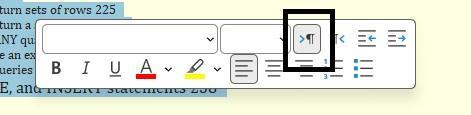
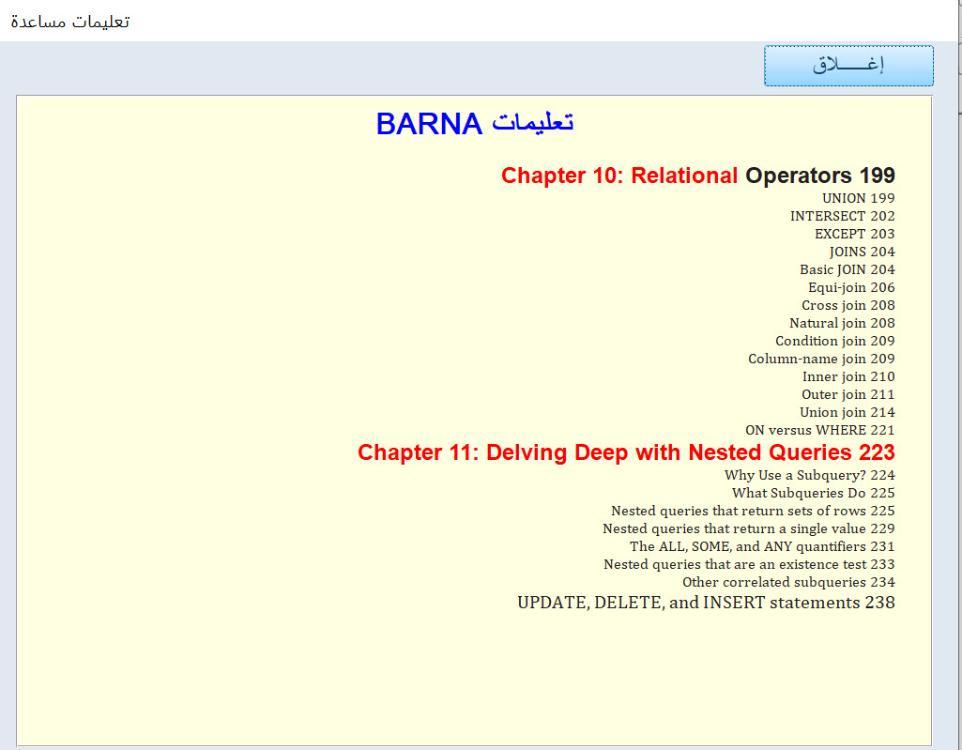
غريب !!!! 😐 بناء على كلامك قمت بمراجعة الملف المرفق مع الاداة الذي بالإسم (مثال عملي) وأعتقد أنه قد شمل جميع النقاط التي قد تحتاجها لعمل تعليمات مخصصة فإذا كان لديك نقطة غفلت عن ذكرها في شرحي ياريت توضح ماهي أما إمكانية اللصق تكون مفعلة للمطور ويتم إلغاء تفعيلها للمستخدم النهائي ياريت ترجع وتتابع الشرح الوارد في المثال العملي بتأني وبنفس ترتيب الخطوات بدون القفز بينها شكرا للاخ @Barna على تفاعله وترشيحه للأداة لكن لدي ملاحظة جانبية (يبدو أني نسيت أن أذكرها في تعليمات الأداة) وهي أنه عندما تكون التعليمات باللعة الأنجليزية يفضل تغيير إتجاه النص من اليسار إلى اليمين كما بالصورة ليظهر بهذا الشكل تحياتي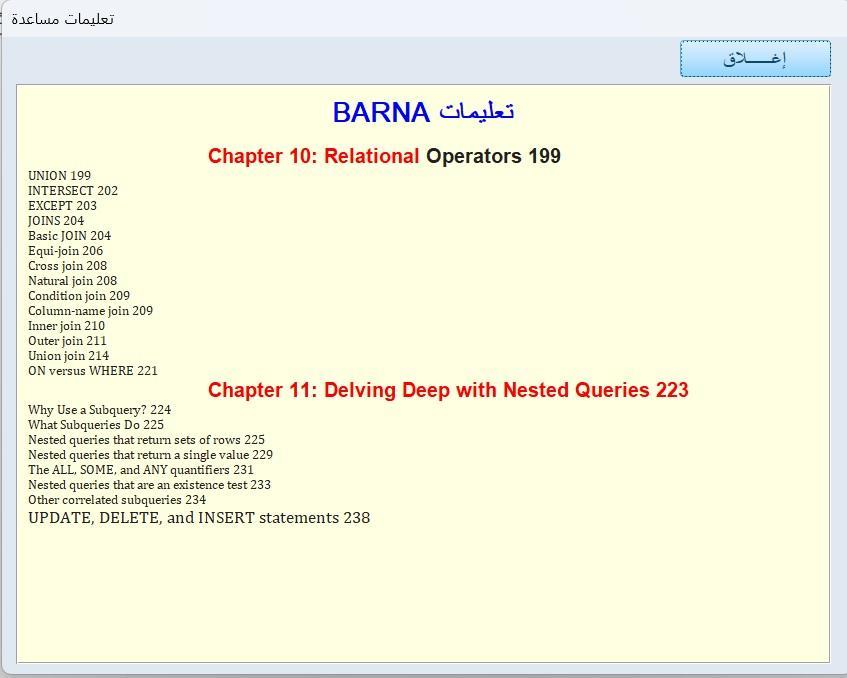
-
في مساء يوم ، جاءني ضيف لحوح اسمه ( الملل ) ، وجلسنا نتسامر ونتحاور ونتشاور ، حتى خرجنا بالفكرة الموضحة في الصورة التالية :- وفي الحقيقة أطمع بأن يشاركني أحد أفكار أضيفها للعمل ، مع العلم أن العمل كاملاً مصمم في نموذج آكسيس واحد حالياً . وكما ترون في الصورة وهي تجسيد للعبة الثعبان التي كثير منا قد تسللت أنامله لها سابقاً ممن استخدموا هواتف نوكيا قديماً .. ولهذا أبحث عن أفكار أضيفها للتنفيذ بشكل عام وليس في التصميم فقط . وشكراً لكل من شارك أو مر من هنا


-
- 1
-

-
 يا هلا باخوي خالد يعلم الله احمل لك كل تقدير واحترام .. وانما يجمعنا هذا المنتدى لتبادل العلم والمعارف ولو التقينا لم يعرف احدنا الآخر .. ولكن القلوب تتلاقى هنا . شكرا لك على المداخلة .. وعلى الفائدة كسر الأمان لا يقف عند حد .. وكما ترى وجد من يخترق دفاعات ميكروسوفت بذاتها برنامجي بسيط وكلمة المرور وضعت للفضولي فقط والأمان هنا هو في البيانات المحاسبية وكما تعلم جداول اكسس مستوى الامان فيها اضعف من كلمات المرور التي وضعتها ولكن لا يمنع فزيادة العلم خير ليتك عدلت على المرفق بما تراه مناسبا وتقبل شكري وتقديري
 -

المساعدة في نموذج لقاعدة بيانات السيارات
أحمد الشحات85 replied to أحمد الشحات85's topic in قسم الأكسيس Access
استاذنا الغالي أعتذر عن القروشة اللي قروشتها لك لاحظت في التقارير اللي سويتها أنه تاريخ انتهاء الإقامة هو نفسه تاريخ أنتهاء التفويض وبالتالي بيعطيني نتيجة خطأ في المدة المتبقية بالاقامة وكذلك تاريخ الإنتهاء بيكون خطأ في التقرير ... أرجو الإفادة وشكرا جزيلا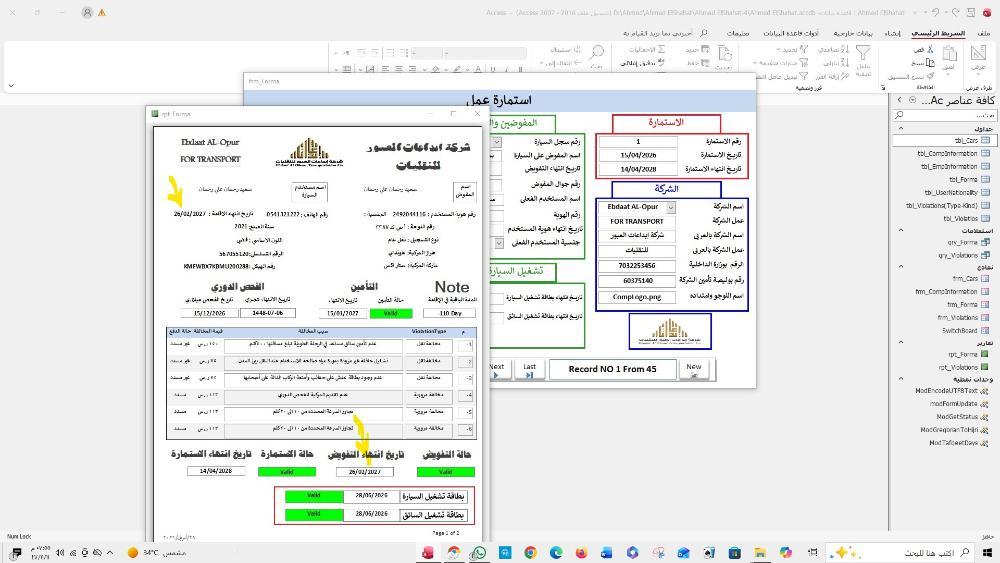
-
تفضل <<<<<<<<<<<<<<< التعديل يكون في الجدول وليس النموذج مثال عملي.accdb
-

هل يمكن تمديد صورة زر بالعرض بدون تشوهات
أحمد العيسى replied to أحمد العيسى's topic in قسم الأكسيس Access
طالعته من قبل ، وليس به شرح وافي ، وإمكانية اللصق فيه معدومة ولا أحتاج منه غير الوضع البسيط .. فهل من شرح للخطوات لكى أكتب فيه كل محتوى الـ PDF -
 السلام عليكم بداية التصميم الاخير رائع جدا والبرنامج فكرته ايضا جميلة ندخل في الموضوع بعد تردد في وضع المشاركة قررت بعد التوكل على الله ان اضع هذا الرد تأسيا بقول المولى عز وجل على لسان سيدنا شعيب عليه السلام "إِنْ أُرِيدُ إِلَّا الْإِصْلَاحَ مَا اسْتَطَعْتُ ۚ وَمَا تَوْفِيقِي إِلَّا بِاللَّهِ" ومشاركتي تقتصر على نظام تسجيل الدخول حيث يمكن تجاوز كلمة المرور من خلال الرموز حيث ان 'x'='x' دائما true وبالتالي لا نحتاج الى معرفة كلمة المرور سبق ان اشار الاخ شايب الى ثغرات الرموز وتحدث عن رمز واحد ولم يستكمل بقية الرموز استغلال رسائل الخطأ غير المعالجة ونتعمد الحصول على رسالة ننفذ منها الى محرر الاكواد وتعطيل جزئية التحقق ويمكن معالجة ذلك باستخدام رسائل معالجة الأخطاء وكذلك عند تحويل القاعد الى accde فلن نتمكن من الاختراق تجاوز شاشة تسجيل الدخول والقفز للشاشة الرئيسية من خلال ملف دفعي ويمكن علاجها بعدة طرق من ايسرها استخدام متغير عام يستمد قيمتها بعد تسجيل الدخول الناجح اخيرا يمكن لمن يملك الصلاحية حذف المشاركة فهذا افضل من التقليل من جهود الاخرين او استنقاص افكارهم او الدخول في النوايا املاه اخونا الشايب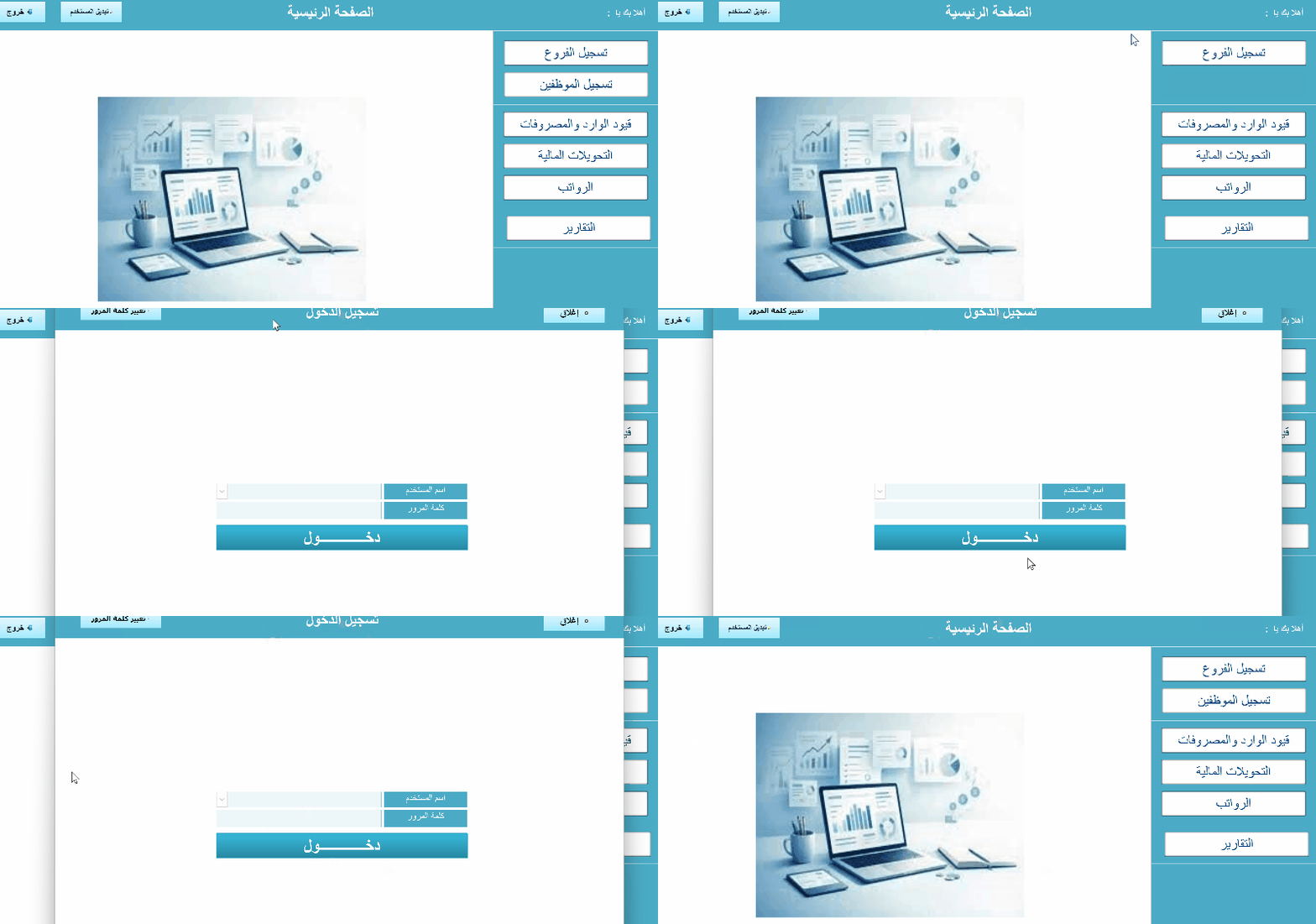
-
انظر هذا الموضوع <<<<<<<<<<<<<<<<<<<<<
-
هل يمكن تمديد صورة زر بالعرض بدون تشوهات
أحمد العيسى replied to أحمد العيسى's topic in قسم الأكسيس Access
تمام كما ذكرت لحضرتك الـ Message لن يتسع لمزيد من التعليمات كما أنه عقيم فى التنسيق والناحية الجمالية خذ مثلاً هل يمكن وضع محتوى ملف الـ PDF فيه .. من المؤكد أن هناك شئ أفضل بخصوص Easy Button Creator 1.4 ليس به تفعيل أنا عندى هذا النسخة الأعلى Easy Button Creator 2.6 ولكن بلا سيريال أيضاً بيانات المدرسين.pdf -
هل يمكن تمديد صورة زر بالعرض بدون تشوهات
kkhalifa1960 replied to أحمد العيسى's topic in قسم الأكسيس Access
وهذل برنامج ممتاز سطبه وجربه انا استخدمه كثيراً لصناعة ابقوناتي . easy-button-creator-1.4.zip طالع أحمد العيسى.mdb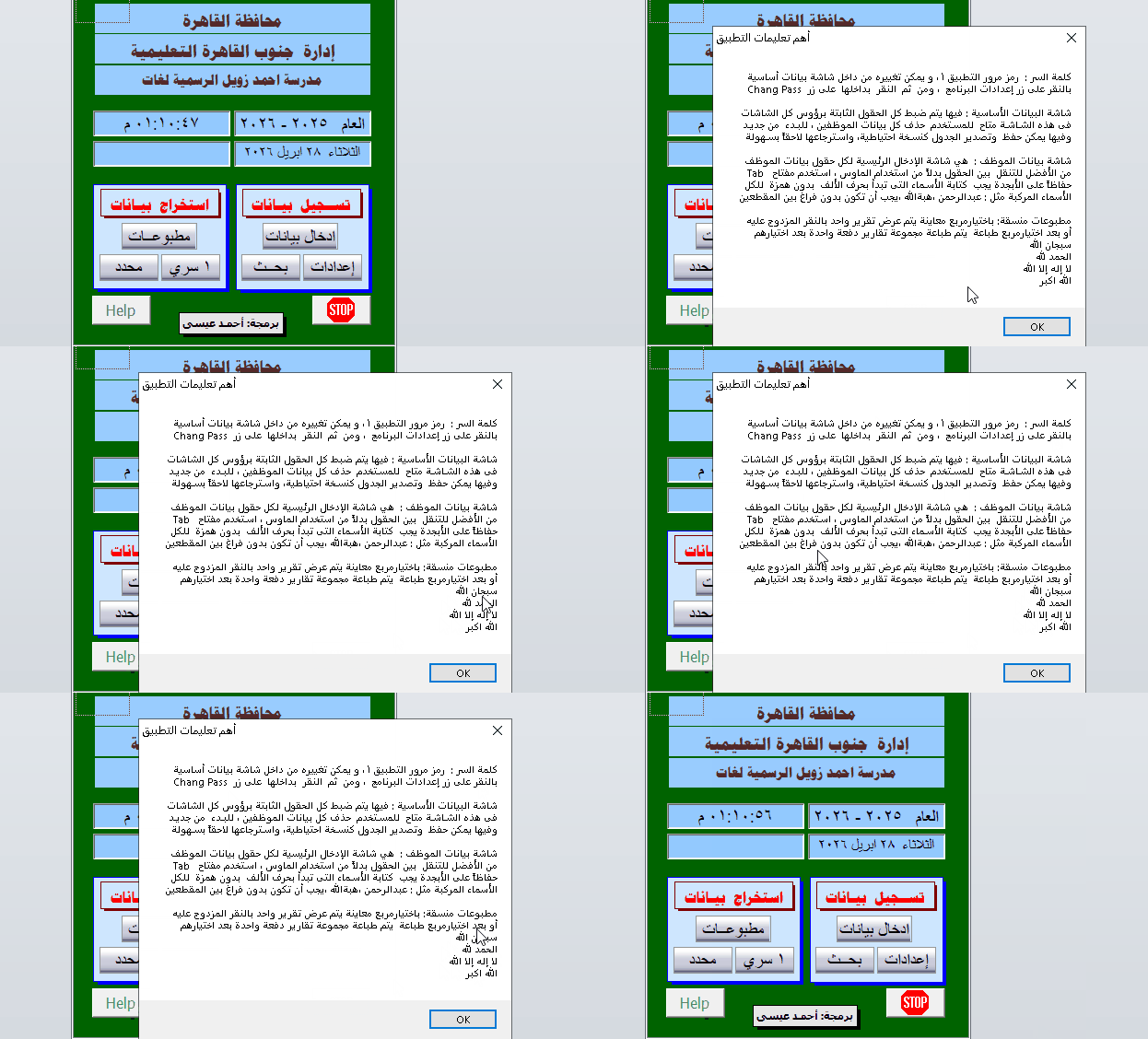
-
هل يمكن تمديد صورة زر بالعرض بدون تشوهات
أحمد العيسى replied to أحمد العيسى's topic in قسم الأكسيس Access
شكراً أخى خليفة الــ Message لم يحدث بها تغيير ، مساحتها القصوى ستظل محدودة مهما فعلت و يفضل طبعاً وجود طريقة احترافية بديله لعرض الـ HELP البرامج التى أرفقتها لم أستطيع التعامل معها !! -
هل يمكن تمديد صورة زر بالعرض بدون تشوهات
kkhalifa1960 replied to أحمد العيسى's topic in قسم الأكسيس Access
بالنسبة للماسج تفضل Private Sub B8_Click() Dim helpMessage As String helpMessage = "كلمة السر : رمز مرور التطبيق 1 ، و يمكن تغييره من داخل شاشة بيانات أساسية" & vbCrLf & _ "Chang Pass بالنقر على زر إعدادات البرنامج ، ومن ثم النقر بداخلها على زر" & vbCrLf & vbCrLf & _ "شاشة البيانات الأساسية : فيها يتم ضبط كل الحقول الثابتة برؤوس كل الشاشات" & vbCrLf & _ "فى هذه الشـاشـة متاح للمسـتخدم حذف كل بيانات الموظفين ، للبـدء من جديـد" & vbCrLf & _ "وفيها يمكن حفظ وتصدير الجدول كنسـخة احتياطية، واسـترجاعها لاحقاً بسـهولة" & vbCrLf & vbCrLf & _ "شاشة بيانات الموظف : هي شاشة الإدخال الرئيسية لكل حقول بيانات الموظف" & vbCrLf & _ "Tab من الأفضل للتنقل بين الحقول بدلاً من استخدام الماوس ، اسـتخدم مفتاح" & vbCrLf & _ "حفاظاً على الأبجدة يجب كتابة الأسـماء التى تبدأ بحرف الألف بدون همزة للكل" & vbCrLf & _ "الأسماء المركبة مثل : عبدالرحمن ،هبةالله ،يجب أن تكون بدون فراغ بين المقطعين" & vbCrLf & vbCrLf & _ "مطبوعات منسقة: باختيارمربع معاينة يتم عرض تقرير واحد بالنقر المزدوج عليه" & vbCrLf & _ "أو بعد اختيارمربع طباعة يتم طباعة مجموعة تقارير دفعة واحدة بعد اختيارهم" & vbCrLf & _ "سبجان الله" & vbCrLf & _ "الحمد لله" & vbCrLf & _ "لا إله إلا الله" & vbCrLf & _ "الله اكبر" & vbCrLf & _ "" MsgBox helpMessage, vbMsgBoxRight, "أهم تعليمات التطبيق" End Sub اما بخصوص الصور لك برنامجين بالمرفق . imagetuner لاتحدثه خليه كما هو استدعي له صورة او فولدر صور عاوز تكبر الرزليوشن . واعمال اخرى toycon-0.7 اسكب به أي صورة وهو بيحولها لايكن . جرب . ووافني بالرد . Icons.rar -
استاذ @ali kazem لا تنسي اذا كان هذا طلبك اضغظ على تمت الاجابة . على مشاركتي .
-
استاذ @kkhalifa1960 كلامك كله علي راسي قسما بالله وكفايه اهتمامك وذوقك انا فعلا كنت بفكر اعمل قريب جدا جدا من اللي حضرتك ذكرته ده مع بعض التعديلات البسيطة وانا للاسف مش جمب الجهاز دلوقتي ان شاء الله علي بالليل هبص عالملف وانا متأكد كل التأكيد من انه ان شاء الله هيطلع حاجه مشرفه انا مش عارف اقولك ايه صراحه علس اهتمامك واحترامك الزايد وكلماتك المحترمه اللي شبهك ( فعلا كلما ازداد الانسان علم كلما ازداد تواضع) ربنا يجازيك عننا خير ويفتحلك الابواب المغلقه ايا كانت النتيجه فانا ممتن وشاكر لذوقك العالي ولحسن اخلاقك واهتمامك بالصغير قبل الكبير هنا تحياتي لشخصك الكريم
-
تطوير 5 اقتباس من واجهات الاستاذ موسى مع بعض تصرف عمل نظام صلاحيات خفيف ومختصر توسع من اجل التطوير مستقبلا الادمن كلمة المرور =78 البقية كلمة المرور =1 اتمنى تجدوا الفائدة والمتعة KhlAcc5.rar
-
ممنون أستاذنا العزيز ودمتم ..
-
السلام عليكم بالمرفق (من موضوع قديم) : مثال له شكل جمالى لعديد من أزرار النموذج .. كل منهم يحنوي على طبقتين لكن إذا أردت تمديد عرض الزر الذى يحتوى على صورة gif بأى وسيلة تجد التشوه الحاصل به والأغرب أن مسار الصورة تجدها بخصائص الزر فى هذا الموضع رغم عدم وجوده عندى E:\Muhannad\Soccer\test Colors\SmallButtonXP.gif هل يمكن فعلاً تمديد الزر بدون تشوه ، واين هذه البرامج التى تمدنا بالعديد من الصور تلك ؟ سؤال آخر : كيف يمكن تكبير MsgBox لتسع المزيد من التعليمات ، فهذا هو أقصى حجم لها db.mdb
-
استاذ @M.Abd Allah انا بمطلع شبابي عملت بشركة ايديال بمدينة نصر قبل بيعها ..... والمهم ..عارف المراحل وما بداخلها (وانت تريد ما بداخلها) لكن ... كان يوضع على ظهر المنتج ختم الجودة من قبل مسؤول الجودة وكان بكل منتج شيت المراحل الذي سويناه وصدرناه لوورد لكن كان يدوي بختم كل مرحلة .. فهنا مسؤول الجودة لايسأل عن خطوات المرحلة بل لو الاختام مكتملة فقط بيخم المنتج بختم الجودة . الخلاصة ( مابداخل الخطوات غير مهم هنا في برمجتنا ). لكن لو تريد ذلك مافي مانع ارسل الخطوات وما بداخلها وانا حاضر لك . وعلشان انت رجل محترم جداً اليك مرفق جديد اضافة زر التصدير PDF . واعتقد هذا اسرع من وورد ولا يحتاج تجهز ملف وورد مسبق الاعدادت . جرب الزران . ووافني بالرد . M.Abd Allah-LAST.rar
-

عند الطباعة لا تظهر البيانات اللون الاصفر
ahmed23652 replied to ahmed23652's topic in قسم الأكسيس Access
شكرا جزيلا لك من القلب على مساعدتك في حل مشكلة ، ما قصّرت أبدًا، ووقفتك وخبرتك كانت فرقًا كبيرا. ممتن جدًا لك. -
عمل فورم من خلال ملف بوربوينت للعمليات الحسابية الفيديو