بحث مخصص من جوجل فى أوفيسنا

Custom Search
|


Shivan Kurdi - شڤان کوردی
-
Posts
3491 -
تاريخ الانضمام
-
تاريخ اخر زياره
-
Days Won
152
نوع المحتوي
التقويم
المنتدى
مكتبة الموقع
معرض الصور
المدونات
الوسائط المتعددة
كل منشورات العضو Shivan Kurdi - شڤان کوردی
-

رسالة بتوقيت معين Msgbox Timer
Shivan Kurdi - شڤان کوردی replied to jjafferr's topic in قسم الأكسيس Access
هذا هو كود التحويل Dim strSql As String 'Purpose: Convert a SQL statement into a string to paste into VBA code. Const strcLineEnd = " "" & vbCrLf & _" & vbCrLf & """" If IsNull(Me.txtSQL) Then Beep Else strSql = Me.txtSQL strSql = Replace(strSql, """", """""") 'Double up any quotes. strSql = Replace(strSql, vbCrLf, strcLineEnd) strSql = "strSql = """ & strSql & """" Me.txtVBA = strSql Me.txtVBA.SetFocus RunCommand acCmdCopy End If فقط غير اسم المربع TxtSql باسم المربع عندك اللي تكتب فيه جملة سكويليتي وغير اسم المربع txtVBA باسم المربع اللي تريد ان يظهر فيها كود برمجي تقبل تحياتي -
احتساب مجموع استقطاعات حسب الكود و النوع
Shivan Kurdi - شڤان کوردی replied to moham_q's topic in قسم الأكسيس Access
اتفضل اليك هذا استعلام SELECT [1].cod, [1].nm, [1].cut_type, Sum([1].cut) AS SumOfcut, DSum("[SumOfcut]","QUERY1","[cod]='" & [cod] & "'") AS sumforNM FROM 1 GROUP BY [1].cod, [1].nm, [1].cut_type; احد الحقول بيعطيك جمع حسب موظف و نوع الاستقطاع وحقل اخر بيعطيك مجموع استقطاع حسب موظف اي مجموع استقطاع الموظف 1.rar -
كان من الاحسن اذا كان هناك قاعدة لكن ... ومن الاحسن ان تعمل استعلام بين تاريخين تختار تاريخ الاول و تاريخ الثاني والاستعلام يعطيك نتائج بين تاريخين اذا كان هناك حقل في الجدول يبين مدة انتهاء البطاقة هذا جيد وفي الاستعلام اضف ذلك الحقل وفي سطر الشروط اكتب بتوين بين تاريخ الاول والتاريخ الثاني اما اذا ليس هناك حقل لتاريخ انتهاء البطاقة في الاستعلام قم بعمل حقل جديد بواسطة دالة ادددات اضف 5 سنوات الى حقل تاريخ عمل بطاقة و اكتب شرط بين تاريخين
-
رسالة بتوقيت معين Msgbox Timer
Shivan Kurdi - شڤان کوردی replied to jjafferr's topic in قسم الأكسيس Access
ماشاء الله عليك 1 / هل ممكن ان تفتح موضوع به شروحات عامة عن WScript 2 / هل يمكن ان نستخدم تايمر خارجي لاغلاق نموذج مثلا بدون استخدام تايمر الداخلي للنماذج ؟ -
شكرا اخي و استاذي الحبيب المواليد كان عشوائية ... هناك احتمال الخطأ في المواليد كلكم عدا مواليدي
-
السلام عليكم ورحمة الله وبركاته في السنة الماضية ( 2017 ) كان اريد افتح موضوع و اسأل عن كيفية تغيير محاذاة النص في ليست بوكس الى الوسط العمود تجولت في دار دار في النيت لكن وصلت للحل لاوفيس 2003 وهو تحويل ليست بوكس الى كومبوبوكس وبعدين اغير محاذات الى الوسط و بعدي اغير من جديد الى ليست بوكس لكن ما نفعت مع اصدار 2010 وفي الاخير وجدت حل لاسئلتي على الرغم غير مضبوطة مع الاسماء بالعربية كما انا اريد لكن احسن من لا شيء و رأيت الحل هناhttp://www.tek-tips.com/viewthread.cfm?qid=1111959 وباستخدام هذا الكود في وحدة النطية Option Compare Database Option Explicit 'Authors: Stephen Lebans ' Terry Kreft 'Date: Dec 14, 1999 'Copyright: Lebans Holdings (1999) Ltd. ' Terry Kreft 'Use: Center and Right Align data in ' List or Combo control's 'Bugs: Please me know if you find any. 'Contact: Stephen@lebans.com Private Type Size cx As Long cy As Long End Type Private Const LF_FACESIZE = 32 Private Type LOGFONT lfHeight As Long lfWidth As Long lfEscapement As Long lfOrientation As Long lfWeight As Long lfItalic As Byte lfUnderline As Byte lfStrikeOut As Byte lfCharSet As Byte lfOutPrecision As Byte lfClipPrecision As Byte lfQuality As Byte lfPitchAndFamily As Byte lfFaceName As String * LF_FACESIZE End Type Private Declare Function apiCreateFontIndirect Lib "gdi32" Alias _ "CreateFontIndirectA" (lplogfont As LOGFONT) As Long Private Declare Function apiSelectObject Lib "gdi32" _ Alias "SelectObject" (ByVal hDC As Long, ByVal hObject As Long) As Long Private Declare Function apiGetDC Lib "user32" _ Alias "GetDC" (ByVal hWnd As Long) As Long Private Declare Function apiReleaseDC Lib "user32" _ Alias "ReleaseDC" (ByVal hWnd As Long, _ ByVal hDC As Long) As Long Private Declare Function apiDeleteObject Lib "gdi32" _ Alias "DeleteObject" (ByVal hObject As Long) As Long Private Declare Function apiGetTextExtentPoint32 Lib "gdi32" _ Alias "GetTextExtentPoint32A" _ (ByVal hDC As Long, ByVal lpsz As String, ByVal cbString As Long, _ lpSize As Size) As Long ' Create an Information Context Declare Function apiCreateIC Lib "gdi32" Alias "CreateICA" _ (ByVal lpDriverName As String, ByVal lpDeviceName As String, _ ByVal lpOutput As String, lpInitData As Any) As Long ' Close an existing Device Context (or information context) Declare Function apiDeleteDC Lib "gdi32" Alias "DeleteDC" _ (ByVal hDC As Long) As Long Private Declare Function GetSystemMetrics Lib "user32" (ByVal nIndex As Long) As Long Private Declare Function GetDeviceCaps Lib "gdi32" _ (ByVal hDC As Long, ByVal nIndex As Long) As Long ' Constants Private Const SM_CXVSCROLL = 2 Private Const LOGPIXELSX = 88 ' ' 1) We now call the function with an Optional SubForm parameter. This is ' the name of the SubForm Control. If you used the Wizard to add the ' SubForm to the main Form then the SubForm control has the same name as ' the SubForm. But this is not always the case. For the benefit of those ' lurkers out there<bg> we must remember that the SubForm and the SubForm ' Control are two seperate entities. It's very straightforward, the ' SubForm Control houses the actual SubForm. Sometimes the have the same ' name, very confusing, or you can name the Control anything you want! In ' this case for clarity I changed the name of the SubForm Control to ' SFFrmJustify. Ugh..OK that's not too clear but it's late! ' ' So the adjusted SQL statement is now. ' CODENUM: JustifyString("FrmMain","List5",[code],0,True,"SFfrmJustify") ' ' ***CODE START Function JustifyString(myform As String, myctl As String, myfield As Variant, _ col As Integer, RightOrCenter As Integer, Optional Sform As String = "") As Variant ' March 21, 2000 ' Changes RightOrCenter to Integer from Boolean ' -1 = Right. 0 = Center, 1 = Left ' Called from UserDefined Function in Query like: ' SELECT DISTINCTROW JustifyString("frmJustify","list4",_ ' [code],0,False) AS CODENUM, HORTACRAFT.NAME FROM HORTACRAFT; ' myform = name of form containing control ' myctl = name of control ' myfield is the actual data field from query we will Justify ' col = column of the control the data is to appear in(0 based index) ' RightOrCenter True = Right. False = Center Dim UserControl As Control Dim UserForm As Form Dim lngWidth As Long Dim intSize As Integer Dim strText As String Dim lngL As Long Dim strColumnWidths As String Dim lngColumnWidth As Long Dim lngScrollBarWidth As Long Dim lngOneSpace As Long Dim lngFudge As Long Dim arrCols() As String Dim lngRet As Long ' Add your own Error Handling On Error Resume Next ' Need fudge factor. ' Access allows for a margin in drawing its Controls. lngFudge = 60 ' We need the Control as an Object ' Check and see if use passed SubForm or not If Len(Sform & vbNullString) > 0 Then Set UserForm = Forms(myform).Controls(Sform).Form Else Set UserForm = Forms(myform) End If ' Assign ListBox or Combo to our Control var Set UserControl = UserForm.Controls.Item(myctl) With UserControl If col > Split(arrCols(), .ColumnWidths, ";") Then Exit Function If col = .ColumnCount - 1 Then ' Add in the width of the scrollbar, which we get in pixels. ' Convert it to twips for use in Access. lngScrollBarWidth = GetSystemMetrics(SM_CXVSCROLL) lngScrollBarWidth = lngScrollBarWidth * (1440 / GetTwipsPerPixel()) End If lngColumnWidth = Nz(Val(arrCols(col)), 1) lngColumnWidth = lngColumnWidth - (lngScrollBarWidth + lngFudge) End With ' Single space character will be used ' to calculate the number of SPACE characters ' we have to add to the Input String to ' achieve Right justification. strText = " " ' Call Function to determine how many ' Twips in width our String is lngWidth = StringToTwips(UserControl, strText) ' Check for error If lngWidth > 0 Then lngOneSpace = Nz(lngWidth, 0) ' Clear variables for next call lngWidth = 0 ' Convert all variables to type string Select Case VarType(myfield) Case 1 To 6, 7, 14 ' It's a number(1-6) or 7=date strText = Str$(myfield) Case 8 ' It's a string..leave alone strText = myfield Case Else ' Houston, we have a problem Call MsgBox("Field type must be Numeric, Date or String", vbOKOnly) End Select 'let's trim the string - better safe than sorry strText = Trim$(strText) ' Call Function to determine how many ' Twips in width our String is lngWidth = StringToTwips(UserControl, strText) ' Check for error If lngWidth > 0 Then ' Calculate how many SPACE characters to append ' to our String. ' Are we asking for Right or Center Alignment? Select Case RightOrCenter Case -1 ' Right strText = String(Int((lngColumnWidth - lngWidth) / lngOneSpace), " ") & strText Case 0 ' Center strText = String((Int((lngColumnWidth - lngWidth) / lngOneSpace) / 2), " ") & strText _ & String((Int((lngColumnWidth - lngWidth) / lngOneSpace) / 2), " ") Case 1 ' Left strText = strText Case Else End Select ' Return Original String with embedded Space characters JustifyString = strText End If End If ' Cleanup Set UserControl = Nothing Set UserForm = Nothing End Function Function Split(ArrayReturn() As String, ByVal StringToSplit As String, _ SplitAt As String) As Integer Dim intInstr As Integer Dim intCount As Integer Dim strTemp As String intCount = -1 intInstr = InStr(StringToSplit, SplitAt) Do While intInstr > 0 intCount = intCount + 1 ReDim Preserve ArrayReturn(0 To intCount) ArrayReturn(intCount) = Left(StringToSplit, intInstr - 1) StringToSplit = Mid(StringToSplit, intInstr + 1) intInstr = InStr(StringToSplit, SplitAt) Loop If Len(StringToSplit) > 0 Then intCount = intCount + 1 ReDim Preserve ArrayReturn(0 To intCount) ArrayReturn(intCount) = StringToSplit End If Split = intCount End Function '************* Code End ************* Private Function StringToTwips(ctl As Control, strText As String) As Long Dim myfont As LOGFONT Dim stfSize As Size Dim lngLength As Long Dim lngRet As Long Dim hDC As Long Dim lngscreenXdpi As Long Dim fontsize As Long Dim hfont As Long, prevhfont As Long ' Get Desktop's Device Context hDC = apiGetDC(0&) 'Get Current Screen Twips per Pixel lngscreenXdpi = GetTwipsPerPixel() ' Build our LogFont structure. ' This is required to create a font matching ' the font selected into the Control we are passed ' to the main function. 'Copy font stuff from Text Control's property sheet With myfont .lfFaceName = ctl.FontName & Chr$(0) 'Terminate with Null fontsize = ctl.fontsize .lfWeight = ctl.FontWeight .lfItalic = ctl.FontItalic .lfUnderline = ctl.FontUnderline ' Must be a negative figure for height or system will return ' closest match on character cell not glyph .lfHeight = (fontsize / 72) * -lngscreenXdpi End With ' Create our Font hfont = apiCreateFontIndirect(myfont) ' Select our Font into the Device Context prevhfont = apiSelectObject(hDC, hfont) ' Let's get length and height of output string lngLength = Len(strText) lngRet = apiGetTextExtentPoint32(hDC, strText, lngLength, stfSize) ' Select original Font back into DC hfont = apiSelectObject(hDC, prevhfont) ' Delete Font we created lngRet = apiDeleteObject(hfont) ' Release the DC lngRet = apiReleaseDC(0&, hDC) ' Return the length of the String in Twips StringToTwips = stfSize.cx * (1440 / GetTwipsPerPixel()) End Function Private Function GetTwipsPerPixel() As Integer ' Determine how many Twips make up 1 Pixel ' based on current screen resolution Dim lngIC As Long lngIC = apiCreateIC("DISPLAY", vbNullString, _ vbNullString, vbNullString) ' If the call to CreateIC didn't fail, then get the info. If lngIC <> 0 Then GetTwipsPerPixel = GetDeviceCaps(lngIC, LOGPIXELSX) ' Release the information context. apiDeleteDC lngIC Else ' Something has gone wrong. Assume a standard value. GetTwipsPerPixel = 120 End If End Function وفي مصدر الليست بوكس لكل عمود يجب ان تستخدم فانكشن بهذا الشكل مثلا لحقل تسلسل ستستخدم هكذا تسلسل: JustifyString("frmmaalomat";"List0";[id];0;False) اسم الفاكشن ( اسم النموذج بعدين اسم ليست بوكس اللي في النموذج وبعدين اسم الحقل المطلوب و بعدين رقم صفر وبعدين فالس للوسط او ترو لليمين اليكم صورة لقبل استخدام و بعد استخدام الفانكشن على الرغم ان هناك نقص في ترتيب هوامش للاسماء بالعربية لكن نقدر ان نغير في هذه الخاصية كما مبية في الصورة وبعدين سيظهر لنا ليست بوكس هكذا اليكم المرفق تحياتي شفان ريكاني AlignListbox.rar
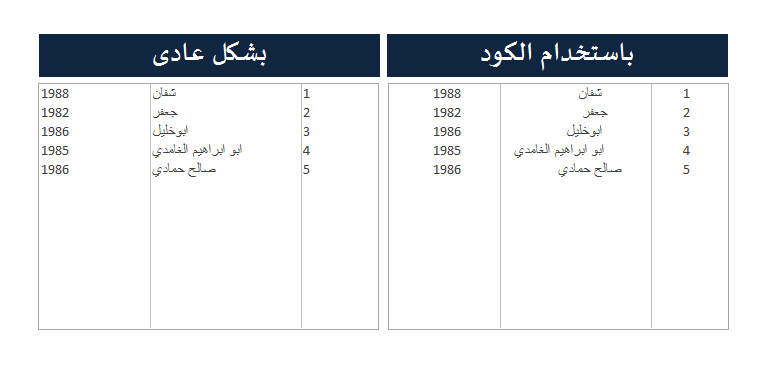
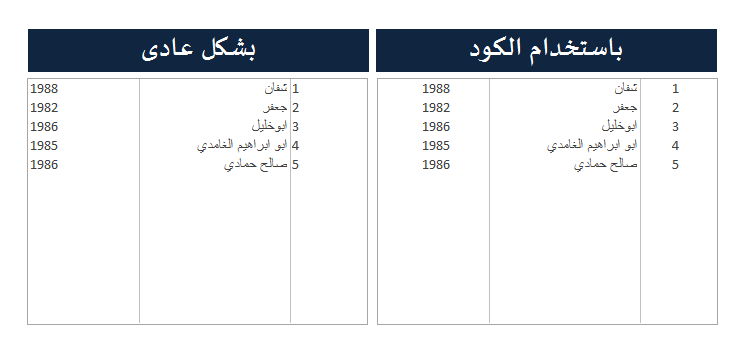
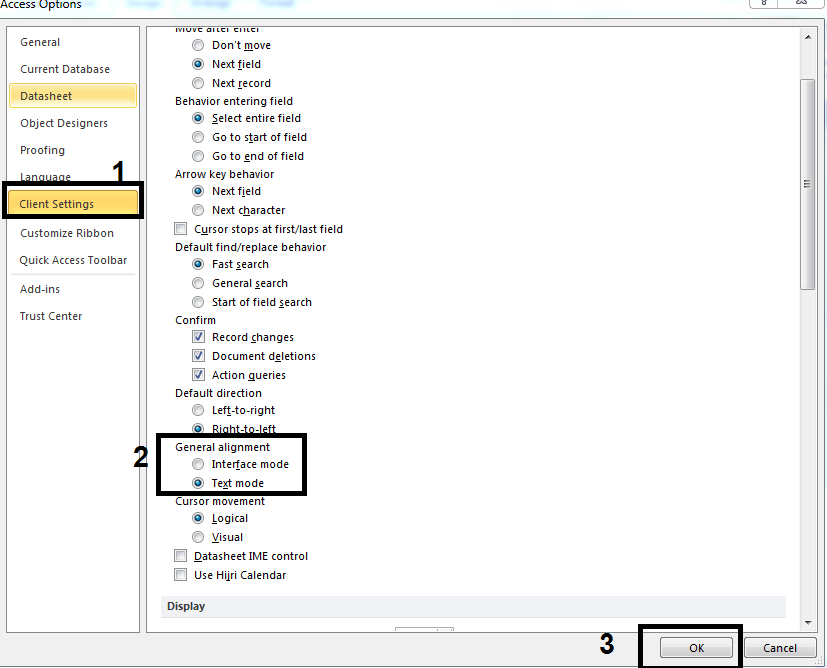
-
كل عام وانتم بخير ، دخلنا في سنة 2018
Shivan Kurdi - شڤان کوردی replied to jjafferr's topic in قسم الأكسيس Access
اللهم امين لكن بعد احنا ما دخلنا ... بقى عندنا 6 دقائق -
جمع الاجازات لموظف بشرط
Shivan Kurdi - شڤان کوردی replied to Allfaaleh's topic in قسم الأكسيس Access
اتفضل اليك هذا للاعتيادية =Nz(DSum("[مدة الإجازة]";"جدول الإجازات";"[نوع الاجازة]='اعتيادية'" & "and [رقم الموظف]=" & [Forms]![AAA]![رقم الموظف])) وهذا للاجازات التعويضية =Nz(DSum("[مدة الإجازة]";"جدول الإجازات";"[نوع الاجازة]='تعويضية'" & "and [رقم الموظف]=" & [Forms]![AAA]![رقم الموظف])) نوع الاجازة.rar -
ممكن ترفق القاعدة وتتوضح اكثر
-
ظهور اسم المستخدم بالنموذج
Shivan Kurdi - شڤان کوردی replied to mohamed elalfy's topic in قسم الأكسيس Access
اتفضل اضفت حقل جديد في الجدول باسم يوزر نيم وعند عملية تحديث او تسجيل اي سجل سيتم كتابة اسم المستخدم اللي عمل التحديث او اللي سجل السجل وهناك طريقة اخرى وهو سيعمل جدول خاص لكي تعرف من سجل السجل جديد وفي اي وقت و من قاب بعد ذلك بتعديله example.rar -
الترقيم في النموذج بعد الضغط على زرار الحفظ
Shivan Kurdi - شڤان کوردی replied to f16's topic in قسم الأكسيس Access
في حدث عند الضغط على الزر اكتب هذا ME.ID = NZ(DMAX("[ID]","Tbl1"),0)+1 غير هذه العبارات الاسفل باللي عندك ME.ID = هو اسم المربع الترقيم في النموذج ID = هو اسم الحقل الترقيم في جدول Tbl1 = هو الجدول اللي نريد ان نعمل الترقيم فيه -
تم التجربة وظهرت الخطأ .... لكن تم التجربة هل هناك خطأ في قاعدة بياناتي اللي اقوم بتحويله كشفت انه فيه الخطأ فقمت بعمل كومبايل للقاعدة وخلصت من الاخطاء وتم التجربة الكود من جديد وبيشتغل 100% اي يعني يجب على استاذ @Amr Ashraf ان يتأكد هل سيتحول القاعدته يدويا ام لا اذا لا ان هناك خطأ في الاكاد ويجب عليه ان يعمل كومبايل للقاعدته لكي يعرف اين الخطأ وبيعمل التعديل وبعدين يجرب من جديد
-
هناك سؤال ... ماذا سيحدث اذا المشتري اخذ نسخة من قاعدة من نوع accdb قبل فتحه اول مرة ؟ من الاحسن انك تعمل تحويل الى accde وبعدين تعطي نسخة من accde للمشتري وتأخذ نسخة من accdb اليك اذا احتاجت للتعديلات عليه تقبل تحياتي
-
احتساب الكميات عند عمل المرتجع اكثر من مره
Shivan Kurdi - شڤان کوردی replied to النجاشي's topic in قسم الأكسيس Access
ههههه فهمت مني بخطأ هذا المنتدى التعليمي واي قاعدة في المنتدى هو لكل اعضاء لكن كان قصدي بذلك المشاركة انه تم استخدام قاعدته و بنفس الموضوع اللي هو يريد وتحياتي لكم جميعا -
احتساب الكميات عند عمل المرتجع اكثر من مره
Shivan Kurdi - شڤان کوردی replied to النجاشي's topic in قسم الأكسيس Access
ممكن ان تتوضح بالصور او باسماء النماذج و اسماء الحقول اي مربعات النصية وضح بالتفصيل لكي نوصل الى نقطة اللي يجب علينا ان نعمل التعديل عليه تحياتي اظن ان هذه الموضوع بيحكي على نفس الشيء ... وبيستخدم قاعدة بياناتك ... القي نظرتا اليه -
شكرا لك فرحّنا مشاركتك معنا ... شكرا لك مجددا
-
انا فتحت قاعدة بياناتك وما فهمت شيء منه لكن على هذا الكلام تقدر تستخدم احد من هذه السطور DoCmd.RunCommand acCmdRefresh DoCmd.RunCommand acCmdSaveRecord
-
القی نژرتا الێ اسم النموذج !! ليس لدينا اي نموذج بهذا الاسم اتفضل اليك هذا الكود Private Sub Orient_DblClick(Cancel As Integer) If CurrentProject.AllForms("FrmMoh").IsLoaded = True Then Form_FrmMoh.mytxt.Value = Me.Orient DoCmd.Close acForm, "search orient", acSavePrompt Else Form_FrmAmr.mytxt.Value = Me.Orient DoCmd.Close acForm, "search orient", acSavePrompt End If End Sub 2.rar
-
السلام عليكم ورحمة الله وبركاته من المستحسن ان ترفقوا نسخة مصغرة من قاعدة بياناتكم لكي نشوفه ونقدر نعطيكم الجواب باسرع وقت ممكن هناك استخدمت DoCmd.Close كلوس اي ... هذه سيتم اغلاق النافذة اللي في المقدمة لذلك يجب ان تكتب اسم النموذج اللي تريد ان تغلقه ثانيا اذا هناك مشكلة اخرى فيه ستتم وصول الى نتيجة بعد ارفاق نسخة مصغرة من القاعدة
-
تنسيق التاريخ من القديم الى الحديث
Shivan Kurdi - شڤان کوردی replied to ahmedabuzena's topic in قسم الأكسيس Access
اتفضل القي نظرتا الى هذه الصور تم عمر كروب للحقل تاريخ و تم تسلسله من القديم الى الجديد و بعدين تم اختيار الكروب للشهر واحد باي مونث sorting date.rar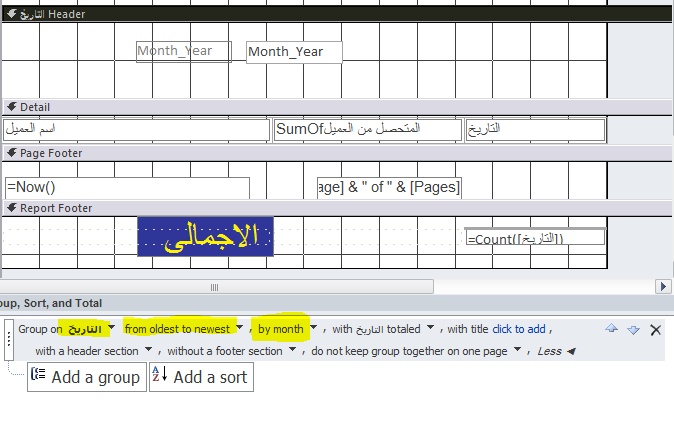
-
ظهور اسم المستخدم بالنموذج
Shivan Kurdi - شڤان کوردی replied to mohamed elalfy's topic in قسم الأكسيس Access
اليك هذا الرابط به ما تريد واذا تريد شيء اضافي ارفق نسخة مصغرة من قاعدة بياناتك كما اشر به استاذ @ابو ياسين المشولي ليتم التعديل عليه لاني لا احب الموضوعات اللي ما بها المرفق -
عد القيم فى سجل أفقيا
Shivan Kurdi - شڤان کوردی replied to عبد الفتاح كيرة's topic in قسم الأكسيس Access
السلام عليكم ورحمة الله وبركاته انا كتير بحب مواضيعك لكن انا ما فهمت من طلبك هذا ممكن توضيح اكثر هل تريد شيء مثل دالة COUNTA في اكسل ؟ وهل هناك قاعدة للتجربة عليه بعد توضيح -
الشعب يريد ..... ههههه سنكون من الشاكرين
-
شكرا على هذا المجهود الرائع لكن عجبت هذا نموذجك اللي في هذه المشاركة اللي فيها ليست بوكس ممكن ترفقه هنا او يجب ان اعتذر منك تقبل تحياتي اخوك شفان ريكاني
-
حذف بيانات حقل خيارات متعددة سرد
Shivan Kurdi - شڤان کوردی replied to ابوآمنة's topic in قسم الأكسيس Access
اتفضل استخدم هذا السطر fff.Value = Array() غیر FFF باسم الكومبوبوكس عندك