

قلم.رصاص
-
Posts
32 -
تاريخ الانضمام
-
تاريخ اخر زياره
-
Days Won
3
عن العضو قلم.رصاص

-
تعديل كود يعمل على اوفيس 32بت ولا يعمل على اوفيس 64 بت
قلم.رصاص replied to jo_2010's topic in قسم الأكسيس Access
اوجزت فأحسنت وأبدعت -
فتح نموذج فرعى لاضافة بيانات جديدة او عرض القديمة
قلم.رصاص replied to jo_2010's topic in قسم الأكسيس Access
اتفق مع معاليك يا باشا الحل مش صعب لكن مش صح انا حاولت اقدم له الحل الصح بالشكل ده اسم المريض حيكون موجود فى جدولين والله اعلم حيكون موجود فى جداول تانى بالشكل ده واللا لاء ده مش الاصح فى قواعد البيانات اومال هى اسمها قواعد بيانات ليه علشان اكرر مدخلات فى اكثر من مكان ده غير المشكلة اللى حضرتك قلتها تغير الاسم فى مكان يخرب الدنيا فى المستقبل والمشاكل دى على سبيل المثال وليس الحصر -
ترتيب أرقام محددة بينها فاصلة أو شرطة أو غيرهما:
قلم.رصاص replied to أبو عاصم المصري's topic in منتدي الوورد Word
ممكن نعدل كود الماكرو فى المودويل نعمل نموذج يفتح لما نعمل رن للماكرو من النموذج نحدد شكل الفواصل اللى احنا عاوزينها ونحدد شكل الفرز والترتيب تصاعدى / تنازلى بدل الرسائل لو حد مهتم بالموضوع ده وحابيين نعمل النموذج ونعدل الكود عرفونى -
فتح نموذج فرعى لاضافة بيانات جديدة او عرض القديمة
قلم.رصاص replied to jo_2010's topic in قسم الأكسيس Access
باشا بعد اذنك المفروض ان كل مريض له رقم تعريفى واحد لا يتغير لكن تكرار الحضور يكون رقم تعريفى الزيارة فى فرق يا باشا بين الاتنين واضح ان ده مش شغلك و انت عمال تحاول تعدل لان انا شرحت لك بالتفصيل لما حوار الرفع فشل بسبب حجم القاعدة الكبير او انك جديد وبتحاول تتعلم وفى الحالة دى ركز فى السطرين اللى قلتهم لك دول كويس لو لسه بتبنى فى القاعدة حاول تعيد البناء على اساس سليم لان كده هتتعب قوى بالشكل ده -
فتح نموذج فرعى لاضافة بيانات جديدة او عرض القديمة
قلم.رصاص replied to jo_2010's topic in قسم الأكسيس Access
اتفضل يا باشا LAb_Mobile.zip -
فتح نموذج فرعى لاضافة بيانات جديدة او عرض القديمة
قلم.رصاص replied to jo_2010's topic in قسم الأكسيس Access
المساحة بعد الضغط = 2.05 MB المنتدى لا يقبل رفع مرفقات اكبر من 1.03 MB تقريبا مش عارف اعمل ايه بجد لو عندكم حلول هنا قول لى انا جديد عليكم -
ترتيب أرقام محددة بينها فاصلة أو شرطة أو غيرهما:
قلم.رصاص replied to أبو عاصم المصري's topic in منتدي الوورد Word
الكود سوف يعمل لكنه يعتمد على WordBasic (قديم) يقوم بترتيب نصي لا رقمي سوف أشارك معكم: ماكرو متقدم لفرز الأرقام داخل Microsoft Word بدون استخدام WordBasic مع دعم كامل للأعداد العشرية والفواصل المختلفة دعم الأعداد العشرية كشف الفاصل تلقائيا (، , ; | - :) إمكانية إدخال الفاصل يدويا خيار ترتيب تصاعدي/تنازلي التحقق من صحة البيانات (رفض الحروف) استبدال النص مباشرة داخل التحديد الكود Option Explicit Private Const MODULE_NAME As String = "SortSelectionModule" Private Const PROC_MAIN As String = "SortSelectedNumbersInWord" Private Const ERR_NO_SELECTION As Long = vbObjectError + 1001 Private Const ERR_EMPTY_TOKEN As Long = vbObjectError + 1002 Private Const ERR_NON_NUMERIC As Long = vbObjectError + 1003 Private Const ERR_NO_VALID_TOKENS As Long = vbObjectError + 1004 Private Const ERR_USER_CANCEL As Long = vbObjectError + 1005 Private Const DEFAULT_DELIMITER As String = "،" Public Sub SortSelectedNumbersInWord() Const PROC_NAME As String = PROC_MAIN On Error GoTo ErrorHandler Dim selectedText As String selectedText = Trim$(Selection.Text) Debug.Print String(50, "=") Debug.Print "INPUT TEXT = [" & selectedText & "]" If Len(selectedText) <= 1 Then Err.Raise ERR_NO_SELECTION, PROC_NAME, "يرجى تحديد قائمة أرقام مفصولة بمحدد." End If Dim autoDelim As String Dim delimiter As String autoDelim = DetectDelimiter(selectedText) autoDelim = Trim$(autoDelim) Dim respDelim As VbMsgBoxResult respDelim = MsgBox( _ "تم اكتشاف الفاصل: [" & autoDelim & "]" & vbCrLf & vbCrLf & _ "هل تريد استخدامه؟" & vbCrLf & _ "Yes = استخدام التلقائي" & vbCrLf & _ "No = إدخال فاصل يدوي", _ vbYesNoCancel + vbQuestion, "اختيار الفاصل") If respDelim = vbCancel Then Err.Raise ERR_USER_CANCEL, PROC_NAME, "تم الإلغاء." End If If respDelim = vbYes And Len(autoDelim) > 0 Then delimiter = autoDelim Else delimiter = InputBox( _ "أدخل الفاصل بين الأرقام (مثل: ، أو , أو ; أو | أو -):", _ "إدخال الفاصل يدويًا", DEFAULT_DELIMITER) If Len(Trim$(delimiter)) = 0 Then Err.Raise ERR_USER_CANCEL, PROC_NAME, "تم الإلغاء." End If End If Dim cleanedText As String cleanedText = Replace(selectedText, " " & delimiter & " ", delimiter) cleanedText = Replace(cleanedText, delimiter & " ", delimiter) cleanedText = Replace(cleanedText, " " & delimiter, delimiter) Debug.Print "CLEANED TEXT = [" & cleanedText & "]" Dim resp As VbMsgBoxResult resp = MsgBox("Yes = تصاعدي / No = تنازلي", vbYesNoCancel) If resp = vbCancel Then Err.Raise ERR_USER_CANCEL, PROC_NAME, "تم الإلغاء." Dim isDesc As Boolean isDesc = (resp = vbNo) Dim rawTokens() As String rawTokens = Split(cleanedText, delimiter) Debug.Print "ELEMENTS COUNT = " & (UBound(rawTokens) - LBound(rawTokens) + 1) Dim values() As Double ReDim values(0 To UBound(rawTokens)) Dim i As Long, validCount As Long Dim t As String validCount = 0 For i = LBound(rawTokens) To UBound(rawTokens) t = Trim$(rawTokens(i)) Debug.Print "TOKEN[" & i & "] = [" & t & "]" If Len(t) > 0 Then If Not IsNumeric(t) Then Err.Raise ERR_NON_NUMERIC, PROC_NAME, "قيمة غير رقمية: [" & t & "]" End If values(validCount) = CDbl(t) validCount = validCount + 1 End If Next i If validCount = 0 Then Err.Raise ERR_NO_VALID_TOKENS, PROC_NAME, "لا توجد أرقام صالحة." End If ReDim Preserve values(0 To validCount - 1) If validCount > 1 Then QuickSort values, 0, validCount - 1, isDesc End If Dim output() As String ReDim output(0 To validCount - 1) For i = 0 To validCount - 1 output(i) = Trim$(CStr(values(i))) Next i Dim result As String Dim sep As String sep = delimiter & " " Dim k As Long result = output(0) For k = 1 To validCount - 1 result = result & sep & output(k) Next k With Selection .Delete .TypeText result End With Debug.Print "SORTED TEXT = [" & result & "]" Debug.Print "SORT COMPLETED SUCCESSFULLY" Debug.Print String(50, "=") Exit Sub ErrorHandler: Debug.Print String(50, "-") Debug.Print "ERROR NUMBER : " & Err.Number Debug.Print "ERROR DESC : " & Err.Description Debug.Print "PROCEDURE : " & MODULE_NAME & "." & PROC_NAME Debug.Print String(50, "-") MsgBox "Error " & Err.Number & vbCrLf & Err.Description, vbCritical End Sub Private Function DetectDelimiter(ByVal txt As String) As String Dim arr As Variant arr = Array("،", ",", ";", "|", ":", "-") Dim i As Long For i = LBound(arr) To UBound(arr) If InStr(1, txt, arr(i)) > 0 Then DetectDelimiter = arr(i) Exit Function End If Next i DetectDelimiter = "" End Function Private Sub QuickSort(ByRef arr() As Double, ByVal low As Long, ByVal high As Long, ByVal desc As Boolean) Dim i As Long, j As Long Dim pivot As Double, tmp As Double i = low j = high pivot = arr((low + high) \ 2) Do While i <= j If desc Then Do While arr(i) > pivot: i = i + 1: Loop Do While arr(j) < pivot: j = j - 1: Loop Else Do While arr(i) < pivot: i = i + 1: Loop Do While arr(j) > pivot: j = j - 1: Loop End If If i <= j Then tmp = arr(i) arr(i) = arr(j) arr(j) = tmp i = i + 1 j = j - 1 End If Loop If low < j Then QuickSort arr, low, j, desc If i < high Then QuickSort arr, i, high, desc End Sub طريقة الاستخدام افتح Word اضغط ALT + F11 Insert >-->> Module الصق الكود ارجع وحدد الأرقام داخل المستند شغل الماكرو: SortSelectedNumbersInWord -
فتح نموذج فرعى لاضافة بيانات جديدة او عرض القديمة
قلم.رصاص replied to jo_2010's topic in قسم الأكسيس Access
شوف انا حليت المشكلة وغير قادر على رفع مرفق للاسف قيود المنتدى فى الحجم للملفات قليلة جدا جدا جدا افتح الجدول : Tbl_Mobile اضف حقل باسم : PCode الخصائص: حقل رقم - مفهرس ولا يقبل التكرار اضف له على سبيل المثال الرقم : 5 مثلما كنت تستخدم فى حقل اسم المريض وامسح حقل اسم المريض ده اساسا الان توجه الى النموذج : Lab_Mobile فى وضع التصميم فى عندك مربع نص باسم : المعرف وهو مرتبط بحقل باسم : ID وذلك الحقل غير موجود اساسا فى الجدول عير اسم مربع النص الى : PCode اجعل مصدر بيانات مربع النص الحقل الرقمى الجديد اللى انشأته فى الجدول : PCode الان اذهب الى تصميم النموذج : Laboratory وافتح الماكرو المضمن فى زر الامر وفى الخانة الخاصة بالشرط لذلك الماكرو اضف له ذلك الشرط : [PCode]=[Forms]![Laboratory]![PCode] وبس كده احفظ العمل وافتحه فى وضع العرض العادى اذهب للمريض صاحب الكود رقم 5 واضغط على الزر تجد انه تم حل المشكلة ملحوظة مهمة جدا جدا جدا انا جاوبت على سؤالك بالتمام على قدر السؤال انت تريد فتح النموذج على بيانات موجودة داخل الجدول و النموذج الخاصيين ببيانات الهاتف للمرضى بالفعل وليس اضافة بيانات فى حالة عدم وجود بيانات -
مكتبة الموقع - UiMsg Framework - نظام رسائل احترافي
قلم.رصاص replied to قلم.رصاص's topic in قسم الأكسيس Access
وجهة نظر برضو اصل بصراحة شكيت ان ممكن يكون فى اى تعقيدات او شئ من هذا القبيل انا حكاية الاعجاب او كلمات الشكر كل ذلك لن يفرق عندى فى شئ ولا انتظر ايا منهما انا فقط اسال لتفادى اى صعوبات على المستخدمين او مشاكل فى المستقبل أو لحل أى مشاكل لم الاحظها شاكر افضال حضرتك للاهتمام -
حلوة ... ابدعت فأحسنت .. شكرا لك يا سيد منتصر الانسي
- 3 replies
-
- 1
-

-
- نموذج للتعليمات
- تعليمات مخصصة
- (و1 أكثر)
-
مكتبة الموقع - UiMsg Framework - نظام رسائل احترافي
قلم.رصاص replied to قلم.رصاص's topic in قسم الأكسيس Access
هل عدم التفاعل بابداء الرأى بعد التجربة أن الموضوع غير مهم ؟ الفكرة غير مجدية ؟ صعوبة فى التعامل أو طرق الإستدعاء معقدة ؟ الفكرة وآلية العمل متشابهة مع أفكار سابقة ؟ غير مهتم بهذه الأفكار ؟ صندوق الرسائل أفضل ؟ يهمنى معرفة أراء رواد المنتدى ممن قراء الموضوع وحمل المرفق أو حتى قرأ الموضوع فقط دون تحميل المرفق . -
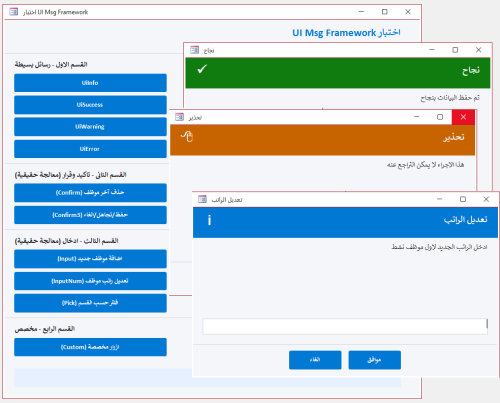
Version 1.0.0
66 تنزيل
استبدال صندوق الرسائل فى الاكسس بنموذج رسائل احترافى بسطر واحد بس كل حاجة جاهزة مش محتاج تفكر في تصميم نموذج مش محتاج نموذج الرسائل يكون موجود اساسا مش محتاج تكتب كود كبير بعد كده لصندوق الرسائل استدعي الدالة وخلاص والنظام يعمل كل شئ النظام يقدم 4 أنواع رسائل جاهزة : { معلومة - نجاح - تحذير - خطأ } كل نوع بتصميمه ولونه وأيقونته معلومة : من خلال : UiInfo اللون : أزرق نجاح : من خلال : UiSuccess اللون : أخضر تحذير : من خلال : UiWarning اللون : برتقالي خطأ : من خلال : UiError اللون : أحمر 3 أنواع إدخال : { نص حر - رقم مع تحقق تلقائي - اختيار من قائمة } نص حر : من خلال : UiInput رقم مع تحقق تلقائي: من خلال : UiInputNum يرفض الحروف بدون ما تكتب سطر واحد اختيار من قائمة : من خلال : UiPick قرارات متعددة : { تأكيد نعم/لا - ثلاثة خيارات أزرار مخصصة بأسماء ترجعها النتيجة مباشرة } نعم / لا : من خلال : BlnUiConfirm يرجع True أو False مباشرة ثلاثة خيارات : من خلال :IntUiConfirm3 يرجع 1 أو 2 أو 0 أزرار مخصصة : من خلال :UiCustom يرجع اسم الزر اللي اتضغط مش رقمه دعم كامل للعربية والإنجليزية : { اتجاه النص RTL/LTR تلقائي - الأزرار والعناوين بالغتين من خلال معامل UiLangEn يكفي لتبديل كل شيء } أضف UiLangEn كآخر parameter وكل شيء يتبدل : اتجاه النص - الأزرار - العناوين الافتراضية ثيم موحد قابل للتخصيص : { ألوان الهيدر والأيقونات والأزرار كلها من UiTheme غير لون الـ Accent في مكان واحد وكل الرسائل تتغير } كل ألوان النظام مجمعة في UiTheme مناسب لأي مشروع قاعدة بيانات صغير أو كبير - عربي أو إنجليزي - مبتدئ أو محترف يبني نفسه : لا تثبيت ولا إعداد كل إجراء أو وظيفة واضحة الاسم - واضحة الـ return - واضحة الاستخدام اسم الوحدة النمطية : modUIMsgFramework كود الوحدة النمطية.. Option Explicit Option Compare Database Public Enum UiIcon UiIconInfo = 0 UiIconSuccess = 1 UiIconWarning = 2 UiIconError = 3 UiIconQuestion = 4 End Enum Public Enum UiMode UiModeAlert = 0 UiModeInput = 1 UiModeNumber = 2 UiModeList = 3 End Enum Public Enum UiLang UiLangAr = 0 UiLangEn = 1 End Enum Public Type UiParams strMessage As String strTitle As String strButtons As String strDefault As String strList As String strDetails As String strResult As String enuIcon As UiIcon enuMode As UiMode enuLang As UiLang End Type Public Type UiTheme lngAccent As Long lngHeader As Long lngBg As Long lngText As Long lngMuted As Long lngBorder As Long lngSuccess As Long lngWarning As Long lngError As Long lngInfo As Long lngQuestion As Long End Type Private Const STRFORMNAME As String = "frmUiMsg" Private Const STRMODNAME As String = "modUICore" Private Const MAX_BUTTONS As Integer = 5 Private Const FRM_W As Long = 9000 Private m_typParams As UiParams Public Function TypDefaultTheme() As UiTheme Dim typT As UiTheme typT.lngAccent = RGB(0, 120, 212) typT.lngHeader = RGB(32, 32, 38) typT.lngBg = RGB(245, 246, 250) typT.lngText = RGB(30, 30, 35) typT.lngMuted = RGB(120, 120, 130) typT.lngBorder = RGB(210, 212, 220) typT.lngSuccess = RGB(16, 124, 16) typT.lngWarning = RGB(200, 100, 0) typT.lngError = RGB(196, 43, 28) typT.lngInfo = RGB(0, 120, 212) typT.lngQuestion = RGB(104, 33, 122) TypDefaultTheme = typT End Function Private Function BlnFormExists(ByVal strName As String) As Boolean On Error Resume Next Dim objFrm As Object Set objFrm = CurrentProject.AllForms(strName) BlnFormExists = Not (objFrm Is Nothing) Set objFrm = Nothing On Error GoTo 0 End Function Private Sub LogError(ByVal strProc As String, _ ByVal lngNum As Long, _ ByVal strDesc As String) Debug.Print "[" & STRMODNAME & "." & strProc & "] " & _ "Err " & lngNum & ": " & strDesc & _ " @ " & Now() End Sub Public Function TypGetParams() As UiParams TypGetParams = m_typParams End Function Public Sub SetResult(ByVal strResult As String) m_typParams.strResult = strResult End Sub Private Sub ResetParams() Dim typEmpty As UiParams m_typParams = typEmpty End Sub Private Function StrDefaultTitle(ByVal enuIcon As UiIcon, _ ByVal enuLang As UiLang) As String If enuLang = UiLangAr Then Select Case enuIcon Case UiIconSuccess: StrDefaultTitle = "تم بنجاح" Case UiIconWarning: StrDefaultTitle = "تحذير" Case UiIconError: StrDefaultTitle = "خطأ" Case UiIconQuestion: StrDefaultTitle = "تأكيد" Case Else: StrDefaultTitle = "معلومة" End Select Else Select Case enuIcon Case UiIconSuccess: StrDefaultTitle = "Success" Case UiIconWarning: StrDefaultTitle = "Warning" Case UiIconError: StrDefaultTitle = "Error" Case UiIconQuestion: StrDefaultTitle = "Confirm" Case Else: StrDefaultTitle = "Information" End Select End If End Function Private Function StrValidateButtons(ByVal strBtns As String) As String Dim arrB() As String Dim intCnt As Integer Dim intI As Integer Dim strOut As String arrB = Split(strBtns, ",") intCnt = UBound(arrB) + 1 If intCnt > MAX_BUTTONS Then LogError "StrValidateButtons", 0, _ "تجاوز الحد الأقصى للأزرار (" & intCnt & "). سيتم اقتصارها على " & MAX_BUTTONS intCnt = MAX_BUTTONS End If For intI = 0 To intCnt - 1 If Len(strOut) > 0 Then strOut = strOut & "," strOut = strOut & Trim(arrB(intI)) Next intI StrValidateButtons = strOut End Function Private Function BlnBuildMsgForm() As Boolean On Error GoTo ErrHandler Dim typT As UiTheme Dim objFrm As Object Dim objCtl As Object Dim strTemp As String Dim intI As Integer Dim lngLeft As Long typT = TypDefaultTheme() Const HDR_H As Long = 900 Const ICON_L As Long = 200 Const ICON_T As Long = 150 Const ICON_W As Long = 600 Const ICON_H As Long = 600 Const TITLE_L As Long = 900 Const TITLE_T As Long = 200 Const TITLE_W As Long = 7800 Const TITLE_H As Long = 500 Const MSG_L As Long = 300 Const MSG_T As Long = 1050 Const MSG_W As Long = 8400 Const MSG_H As Long = 1400 Const DET_L As Long = 300 Const DET_T As Long = 2500 Const DET_W As Long = 8400 Const DET_H As Long = 700 Const INP_L As Long = 300 Const INP_T As Long = 3300 Const INP_W As Long = 8400 Const INP_H As Long = 450 Const DIV_T As Long = 4050 Const BTN_T As Long = 4250 Const BTN_W As Long = 1550 Const BTN_H As Long = 550 Const FRM_H As Long = 5000 Set objFrm = CreateForm strTemp = objFrm.Name With objFrm .Caption = "" .ScrollBars = 0 .RecordSelectors = False .NavigationButtons = False .DividingLines = False .BorderStyle = 1 .AutoCenter = True .PopUp = True .Modal = True .Width = FRM_W .Section(0).Height = FRM_H .Section(0).BackColor = typT.lngBg End With Set objCtl = CreateControl(strTemp, acRectangle, acDetail) With objCtl .Name = "recHeader": .Left = 0: .Top = 0 .Width = FRM_W: .Height = HDR_H .BackColor = typT.lngHeader: .BackStyle = 1 .BorderStyle = 0: .SpecialEffect = 0 End With Set objCtl = CreateControl(strTemp, acRectangle, acDetail) With objCtl .Name = "recIcon": .Left = ICON_L: .Top = ICON_T .Width = ICON_W: .Height = ICON_H .BackColor = typT.lngInfo: .BackStyle = 1 .BorderStyle = 0: .SpecialEffect = 0 End With Set objCtl = CreateControl(strTemp, acLabel, acDetail) With objCtl .Name = "lblIcon": .Caption = "i" .Left = ICON_L: .Top = ICON_T .Width = ICON_W: .Height = ICON_H .FontSize = 20: .FontBold = True .ForeColor = vbWhite: .BackStyle = 0: .TextAlign = 2 End With Set objCtl = CreateControl(strTemp, acLabel, acDetail) With objCtl .Name = "lblTitle": .Caption = "" .Left = TITLE_L: .Top = TITLE_T .Width = TITLE_W: .Height = TITLE_H .FontSize = 14: .FontBold = True .ForeColor = vbWhite: .BackStyle = 0: .TextAlign = 1 End With Set objCtl = CreateControl(strTemp, acLabel, acDetail) With objCtl .Name = "lblMessage": .Caption = "" .Left = MSG_L: .Top = MSG_T .Width = MSG_W: .Height = MSG_H .FontSize = 11: .ForeColor = typT.lngText .BackStyle = 0: .TextAlign = 1 End With Set objCtl = CreateControl(strTemp, acLabel, acDetail) With objCtl .Name = "lblDetails": .Caption = "" .Left = DET_L: .Top = DET_T .Width = DET_W: .Height = DET_H .FontSize = 9: .ForeColor = typT.lngMuted .BackStyle = 0: .Visible = False End With Set objCtl = CreateControl(strTemp, acTextBox, acDetail) With objCtl .Name = "txtInput" .Left = INP_L: .Top = INP_T .Width = INP_W: .Height = INP_H .FontSize = 11 .BorderColor = typT.lngBorder: .BackColor = vbWhite .Visible = False End With Set objCtl = CreateControl(strTemp, acComboBox, acDetail) With objCtl .Name = "cboList" .Left = INP_L: .Top = INP_T .Width = INP_W: .Height = INP_H .FontSize = 11 .BorderColor = typT.lngBorder: .BackColor = vbWhite .RowSourceType = "Value List" .LimitToList = True: .AllowValueListEdits = False .Visible = False End With Set objCtl = CreateControl(strTemp, acLine, acDetail) With objCtl .Name = "linDivider": .Left = 0: .Top = DIV_T .Width = FRM_W: .Height = 0 .BorderColor = typT.lngBorder: .BorderWidth = 1 End With For intI = 1 To MAX_BUTTONS lngLeft = 200 + ((intI - 1) * 1760) Set objCtl = CreateControl(strTemp, acCommandButton, acDetail) With objCtl .Name = "btn" & intI: .Caption = "btn" & intI .Left = lngLeft: .Top = BTN_T .Width = BTN_W: .Height = BTN_H .FontSize = 10: .FontBold = True .BackColor = typT.lngAccent: .ForeColor = vbWhite .BorderStyle = 0: .Visible = False .OnClick = "=ProcBtnClick(" & intI & ")" End With Next intI DoCmd.Save acForm, strTemp DoCmd.Close acForm, strTemp, acSaveYes DoCmd.Rename STRFORMNAME, acForm, strTemp BlnBuildMsgForm = True Set objCtl = Nothing: Set objFrm = Nothing Exit Function ErrHandler: LogError "BlnBuildMsgForm", Err.Number, Err.Description BlnBuildMsgForm = False Set objCtl = Nothing: Set objFrm = Nothing End Function Private Function BlnInjectMsgCode() As Boolean On Error GoTo ErrHandler Dim objMdl As Object Dim strCode As String Dim strOldCode As String DoCmd.OpenForm STRFORMNAME, acDesign, , , , acHidden Set objMdl = Forms(STRFORMNAME).Module If objMdl.CountOfLines > 0 Then strOldCode = objMdl.Lines(1, objMdl.CountOfLines) objMdl.DeleteLines 1, objMdl.CountOfLines End If strCode = StrFormCodeHeader() & _ StrFormCodeApplyIcon() & _ StrFormCodeApplyLang() & _ StrFormCodeSetupBtns() & _ StrFormCodeFillList() & _ StrFormCodeOpen() & _ StrFormCodeBtn() & _ StrFormCodeUnload() objMdl.AddFromString strCode If objMdl.CountOfLines < 10 Then If Len(strOldCode) > 0 Then objMdl.DeleteLines 1, objMdl.CountOfLines objMdl.AddFromString strOldCode End If LogError "BlnInjectMsgCode", 0, "AddFromString أنتج كوداً فارغاً، تم استعادة الكود القديم" BlnInjectMsgCode = False GoTo Cleanup End If DoCmd.Save acForm, STRFORMNAME DoCmd.Close acForm, STRFORMNAME, acSaveYes BlnInjectMsgCode = True Cleanup: Set objMdl = Nothing Exit Function ErrHandler: LogError "BlnInjectMsgCode", Err.Number, Err.Description BlnInjectMsgCode = False Set objMdl = Nothing End Function Private Function StrFormCodeHeader() As String Dim s As String s = "Option Explicit" & vbCrLf s = s & "Option Compare Database" & vbCrLf & vbCrLf s = s & "Private mintMode As Integer" & vbCrLf s = s & "Private mintLang As Integer" & vbCrLf & vbCrLf StrFormCodeHeader = s End Function Private Function StrFormCodeApplyIcon() As String Dim s As String s = "Private Sub ProcApplyIcon(ByVal intIcon As Integer)" & vbCrLf s = s & " Select Case intIcon" & vbCrLf s = s & " Case 1" & vbCrLf s = s & " Me.recHeader.BackColor = RGB(16,124,16)" & vbCrLf s = s & " Me.recIcon.BackColor = RGB(16,124,16)" & vbCrLf s = s & " Me.lblIcon.Caption = Chr(252)" & vbCrLf s = s & " Me.lblIcon.FontName = ""Wingdings""" & vbCrLf s = s & " Case 2" & vbCrLf s = s & " Me.recHeader.BackColor = RGB(200,100,0)" & vbCrLf s = s & " Me.recIcon.BackColor = RGB(200,100,0)" & vbCrLf s = s & " Me.lblIcon.Caption = Chr(56)" & vbCrLf s = s & " Me.lblIcon.FontName = ""Wingdings""" & vbCrLf s = s & " Case 3" & vbCrLf s = s & " Me.recHeader.BackColor = RGB(196,43,28)" & vbCrLf s = s & " Me.recIcon.BackColor = RGB(196,43,28)" & vbCrLf s = s & " Me.lblIcon.Caption = Chr(251)" & vbCrLf s = s & " Me.lblIcon.FontName = ""Wingdings""" & vbCrLf s = s & " Case 4" & vbCrLf s = s & " Me.recHeader.BackColor = RGB(104,33,122)" & vbCrLf s = s & " Me.recIcon.BackColor = RGB(104,33,122)" & vbCrLf s = s & " Me.lblIcon.Caption = Chr(63)" & vbCrLf s = s & " Me.lblIcon.FontName = ""Wingdings""" & vbCrLf s = s & " Case Else" & vbCrLf s = s & " Me.recHeader.BackColor = RGB(0,120,212)" & vbCrLf s = s & " Me.recIcon.BackColor = RGB(0,120,212)" & vbCrLf s = s & " Me.lblIcon.Caption = Chr(105)" & vbCrLf s = s & " Me.lblIcon.FontName = ""Arial""" & vbCrLf s = s & " End Select" & vbCrLf s = s & "End Sub" & vbCrLf & vbCrLf StrFormCodeApplyIcon = s End Function Private Function StrFormCodeApplyLang() As String Dim s As String s = "Private Sub ProcApplyLang(ByVal intLang As Integer)" & vbCrLf s = s & " Dim intAlign As Integer" & vbCrLf s = s & " intAlign = IIf(intLang = 0, 3, 1)" & vbCrLf s = s & " Me.lblTitle.TextAlign = intAlign" & vbCrLf s = s & " Me.lblMessage.TextAlign = intAlign" & vbCrLf s = s & " Me.lblDetails.TextAlign = intAlign" & vbCrLf s = s & " Me.txtInput.TextAlign = intAlign" & vbCrLf s = s & " Me.cboList.TextAlign = intAlign" & vbCrLf s = s & "End Sub" & vbCrLf & vbCrLf StrFormCodeApplyLang = s End Function Private Function StrFormCodeSetupBtns() As String Dim s As String s = "Private Sub ProcSetupBtns(ByVal strBtns As String, ByVal intLang As Integer)" & vbCrLf s = s & " Dim arrBtns() As String" & vbCrLf s = s & " Dim intTotal As Integer" & vbCrLf s = s & " Dim intI As Integer" & vbCrLf s = s & " Dim lngBtnW As Long" & vbCrLf s = s & " Dim lngBtnH As Long" & vbCrLf s = s & " Dim lngGap As Long" & vbCrLf s = s & " Dim lngTotalW As Long" & vbCrLf s = s & " Dim lngStartX As Long" & vbCrLf s = s & " Dim blnIsRtl As Boolean" & vbCrLf s = s & " arrBtns = Split(strBtns, "","")" & vbCrLf s = s & " intTotal = UBound(arrBtns) + 1" & vbCrLf s = s & " If intTotal > 5 Then intTotal = 5" & vbCrLf s = s & " blnIsRtl = (intLang = 0)" & vbCrLf s = s & " lngBtnW = 1550" & vbCrLf s = s & " lngBtnH = 550" & vbCrLf s = s & " lngGap = 200" & vbCrLf s = s & " lngTotalW = (intTotal * lngBtnW) + ((intTotal - 1) * lngGap)" & vbCrLf s = s & " lngStartX = (Me.Width - lngTotalW) \ 2" & vbCrLf s = s & " For intI = 1 To 5" & vbCrLf s = s & " Me(""btn"" & intI).Visible = False" & vbCrLf s = s & " Next intI" & vbCrLf s = s & " For intI = 1 To intTotal" & vbCrLf s = s & " With Me(""btn"" & intI)" & vbCrLf s = s & " .Caption = Trim(arrBtns(intI - 1))" & vbCrLf s = s & " If blnIsRtl Then" & vbCrLf s = s & " .Left = lngStartX + ((intTotal - intI) * (lngBtnW + lngGap))" & vbCrLf s = s & " Else" & vbCrLf s = s & " .Left = lngStartX + ((intI - 1) * (lngBtnW + lngGap))" & vbCrLf s = s & " End If" & vbCrLf s = s & " .Top = 4250: .Width = lngBtnW: .Height = lngBtnH" & vbCrLf s = s & " .Visible = True" & vbCrLf s = s & " End With" & vbCrLf s = s & " Next intI" & vbCrLf s = s & "End Sub" & vbCrLf & vbCrLf StrFormCodeSetupBtns = s End Function Private Function StrFormCodeFillList() As String Dim s As String s = "Private Sub ProcFillList(ByVal strItems As String, ByVal strDefault As String)" & vbCrLf s = s & " Dim arrItems() As String" & vbCrLf s = s & " Dim strSource As String" & vbCrLf s = s & " Dim intI As Integer" & vbCrLf s = s & " arrItems = Split(strItems, "","")" & vbCrLf s = s & " For intI = 0 To UBound(arrItems)" & vbCrLf s = s & " strSource = strSource & Trim(arrItems(intI)) & "";""" & vbCrLf s = s & " Next intI" & vbCrLf s = s & " Me.cboList.RowSource = strSource" & vbCrLf s = s & " If Len(Trim(strDefault)) > 0 Then" & vbCrLf s = s & " Me.cboList.Value = strDefault" & vbCrLf s = s & " ElseIf UBound(arrItems) >= 0 Then" & vbCrLf s = s & " Me.cboList.Value = Trim(arrItems(0))" & vbCrLf s = s & " End If" & vbCrLf s = s & "End Sub" & vbCrLf & vbCrLf StrFormCodeFillList = s End Function Private Function StrFormCodeOpen() As String Dim s As String s = "Private Sub Form_Open(Cancel As Integer)" & vbCrLf s = s & " On Error GoTo ErrHandler" & vbCrLf s = s & " Dim typP As UiParams" & vbCrLf s = s & " typP = TypGetParams()" & vbCrLf s = s & " mintMode = CInt(typP.enuMode)" & vbCrLf s = s & " mintLang = CInt(typP.enuLang)" & vbCrLf s = s & " Me.Caption = typP.strTitle" & vbCrLf s = s & " Me.lblTitle.Caption = typP.strTitle" & vbCrLf s = s & " Me.lblMessage.Caption = typP.strMessage" & vbCrLf s = s & " Me.lblDetails.Visible = (Len(Trim(typP.strDetails)) > 0)" & vbCrLf s = s & " If Me.lblDetails.Visible Then Me.lblDetails.Caption = typP.strDetails" & vbCrLf s = s & " ProcApplyIcon CInt(typP.enuIcon)" & vbCrLf s = s & " ProcApplyLang mintLang" & vbCrLf s = s & " ProcSetupBtns typP.strButtons, mintLang" & vbCrLf s = s & " Me.txtInput.Visible = (mintMode = 1 Or mintMode = 2)" & vbCrLf s = s & " Me.cboList.Visible = (mintMode = 3)" & vbCrLf s = s & " If mintMode = 1 Or mintMode = 2 Then" & vbCrLf s = s & " Me.txtInput.Value = typP.strDefault" & vbCrLf s = s & " Me.txtInput.SetFocus" & vbCrLf s = s & " End If" & vbCrLf s = s & " If mintMode = 3 Then" & vbCrLf s = s & " ProcFillList typP.strList, typP.strDefault" & vbCrLf s = s & " Me.cboList.SetFocus" & vbCrLf s = s & " End If" & vbCrLf s = s & " Exit Sub" & vbCrLf s = s & "ErrHandler:" & vbCrLf s = s & " Debug.Print ""Form_Open Err: "" & Err.Number & "" - "" & Err.Description" & vbCrLf s = s & " DoCmd.Close acForm, Me.Name" & vbCrLf s = s & "End Sub" & vbCrLf & vbCrLf StrFormCodeOpen = s End Function Private Function StrFormCodeBtn() As String Dim s As String s = "Public Function ProcBtnClick(ByVal intNum As Integer)" & vbCrLf s = s & " On Error GoTo ErrHandler" & vbCrLf s = s & " Dim strResult As String" & vbCrLf s = s & " Dim strWarn As String" & vbCrLf s = s & " Select Case mintMode" & vbCrLf s = s & " Case 1" & vbCrLf s = s & " If intNum = 1 Then" & vbCrLf s = s & " strResult = Nz(Me.txtInput.Value, """")" & vbCrLf s = s & " Else" & vbCrLf s = s & " strResult = ""__CANCEL__""" & vbCrLf s = s & " End If" & vbCrLf s = s & " Case 2" & vbCrLf s = s & " If intNum = 1 Then" & vbCrLf s = s & " If Len(Nz(Me.txtInput.Value, """")) > 0 Then" & vbCrLf s = s & " If Not IsNumeric(Me.txtInput.Value) Then" & vbCrLf s = s & " strWarn = IIf(mintLang = 0, ""أدخل رقماً صحيحاً"", ""Enter a valid number"")" & vbCrLf s = s & " MsgBox strWarn, vbExclamation" & vbCrLf s = s & " Me.txtInput.SetFocus" & vbCrLf s = s & " Exit Function" & vbCrLf s = s & " End If" & vbCrLf s = s & " End If" & vbCrLf s = s & " strResult = Nz(Me.txtInput.Value, """")" & vbCrLf s = s & " Else" & vbCrLf s = s & " strResult = ""__CANCEL__""" & vbCrLf s = s & " End If" & vbCrLf s = s & " Case 3" & vbCrLf s = s & " If intNum = 1 Then" & vbCrLf s = s & " strResult = Nz(Me.cboList.Value, """")" & vbCrLf s = s & " Else" & vbCrLf s = s & " strResult = ""__CANCEL__""" & vbCrLf s = s & " End If" & vbCrLf s = s & " Case Else" & vbCrLf s = s & " strResult = Me(""btn"" & intNum).Caption" & vbCrLf s = s & " End Select" & vbCrLf s = s & " SetResult strResult" & vbCrLf s = s & " DoCmd.Close acForm, Me.Name" & vbCrLf s = s & " Exit Function" & vbCrLf s = s & "ErrHandler:" & vbCrLf s = s & " Debug.Print ""ProcBtnClick Err: "" & Err.Number & "" - "" & Err.Description" & vbCrLf s = s & "End Function" & vbCrLf & vbCrLf StrFormCodeBtn = s End Function Private Function StrFormCodeUnload() As String Dim s As String s = "Private Sub Form_Unload(Cancel As Integer)" & vbCrLf s = s & " Dim typP As UiParams" & vbCrLf s = s & " typP = TypGetParams()" & vbCrLf s = s & " If Len(Nz(typP.strResult, """")) = 0 Then" & vbCrLf s = s & " SetResult ""__CANCEL__""" & vbCrLf s = s & " End If" & vbCrLf s = s & "End Sub" & vbCrLf StrFormCodeUnload = s End Function Private Function BlnEnsureForm() As Boolean On Error GoTo ErrHandler If BlnFormExists(STRFORMNAME) Then BlnEnsureForm = True Exit Function End If If Not BlnBuildMsgForm() Then LogError "BlnEnsureForm", 0, "BlnBuildMsgForm failed" Exit Function End If If Not BlnInjectMsgCode() Then LogError "BlnEnsureForm", 0, "BlnInjectMsgCode failed" Exit Function End If BlnEnsureForm = True Exit Function ErrHandler: LogError "BlnEnsureForm", Err.Number, Err.Description BlnEnsureForm = False End Function Private Function StrShowMsg(ByVal strMsg As String, _ ByVal enuIcon As UiIcon, _ ByVal strBtns As String, _ ByVal strTitle As String, _ ByVal enuMode As UiMode, _ ByVal strDef As String, _ ByVal strList As String, _ ByVal strDet As String, _ ByVal enuLang As UiLang) As String On Error GoTo ErrHandler If Not BlnEnsureForm() Then LogError "StrShowMsg", 0, "EnsureForm failed" StrShowMsg = "__CANCEL__" Exit Function End If If Len(Trim(strTitle)) = 0 Then strTitle = StrDefaultTitle(enuIcon, enuLang) End If ResetParams With m_typParams .strMessage = strMsg .strTitle = strTitle .strButtons = StrValidateButtons(strBtns) .enuIcon = enuIcon .enuMode = enuMode .strDefault = strDef .strList = strList .strDetails = strDet .enuLang = enuLang .strResult = "" End With DoCmd.OpenForm STRFORMNAME, acNormal, , , , acDialog StrShowMsg = m_typParams.strResult If Len(StrShowMsg) = 0 Then StrShowMsg = "__CANCEL__" ResetParams Exit Function ErrHandler: LogError "StrShowMsg", Err.Number, Err.Description ResetParams StrShowMsg = "__CANCEL__" End Function Public Sub UiInfo(ByVal strMsg As String, _ Optional ByVal strTitle As String = "", _ Optional ByVal enuLang As UiLang = UiLangAr) Dim strBtns As String strBtns = IIf(enuLang = UiLangAr, "موافق", "OK") StrShowMsg strMsg, UiIconInfo, strBtns, strTitle, UiModeAlert, "", "", "", enuLang End Sub Public Sub UiSuccess(ByVal strMsg As String, _ Optional ByVal strTitle As String = "", _ Optional ByVal enuLang As UiLang = UiLangAr) Dim strBtns As String strBtns = IIf(enuLang = UiLangAr, "موافق", "OK") StrShowMsg strMsg, UiIconSuccess, strBtns, strTitle, UiModeAlert, "", "", "", enuLang End Sub Public Sub UiWarning(ByVal strMsg As String, _ Optional ByVal strTitle As String = "", _ Optional ByVal enuLang As UiLang = UiLangAr) Dim strBtns As String strBtns = IIf(enuLang = UiLangAr, "موافق", "OK") StrShowMsg strMsg, UiIconWarning, strBtns, strTitle, UiModeAlert, "", "", "", enuLang End Sub Public Sub UiError(ByVal strMsg As String, _ Optional ByVal strTitle As String = "", _ Optional ByVal strDetails As String = "", _ Optional ByVal enuLang As UiLang = UiLangAr) Dim strBtns As String strBtns = IIf(enuLang = UiLangAr, "موافق", "OK") StrShowMsg strMsg, UiIconError, strBtns, strTitle, UiModeAlert, "", "", strDetails, enuLang End Sub Public Function BlnUiConfirm(ByVal strMsg As String, _ Optional ByVal strTitle As String = "", _ Optional ByVal enuLang As UiLang = UiLangAr) As Boolean Dim strBtns As String Dim strYes As String Dim strResult As String strBtns = IIf(enuLang = UiLangAr, "نعم,لا", "Yes,No") strYes = IIf(enuLang = UiLangAr, "نعم", "Yes") strResult = StrShowMsg(strMsg, UiIconQuestion, strBtns, strTitle, UiModeAlert, "", "", "", enuLang) BlnUiConfirm = (strResult = strYes) End Function Public Function IntUiConfirm3(ByVal strMsg As String, _ Optional ByVal strTitle As String = "", _ Optional ByVal enuLang As UiLang = UiLangAr) As Integer Dim strBtns As String Dim strYes As String Dim strNo As String Dim strResult As String strBtns = IIf(enuLang = UiLangAr, "نعم,لا,إلغاء", "Yes,No,Cancel") strYes = IIf(enuLang = UiLangAr, "نعم", "Yes") strNo = IIf(enuLang = UiLangAr, "لا", "No") strResult = StrShowMsg(strMsg, UiIconQuestion, strBtns, strTitle, UiModeAlert, "", "", "", enuLang) Select Case strResult Case strYes: IntUiConfirm3 = 1 Case strNo: IntUiConfirm3 = 2 Case Else: IntUiConfirm3 = 0 End Select End Function Public Function UiInput(ByVal strMsg As String, _ Optional ByVal strTitle As String = "", _ Optional ByVal strDefault As String = "", _ Optional ByVal enuLang As UiLang = UiLangAr) As String Dim strBtns As String Dim strResult As String strBtns = IIf(enuLang = UiLangAr, "موافق,إلغاء", "OK,Cancel") strResult = StrShowMsg(strMsg, UiIconInfo, strBtns, strTitle, UiModeInput, strDefault, "", "", enuLang) UiInput = IIf(strResult = "__CANCEL__", "", strResult) End Function Public Function UiInputNum(ByVal strMsg As String, _ Optional ByVal strTitle As String = "", _ Optional ByVal strDefault As String = "", _ Optional ByVal enuLang As UiLang = UiLangAr) As String Dim strBtns As String Dim strResult As String strBtns = IIf(enuLang = UiLangAr, "موافق,إلغاء", "OK,Cancel") strResult = StrShowMsg(strMsg, UiIconInfo, strBtns, strTitle, UiModeNumber, strDefault, "", "", enuLang) Select Case strResult Case "__CANCEL__", "": UiInputNum = "" Case Else UiInputNum = IIf(IsNumeric(strResult), strResult, "") End Select End Function Public Function UiPick(ByVal strMsg As String, _ ByVal strItems As String, _ Optional ByVal strTitle As String = "", _ Optional ByVal strDefault As String = "", _ Optional ByVal enuLang As UiLang = UiLangAr) As String Dim strBtns As String Dim strResult As String strBtns = IIf(enuLang = UiLangAr, "موافق,إلغاء", "OK,Cancel") strResult = StrShowMsg(strMsg, UiIconQuestion, strBtns, strTitle, UiModeList, strDefault, strItems, "", enuLang) UiPick = IIf(strResult = "__CANCEL__", "", strResult) End Function Public Function UiCustom(ByVal strMsg As String, _ ByVal strBtns As String, _ Optional ByVal enuIcon As UiIcon = UiIconQuestion, _ Optional ByVal strTitle As String = "", _ Optional ByVal enuLang As UiLang = UiLangAr) As String Dim strResult As String strResult = StrShowMsg(strMsg, enuIcon, strBtns, strTitle, UiModeAlert, "", "", "", enuLang) UiCustom = IIf(strResult = "__CANCEL__", "", strResult) End Function ' ===================================== ' أمثلة الاستخدام ' ===================================== ' UiSuccess "تم انشاء النظام بنجاح" ' UiInfo "رسالة معلومة" ' UiWarning "تحذير: لا يمكن التراجع" ' UiError "حدث خطأ", "", "تفاصيل الخطأ" ' ' If BlnUiConfirm("هل تريد الحذف؟") Then ... ' ' Select Case IntUiConfirm3("حفظ التغييرات؟") ' Case 1: ' نعم ' Case 2: ' لا ' Case 0: ' إلغاء ' End Select ' ' Dim s As String ' s = StrUiInput("أدخل اسمك", "", "محمد") ' If Len(s) > 0 Then ... ' ' Dim n As String ' n = StrUiInputNum("أدخل العمر", "", "25") ' ' Dim pick As String ' pick = StrUiPick("اختر قسم", "مبيعات,محاسبة,مخازن,إدارة") ' ' Dim choice As String ' choice = StrUiCustom("اختر خيار", "حفظ,تجاهل,إلغاء") ' Select Case choice ' Case "حفظ": ... ' Case "تجاهل": ... ' Case "": ' أُغلق بدون اختيار ' End Select طريقة الاعداد و التشغيل : بعد اضافة الوحدة النمطية: modUIMsgFramework الى قاعدة بياناتك استدعي من أي زر أمر داخل أى نموذج أو من النافذة الفورية مباشرة UiSuccess "تم انشاء النظام بنجاح" للتجربة الفورية فى المرفق تم اضافة ما يلى : وحدة نمطية باسم : modBuildTestUI ماكرو باسم : BuildTestUI شغل الماكرو BuildTestUI على الفور هيتم عمل جدول tblEmployees يحتوى على بيانات افتراضية غير حقيقية للتجربة وهيتم عمل نموذج اختبار متكامل وفتحة بشكل مباشر -
اعرض الملف UiMsg Framework - نظام رسائل احترافي استبدال صندوق الرسائل فى الاكسس بنموذج رسائل احترافى بسطر واحد بس كل حاجة جاهزة مش محتاج تفكر في تصميم نموذج مش محتاج نموذج الرسائل يكون موجود اساسا مش محتاج تكتب كود كبير بعد كده لصندوق الرسائل استدعي الدالة وخلاص والنظام يعمل كل شئ النظام يقدم 4 أنواع رسائل جاهزة : { معلومة - نجاح - تحذير - خطأ } كل نوع بتصميمه ولونه وأيقونته معلومة : من خلال : UiInfo اللون : أزرق نجاح : من خلال : UiSuccess اللون : أخضر تحذير : من خلال : UiWarning اللون : برتقالي خطأ : من خلال : UiError اللون : أحمر 3 أنواع إدخال : { نص حر - رقم مع تحقق تلقائي - اختيار من قائمة } نص حر : من خلال : UiInput رقم مع تحقق تلقائي: من خلال : UiInputNum يرفض الحروف بدون ما تكتب سطر واحد اختيار من قائمة : من خلال : UiPick قرارات متعددة : { تأكيد نعم/لا - ثلاثة خيارات أزرار مخصصة بأسماء ترجعها النتيجة مباشرة } نعم / لا : من خلال : BlnUiConfirm يرجع True أو False مباشرة ثلاثة خيارات : من خلال :IntUiConfirm3 يرجع 1 أو 2 أو 0 أزرار مخصصة : من خلال :UiCustom يرجع اسم الزر اللي اتضغط مش رقمه دعم كامل للعربية والإنجليزية : { اتجاه النص RTL/LTR تلقائي - الأزرار والعناوين بالغتين من خلال معامل UiLangEn يكفي لتبديل كل شيء } أضف UiLangEn كآخر parameter وكل شيء يتبدل : اتجاه النص - الأزرار - العناوين الافتراضية ثيم موحد قابل للتخصيص : { ألوان الهيدر والأيقونات والأزرار كلها من UiTheme غير لون الـ Accent في مكان واحد وكل الرسائل تتغير } كل ألوان النظام مجمعة في UiTheme مناسب لأي مشروع قاعدة بيانات صغير أو كبير - عربي أو إنجليزي - مبتدئ أو محترف يبني نفسه : لا تثبيت ولا إعداد كل إجراء أو وظيفة واضحة الاسم - واضحة الـ return - واضحة الاستخدام اسم الوحدة النمطية : modUIMsgFramework كود الوحدة النمطية.. Option Explicit Option Compare Database Public Enum UiIcon UiIconInfo = 0 UiIconSuccess = 1 UiIconWarning = 2 UiIconError = 3 UiIconQuestion = 4 End Enum Public Enum UiMode UiModeAlert = 0 UiModeInput = 1 UiModeNumber = 2 UiModeList = 3 End Enum Public Enum UiLang UiLangAr = 0 UiLangEn = 1 End Enum Public Type UiParams strMessage As String strTitle As String strButtons As String strDefault As String strList As String strDetails As String strResult As String enuIcon As UiIcon enuMode As UiMode enuLang As UiLang End Type Public Type UiTheme lngAccent As Long lngHeader As Long lngBg As Long lngText As Long lngMuted As Long lngBorder As Long lngSuccess As Long lngWarning As Long lngError As Long lngInfo As Long lngQuestion As Long End Type Private Const STRFORMNAME As String = "frmUiMsg" Private Const STRMODNAME As String = "modUICore" Private Const MAX_BUTTONS As Integer = 5 Private Const FRM_W As Long = 9000 Private m_typParams As UiParams Public Function TypDefaultTheme() As UiTheme Dim typT As UiTheme typT.lngAccent = RGB(0, 120, 212) typT.lngHeader = RGB(32, 32, 38) typT.lngBg = RGB(245, 246, 250) typT.lngText = RGB(30, 30, 35) typT.lngMuted = RGB(120, 120, 130) typT.lngBorder = RGB(210, 212, 220) typT.lngSuccess = RGB(16, 124, 16) typT.lngWarning = RGB(200, 100, 0) typT.lngError = RGB(196, 43, 28) typT.lngInfo = RGB(0, 120, 212) typT.lngQuestion = RGB(104, 33, 122) TypDefaultTheme = typT End Function Private Function BlnFormExists(ByVal strName As String) As Boolean On Error Resume Next Dim objFrm As Object Set objFrm = CurrentProject.AllForms(strName) BlnFormExists = Not (objFrm Is Nothing) Set objFrm = Nothing On Error GoTo 0 End Function Private Sub LogError(ByVal strProc As String, _ ByVal lngNum As Long, _ ByVal strDesc As String) Debug.Print "[" & STRMODNAME & "." & strProc & "] " & _ "Err " & lngNum & ": " & strDesc & _ " @ " & Now() End Sub Public Function TypGetParams() As UiParams TypGetParams = m_typParams End Function Public Sub SetResult(ByVal strResult As String) m_typParams.strResult = strResult End Sub Private Sub ResetParams() Dim typEmpty As UiParams m_typParams = typEmpty End Sub Private Function StrDefaultTitle(ByVal enuIcon As UiIcon, _ ByVal enuLang As UiLang) As String If enuLang = UiLangAr Then Select Case enuIcon Case UiIconSuccess: StrDefaultTitle = "تم بنجاح" Case UiIconWarning: StrDefaultTitle = "تحذير" Case UiIconError: StrDefaultTitle = "خطأ" Case UiIconQuestion: StrDefaultTitle = "تأكيد" Case Else: StrDefaultTitle = "معلومة" End Select Else Select Case enuIcon Case UiIconSuccess: StrDefaultTitle = "Success" Case UiIconWarning: StrDefaultTitle = "Warning" Case UiIconError: StrDefaultTitle = "Error" Case UiIconQuestion: StrDefaultTitle = "Confirm" Case Else: StrDefaultTitle = "Information" End Select End If End Function Private Function StrValidateButtons(ByVal strBtns As String) As String Dim arrB() As String Dim intCnt As Integer Dim intI As Integer Dim strOut As String arrB = Split(strBtns, ",") intCnt = UBound(arrB) + 1 If intCnt > MAX_BUTTONS Then LogError "StrValidateButtons", 0, _ "تجاوز الحد الأقصى للأزرار (" & intCnt & "). سيتم اقتصارها على " & MAX_BUTTONS intCnt = MAX_BUTTONS End If For intI = 0 To intCnt - 1 If Len(strOut) > 0 Then strOut = strOut & "," strOut = strOut & Trim(arrB(intI)) Next intI StrValidateButtons = strOut End Function Private Function BlnBuildMsgForm() As Boolean On Error GoTo ErrHandler Dim typT As UiTheme Dim objFrm As Object Dim objCtl As Object Dim strTemp As String Dim intI As Integer Dim lngLeft As Long typT = TypDefaultTheme() Const HDR_H As Long = 900 Const ICON_L As Long = 200 Const ICON_T As Long = 150 Const ICON_W As Long = 600 Const ICON_H As Long = 600 Const TITLE_L As Long = 900 Const TITLE_T As Long = 200 Const TITLE_W As Long = 7800 Const TITLE_H As Long = 500 Const MSG_L As Long = 300 Const MSG_T As Long = 1050 Const MSG_W As Long = 8400 Const MSG_H As Long = 1400 Const DET_L As Long = 300 Const DET_T As Long = 2500 Const DET_W As Long = 8400 Const DET_H As Long = 700 Const INP_L As Long = 300 Const INP_T As Long = 3300 Const INP_W As Long = 8400 Const INP_H As Long = 450 Const DIV_T As Long = 4050 Const BTN_T As Long = 4250 Const BTN_W As Long = 1550 Const BTN_H As Long = 550 Const FRM_H As Long = 5000 Set objFrm = CreateForm strTemp = objFrm.Name With objFrm .Caption = "" .ScrollBars = 0 .RecordSelectors = False .NavigationButtons = False .DividingLines = False .BorderStyle = 1 .AutoCenter = True .PopUp = True .Modal = True .Width = FRM_W .Section(0).Height = FRM_H .Section(0).BackColor = typT.lngBg End With Set objCtl = CreateControl(strTemp, acRectangle, acDetail) With objCtl .Name = "recHeader": .Left = 0: .Top = 0 .Width = FRM_W: .Height = HDR_H .BackColor = typT.lngHeader: .BackStyle = 1 .BorderStyle = 0: .SpecialEffect = 0 End With Set objCtl = CreateControl(strTemp, acRectangle, acDetail) With objCtl .Name = "recIcon": .Left = ICON_L: .Top = ICON_T .Width = ICON_W: .Height = ICON_H .BackColor = typT.lngInfo: .BackStyle = 1 .BorderStyle = 0: .SpecialEffect = 0 End With Set objCtl = CreateControl(strTemp, acLabel, acDetail) With objCtl .Name = "lblIcon": .Caption = "i" .Left = ICON_L: .Top = ICON_T .Width = ICON_W: .Height = ICON_H .FontSize = 20: .FontBold = True .ForeColor = vbWhite: .BackStyle = 0: .TextAlign = 2 End With Set objCtl = CreateControl(strTemp, acLabel, acDetail) With objCtl .Name = "lblTitle": .Caption = "" .Left = TITLE_L: .Top = TITLE_T .Width = TITLE_W: .Height = TITLE_H .FontSize = 14: .FontBold = True .ForeColor = vbWhite: .BackStyle = 0: .TextAlign = 1 End With Set objCtl = CreateControl(strTemp, acLabel, acDetail) With objCtl .Name = "lblMessage": .Caption = "" .Left = MSG_L: .Top = MSG_T .Width = MSG_W: .Height = MSG_H .FontSize = 11: .ForeColor = typT.lngText .BackStyle = 0: .TextAlign = 1 End With Set objCtl = CreateControl(strTemp, acLabel, acDetail) With objCtl .Name = "lblDetails": .Caption = "" .Left = DET_L: .Top = DET_T .Width = DET_W: .Height = DET_H .FontSize = 9: .ForeColor = typT.lngMuted .BackStyle = 0: .Visible = False End With Set objCtl = CreateControl(strTemp, acTextBox, acDetail) With objCtl .Name = "txtInput" .Left = INP_L: .Top = INP_T .Width = INP_W: .Height = INP_H .FontSize = 11 .BorderColor = typT.lngBorder: .BackColor = vbWhite .Visible = False End With Set objCtl = CreateControl(strTemp, acComboBox, acDetail) With objCtl .Name = "cboList" .Left = INP_L: .Top = INP_T .Width = INP_W: .Height = INP_H .FontSize = 11 .BorderColor = typT.lngBorder: .BackColor = vbWhite .RowSourceType = "Value List" .LimitToList = True: .AllowValueListEdits = False .Visible = False End With Set objCtl = CreateControl(strTemp, acLine, acDetail) With objCtl .Name = "linDivider": .Left = 0: .Top = DIV_T .Width = FRM_W: .Height = 0 .BorderColor = typT.lngBorder: .BorderWidth = 1 End With For intI = 1 To MAX_BUTTONS lngLeft = 200 + ((intI - 1) * 1760) Set objCtl = CreateControl(strTemp, acCommandButton, acDetail) With objCtl .Name = "btn" & intI: .Caption = "btn" & intI .Left = lngLeft: .Top = BTN_T .Width = BTN_W: .Height = BTN_H .FontSize = 10: .FontBold = True .BackColor = typT.lngAccent: .ForeColor = vbWhite .BorderStyle = 0: .Visible = False .OnClick = "=ProcBtnClick(" & intI & ")" End With Next intI DoCmd.Save acForm, strTemp DoCmd.Close acForm, strTemp, acSaveYes DoCmd.Rename STRFORMNAME, acForm, strTemp BlnBuildMsgForm = True Set objCtl = Nothing: Set objFrm = Nothing Exit Function ErrHandler: LogError "BlnBuildMsgForm", Err.Number, Err.Description BlnBuildMsgForm = False Set objCtl = Nothing: Set objFrm = Nothing End Function Private Function BlnInjectMsgCode() As Boolean On Error GoTo ErrHandler Dim objMdl As Object Dim strCode As String Dim strOldCode As String DoCmd.OpenForm STRFORMNAME, acDesign, , , , acHidden Set objMdl = Forms(STRFORMNAME).Module If objMdl.CountOfLines > 0 Then strOldCode = objMdl.Lines(1, objMdl.CountOfLines) objMdl.DeleteLines 1, objMdl.CountOfLines End If strCode = StrFormCodeHeader() & _ StrFormCodeApplyIcon() & _ StrFormCodeApplyLang() & _ StrFormCodeSetupBtns() & _ StrFormCodeFillList() & _ StrFormCodeOpen() & _ StrFormCodeBtn() & _ StrFormCodeUnload() objMdl.AddFromString strCode If objMdl.CountOfLines < 10 Then If Len(strOldCode) > 0 Then objMdl.DeleteLines 1, objMdl.CountOfLines objMdl.AddFromString strOldCode End If LogError "BlnInjectMsgCode", 0, "AddFromString أنتج كوداً فارغاً، تم استعادة الكود القديم" BlnInjectMsgCode = False GoTo Cleanup End If DoCmd.Save acForm, STRFORMNAME DoCmd.Close acForm, STRFORMNAME, acSaveYes BlnInjectMsgCode = True Cleanup: Set objMdl = Nothing Exit Function ErrHandler: LogError "BlnInjectMsgCode", Err.Number, Err.Description BlnInjectMsgCode = False Set objMdl = Nothing End Function Private Function StrFormCodeHeader() As String Dim s As String s = "Option Explicit" & vbCrLf s = s & "Option Compare Database" & vbCrLf & vbCrLf s = s & "Private mintMode As Integer" & vbCrLf s = s & "Private mintLang As Integer" & vbCrLf & vbCrLf StrFormCodeHeader = s End Function Private Function StrFormCodeApplyIcon() As String Dim s As String s = "Private Sub ProcApplyIcon(ByVal intIcon As Integer)" & vbCrLf s = s & " Select Case intIcon" & vbCrLf s = s & " Case 1" & vbCrLf s = s & " Me.recHeader.BackColor = RGB(16,124,16)" & vbCrLf s = s & " Me.recIcon.BackColor = RGB(16,124,16)" & vbCrLf s = s & " Me.lblIcon.Caption = Chr(252)" & vbCrLf s = s & " Me.lblIcon.FontName = ""Wingdings""" & vbCrLf s = s & " Case 2" & vbCrLf s = s & " Me.recHeader.BackColor = RGB(200,100,0)" & vbCrLf s = s & " Me.recIcon.BackColor = RGB(200,100,0)" & vbCrLf s = s & " Me.lblIcon.Caption = Chr(56)" & vbCrLf s = s & " Me.lblIcon.FontName = ""Wingdings""" & vbCrLf s = s & " Case 3" & vbCrLf s = s & " Me.recHeader.BackColor = RGB(196,43,28)" & vbCrLf s = s & " Me.recIcon.BackColor = RGB(196,43,28)" & vbCrLf s = s & " Me.lblIcon.Caption = Chr(251)" & vbCrLf s = s & " Me.lblIcon.FontName = ""Wingdings""" & vbCrLf s = s & " Case 4" & vbCrLf s = s & " Me.recHeader.BackColor = RGB(104,33,122)" & vbCrLf s = s & " Me.recIcon.BackColor = RGB(104,33,122)" & vbCrLf s = s & " Me.lblIcon.Caption = Chr(63)" & vbCrLf s = s & " Me.lblIcon.FontName = ""Wingdings""" & vbCrLf s = s & " Case Else" & vbCrLf s = s & " Me.recHeader.BackColor = RGB(0,120,212)" & vbCrLf s = s & " Me.recIcon.BackColor = RGB(0,120,212)" & vbCrLf s = s & " Me.lblIcon.Caption = Chr(105)" & vbCrLf s = s & " Me.lblIcon.FontName = ""Arial""" & vbCrLf s = s & " End Select" & vbCrLf s = s & "End Sub" & vbCrLf & vbCrLf StrFormCodeApplyIcon = s End Function Private Function StrFormCodeApplyLang() As String Dim s As String s = "Private Sub ProcApplyLang(ByVal intLang As Integer)" & vbCrLf s = s & " Dim intAlign As Integer" & vbCrLf s = s & " intAlign = IIf(intLang = 0, 3, 1)" & vbCrLf s = s & " Me.lblTitle.TextAlign = intAlign" & vbCrLf s = s & " Me.lblMessage.TextAlign = intAlign" & vbCrLf s = s & " Me.lblDetails.TextAlign = intAlign" & vbCrLf s = s & " Me.txtInput.TextAlign = intAlign" & vbCrLf s = s & " Me.cboList.TextAlign = intAlign" & vbCrLf s = s & "End Sub" & vbCrLf & vbCrLf StrFormCodeApplyLang = s End Function Private Function StrFormCodeSetupBtns() As String Dim s As String s = "Private Sub ProcSetupBtns(ByVal strBtns As String, ByVal intLang As Integer)" & vbCrLf s = s & " Dim arrBtns() As String" & vbCrLf s = s & " Dim intTotal As Integer" & vbCrLf s = s & " Dim intI As Integer" & vbCrLf s = s & " Dim lngBtnW As Long" & vbCrLf s = s & " Dim lngBtnH As Long" & vbCrLf s = s & " Dim lngGap As Long" & vbCrLf s = s & " Dim lngTotalW As Long" & vbCrLf s = s & " Dim lngStartX As Long" & vbCrLf s = s & " Dim blnIsRtl As Boolean" & vbCrLf s = s & " arrBtns = Split(strBtns, "","")" & vbCrLf s = s & " intTotal = UBound(arrBtns) + 1" & vbCrLf s = s & " If intTotal > 5 Then intTotal = 5" & vbCrLf s = s & " blnIsRtl = (intLang = 0)" & vbCrLf s = s & " lngBtnW = 1550" & vbCrLf s = s & " lngBtnH = 550" & vbCrLf s = s & " lngGap = 200" & vbCrLf s = s & " lngTotalW = (intTotal * lngBtnW) + ((intTotal - 1) * lngGap)" & vbCrLf s = s & " lngStartX = (Me.Width - lngTotalW) \ 2" & vbCrLf s = s & " For intI = 1 To 5" & vbCrLf s = s & " Me(""btn"" & intI).Visible = False" & vbCrLf s = s & " Next intI" & vbCrLf s = s & " For intI = 1 To intTotal" & vbCrLf s = s & " With Me(""btn"" & intI)" & vbCrLf s = s & " .Caption = Trim(arrBtns(intI - 1))" & vbCrLf s = s & " If blnIsRtl Then" & vbCrLf s = s & " .Left = lngStartX + ((intTotal - intI) * (lngBtnW + lngGap))" & vbCrLf s = s & " Else" & vbCrLf s = s & " .Left = lngStartX + ((intI - 1) * (lngBtnW + lngGap))" & vbCrLf s = s & " End If" & vbCrLf s = s & " .Top = 4250: .Width = lngBtnW: .Height = lngBtnH" & vbCrLf s = s & " .Visible = True" & vbCrLf s = s & " End With" & vbCrLf s = s & " Next intI" & vbCrLf s = s & "End Sub" & vbCrLf & vbCrLf StrFormCodeSetupBtns = s End Function Private Function StrFormCodeFillList() As String Dim s As String s = "Private Sub ProcFillList(ByVal strItems As String, ByVal strDefault As String)" & vbCrLf s = s & " Dim arrItems() As String" & vbCrLf s = s & " Dim strSource As String" & vbCrLf s = s & " Dim intI As Integer" & vbCrLf s = s & " arrItems = Split(strItems, "","")" & vbCrLf s = s & " For intI = 0 To UBound(arrItems)" & vbCrLf s = s & " strSource = strSource & Trim(arrItems(intI)) & "";""" & vbCrLf s = s & " Next intI" & vbCrLf s = s & " Me.cboList.RowSource = strSource" & vbCrLf s = s & " If Len(Trim(strDefault)) > 0 Then" & vbCrLf s = s & " Me.cboList.Value = strDefault" & vbCrLf s = s & " ElseIf UBound(arrItems) >= 0 Then" & vbCrLf s = s & " Me.cboList.Value = Trim(arrItems(0))" & vbCrLf s = s & " End If" & vbCrLf s = s & "End Sub" & vbCrLf & vbCrLf StrFormCodeFillList = s End Function Private Function StrFormCodeOpen() As String Dim s As String s = "Private Sub Form_Open(Cancel As Integer)" & vbCrLf s = s & " On Error GoTo ErrHandler" & vbCrLf s = s & " Dim typP As UiParams" & vbCrLf s = s & " typP = TypGetParams()" & vbCrLf s = s & " mintMode = CInt(typP.enuMode)" & vbCrLf s = s & " mintLang = CInt(typP.enuLang)" & vbCrLf s = s & " Me.Caption = typP.strTitle" & vbCrLf s = s & " Me.lblTitle.Caption = typP.strTitle" & vbCrLf s = s & " Me.lblMessage.Caption = typP.strMessage" & vbCrLf s = s & " Me.lblDetails.Visible = (Len(Trim(typP.strDetails)) > 0)" & vbCrLf s = s & " If Me.lblDetails.Visible Then Me.lblDetails.Caption = typP.strDetails" & vbCrLf s = s & " ProcApplyIcon CInt(typP.enuIcon)" & vbCrLf s = s & " ProcApplyLang mintLang" & vbCrLf s = s & " ProcSetupBtns typP.strButtons, mintLang" & vbCrLf s = s & " Me.txtInput.Visible = (mintMode = 1 Or mintMode = 2)" & vbCrLf s = s & " Me.cboList.Visible = (mintMode = 3)" & vbCrLf s = s & " If mintMode = 1 Or mintMode = 2 Then" & vbCrLf s = s & " Me.txtInput.Value = typP.strDefault" & vbCrLf s = s & " Me.txtInput.SetFocus" & vbCrLf s = s & " End If" & vbCrLf s = s & " If mintMode = 3 Then" & vbCrLf s = s & " ProcFillList typP.strList, typP.strDefault" & vbCrLf s = s & " Me.cboList.SetFocus" & vbCrLf s = s & " End If" & vbCrLf s = s & " Exit Sub" & vbCrLf s = s & "ErrHandler:" & vbCrLf s = s & " Debug.Print ""Form_Open Err: "" & Err.Number & "" - "" & Err.Description" & vbCrLf s = s & " DoCmd.Close acForm, Me.Name" & vbCrLf s = s & "End Sub" & vbCrLf & vbCrLf StrFormCodeOpen = s End Function Private Function StrFormCodeBtn() As String Dim s As String s = "Public Function ProcBtnClick(ByVal intNum As Integer)" & vbCrLf s = s & " On Error GoTo ErrHandler" & vbCrLf s = s & " Dim strResult As String" & vbCrLf s = s & " Dim strWarn As String" & vbCrLf s = s & " Select Case mintMode" & vbCrLf s = s & " Case 1" & vbCrLf s = s & " If intNum = 1 Then" & vbCrLf s = s & " strResult = Nz(Me.txtInput.Value, """")" & vbCrLf s = s & " Else" & vbCrLf s = s & " strResult = ""__CANCEL__""" & vbCrLf s = s & " End If" & vbCrLf s = s & " Case 2" & vbCrLf s = s & " If intNum = 1 Then" & vbCrLf s = s & " If Len(Nz(Me.txtInput.Value, """")) > 0 Then" & vbCrLf s = s & " If Not IsNumeric(Me.txtInput.Value) Then" & vbCrLf s = s & " strWarn = IIf(mintLang = 0, ""أدخل رقماً صحيحاً"", ""Enter a valid number"")" & vbCrLf s = s & " MsgBox strWarn, vbExclamation" & vbCrLf s = s & " Me.txtInput.SetFocus" & vbCrLf s = s & " Exit Function" & vbCrLf s = s & " End If" & vbCrLf s = s & " End If" & vbCrLf s = s & " strResult = Nz(Me.txtInput.Value, """")" & vbCrLf s = s & " Else" & vbCrLf s = s & " strResult = ""__CANCEL__""" & vbCrLf s = s & " End If" & vbCrLf s = s & " Case 3" & vbCrLf s = s & " If intNum = 1 Then" & vbCrLf s = s & " strResult = Nz(Me.cboList.Value, """")" & vbCrLf s = s & " Else" & vbCrLf s = s & " strResult = ""__CANCEL__""" & vbCrLf s = s & " End If" & vbCrLf s = s & " Case Else" & vbCrLf s = s & " strResult = Me(""btn"" & intNum).Caption" & vbCrLf s = s & " End Select" & vbCrLf s = s & " SetResult strResult" & vbCrLf s = s & " DoCmd.Close acForm, Me.Name" & vbCrLf s = s & " Exit Function" & vbCrLf s = s & "ErrHandler:" & vbCrLf s = s & " Debug.Print ""ProcBtnClick Err: "" & Err.Number & "" - "" & Err.Description" & vbCrLf s = s & "End Function" & vbCrLf & vbCrLf StrFormCodeBtn = s End Function Private Function StrFormCodeUnload() As String Dim s As String s = "Private Sub Form_Unload(Cancel As Integer)" & vbCrLf s = s & " Dim typP As UiParams" & vbCrLf s = s & " typP = TypGetParams()" & vbCrLf s = s & " If Len(Nz(typP.strResult, """")) = 0 Then" & vbCrLf s = s & " SetResult ""__CANCEL__""" & vbCrLf s = s & " End If" & vbCrLf s = s & "End Sub" & vbCrLf StrFormCodeUnload = s End Function Private Function BlnEnsureForm() As Boolean On Error GoTo ErrHandler If BlnFormExists(STRFORMNAME) Then BlnEnsureForm = True Exit Function End If If Not BlnBuildMsgForm() Then LogError "BlnEnsureForm", 0, "BlnBuildMsgForm failed" Exit Function End If If Not BlnInjectMsgCode() Then LogError "BlnEnsureForm", 0, "BlnInjectMsgCode failed" Exit Function End If BlnEnsureForm = True Exit Function ErrHandler: LogError "BlnEnsureForm", Err.Number, Err.Description BlnEnsureForm = False End Function Private Function StrShowMsg(ByVal strMsg As String, _ ByVal enuIcon As UiIcon, _ ByVal strBtns As String, _ ByVal strTitle As String, _ ByVal enuMode As UiMode, _ ByVal strDef As String, _ ByVal strList As String, _ ByVal strDet As String, _ ByVal enuLang As UiLang) As String On Error GoTo ErrHandler If Not BlnEnsureForm() Then LogError "StrShowMsg", 0, "EnsureForm failed" StrShowMsg = "__CANCEL__" Exit Function End If If Len(Trim(strTitle)) = 0 Then strTitle = StrDefaultTitle(enuIcon, enuLang) End If ResetParams With m_typParams .strMessage = strMsg .strTitle = strTitle .strButtons = StrValidateButtons(strBtns) .enuIcon = enuIcon .enuMode = enuMode .strDefault = strDef .strList = strList .strDetails = strDet .enuLang = enuLang .strResult = "" End With DoCmd.OpenForm STRFORMNAME, acNormal, , , , acDialog StrShowMsg = m_typParams.strResult If Len(StrShowMsg) = 0 Then StrShowMsg = "__CANCEL__" ResetParams Exit Function ErrHandler: LogError "StrShowMsg", Err.Number, Err.Description ResetParams StrShowMsg = "__CANCEL__" End Function Public Sub UiInfo(ByVal strMsg As String, _ Optional ByVal strTitle As String = "", _ Optional ByVal enuLang As UiLang = UiLangAr) Dim strBtns As String strBtns = IIf(enuLang = UiLangAr, "موافق", "OK") StrShowMsg strMsg, UiIconInfo, strBtns, strTitle, UiModeAlert, "", "", "", enuLang End Sub Public Sub UiSuccess(ByVal strMsg As String, _ Optional ByVal strTitle As String = "", _ Optional ByVal enuLang As UiLang = UiLangAr) Dim strBtns As String strBtns = IIf(enuLang = UiLangAr, "موافق", "OK") StrShowMsg strMsg, UiIconSuccess, strBtns, strTitle, UiModeAlert, "", "", "", enuLang End Sub Public Sub UiWarning(ByVal strMsg As String, _ Optional ByVal strTitle As String = "", _ Optional ByVal enuLang As UiLang = UiLangAr) Dim strBtns As String strBtns = IIf(enuLang = UiLangAr, "موافق", "OK") StrShowMsg strMsg, UiIconWarning, strBtns, strTitle, UiModeAlert, "", "", "", enuLang End Sub Public Sub UiError(ByVal strMsg As String, _ Optional ByVal strTitle As String = "", _ Optional ByVal strDetails As String = "", _ Optional ByVal enuLang As UiLang = UiLangAr) Dim strBtns As String strBtns = IIf(enuLang = UiLangAr, "موافق", "OK") StrShowMsg strMsg, UiIconError, strBtns, strTitle, UiModeAlert, "", "", strDetails, enuLang End Sub Public Function BlnUiConfirm(ByVal strMsg As String, _ Optional ByVal strTitle As String = "", _ Optional ByVal enuLang As UiLang = UiLangAr) As Boolean Dim strBtns As String Dim strYes As String Dim strResult As String strBtns = IIf(enuLang = UiLangAr, "نعم,لا", "Yes,No") strYes = IIf(enuLang = UiLangAr, "نعم", "Yes") strResult = StrShowMsg(strMsg, UiIconQuestion, strBtns, strTitle, UiModeAlert, "", "", "", enuLang) BlnUiConfirm = (strResult = strYes) End Function Public Function IntUiConfirm3(ByVal strMsg As String, _ Optional ByVal strTitle As String = "", _ Optional ByVal enuLang As UiLang = UiLangAr) As Integer Dim strBtns As String Dim strYes As String Dim strNo As String Dim strResult As String strBtns = IIf(enuLang = UiLangAr, "نعم,لا,إلغاء", "Yes,No,Cancel") strYes = IIf(enuLang = UiLangAr, "نعم", "Yes") strNo = IIf(enuLang = UiLangAr, "لا", "No") strResult = StrShowMsg(strMsg, UiIconQuestion, strBtns, strTitle, UiModeAlert, "", "", "", enuLang) Select Case strResult Case strYes: IntUiConfirm3 = 1 Case strNo: IntUiConfirm3 = 2 Case Else: IntUiConfirm3 = 0 End Select End Function Public Function UiInput(ByVal strMsg As String, _ Optional ByVal strTitle As String = "", _ Optional ByVal strDefault As String = "", _ Optional ByVal enuLang As UiLang = UiLangAr) As String Dim strBtns As String Dim strResult As String strBtns = IIf(enuLang = UiLangAr, "موافق,إلغاء", "OK,Cancel") strResult = StrShowMsg(strMsg, UiIconInfo, strBtns, strTitle, UiModeInput, strDefault, "", "", enuLang) UiInput = IIf(strResult = "__CANCEL__", "", strResult) End Function Public Function UiInputNum(ByVal strMsg As String, _ Optional ByVal strTitle As String = "", _ Optional ByVal strDefault As String = "", _ Optional ByVal enuLang As UiLang = UiLangAr) As String Dim strBtns As String Dim strResult As String strBtns = IIf(enuLang = UiLangAr, "موافق,إلغاء", "OK,Cancel") strResult = StrShowMsg(strMsg, UiIconInfo, strBtns, strTitle, UiModeNumber, strDefault, "", "", enuLang) Select Case strResult Case "__CANCEL__", "": UiInputNum = "" Case Else UiInputNum = IIf(IsNumeric(strResult), strResult, "") End Select End Function Public Function UiPick(ByVal strMsg As String, _ ByVal strItems As String, _ Optional ByVal strTitle As String = "", _ Optional ByVal strDefault As String = "", _ Optional ByVal enuLang As UiLang = UiLangAr) As String Dim strBtns As String Dim strResult As String strBtns = IIf(enuLang = UiLangAr, "موافق,إلغاء", "OK,Cancel") strResult = StrShowMsg(strMsg, UiIconQuestion, strBtns, strTitle, UiModeList, strDefault, strItems, "", enuLang) UiPick = IIf(strResult = "__CANCEL__", "", strResult) End Function Public Function UiCustom(ByVal strMsg As String, _ ByVal strBtns As String, _ Optional ByVal enuIcon As UiIcon = UiIconQuestion, _ Optional ByVal strTitle As String = "", _ Optional ByVal enuLang As UiLang = UiLangAr) As String Dim strResult As String strResult = StrShowMsg(strMsg, enuIcon, strBtns, strTitle, UiModeAlert, "", "", "", enuLang) UiCustom = IIf(strResult = "__CANCEL__", "", strResult) End Function ' ===================================== ' أمثلة الاستخدام ' ===================================== ' UiSuccess "تم انشاء النظام بنجاح" ' UiInfo "رسالة معلومة" ' UiWarning "تحذير: لا يمكن التراجع" ' UiError "حدث خطأ", "", "تفاصيل الخطأ" ' ' If BlnUiConfirm("هل تريد الحذف؟") Then ... ' ' Select Case IntUiConfirm3("حفظ التغييرات؟") ' Case 1: ' نعم ' Case 2: ' لا ' Case 0: ' إلغاء ' End Select ' ' Dim s As String ' s = StrUiInput("أدخل اسمك", "", "محمد") ' If Len(s) > 0 Then ... ' ' Dim n As String ' n = StrUiInputNum("أدخل العمر", "", "25") ' ' Dim pick As String ' pick = StrUiPick("اختر قسم", "مبيعات,محاسبة,مخازن,إدارة") ' ' Dim choice As String ' choice = StrUiCustom("اختر خيار", "حفظ,تجاهل,إلغاء") ' Select Case choice ' Case "حفظ": ... ' Case "تجاهل": ... ' Case "": ' أُغلق بدون اختيار ' End Select طريقة الاعداد و التشغيل : بعد اضافة الوحدة النمطية: modUIMsgFramework الى قاعدة بياناتك استدعي من أي زر أمر داخل أى نموذج أو من النافذة الفورية مباشرة UiSuccess "تم انشاء النظام بنجاح" للتجربة الفورية فى المرفق تم اضافة ما يلى : وحدة نمطية باسم : modBuildTestUI ماكرو باسم : BuildTestUI شغل الماكرو BuildTestUI على الفور هيتم عمل جدول tblEmployees يحتوى على بيانات افتراضية غير حقيقية للتجربة وهيتم عمل نموذج اختبار متكامل وفتحة بشكل مباشر صاحب الملف عسل قليل الدسم تمت الاضافه 04/29/26 الاقسام قسم الأكسيس
-
شخابيط ابو جودى : نموذج ازرار تنقل احترافى
قلم.رصاص replied to ابو جودي's topic in قسم الأكسيس Access
فكرة رائعة -
شكرا لك @ابوخليل انت الحلا كله