بحث مخصص من جوجل فى أوفيسنا

Custom Search
|
نجوم المشاركات




Popular Content
Showing content with the highest reputation on 04/03/26 in all areas
-
السلام عليكم ضع المعادلة =SUM(C8:C12) بدل الموجودة في خلية الجمع = SUM(C8+C9+C10+C11+C12) وفي الخلية c6 اكتب المعادلة =EOMONTH(P1;0) خطأ في الجمع و نهاية الشهر.xlsx3 points
-
اليك الملف البحث في القائمة بالحروف.xlsm2 points
-
تفضل جرب التعديل المرفق dbexample.mdb1 point
-
تمام بارك الله فيك1 point
-
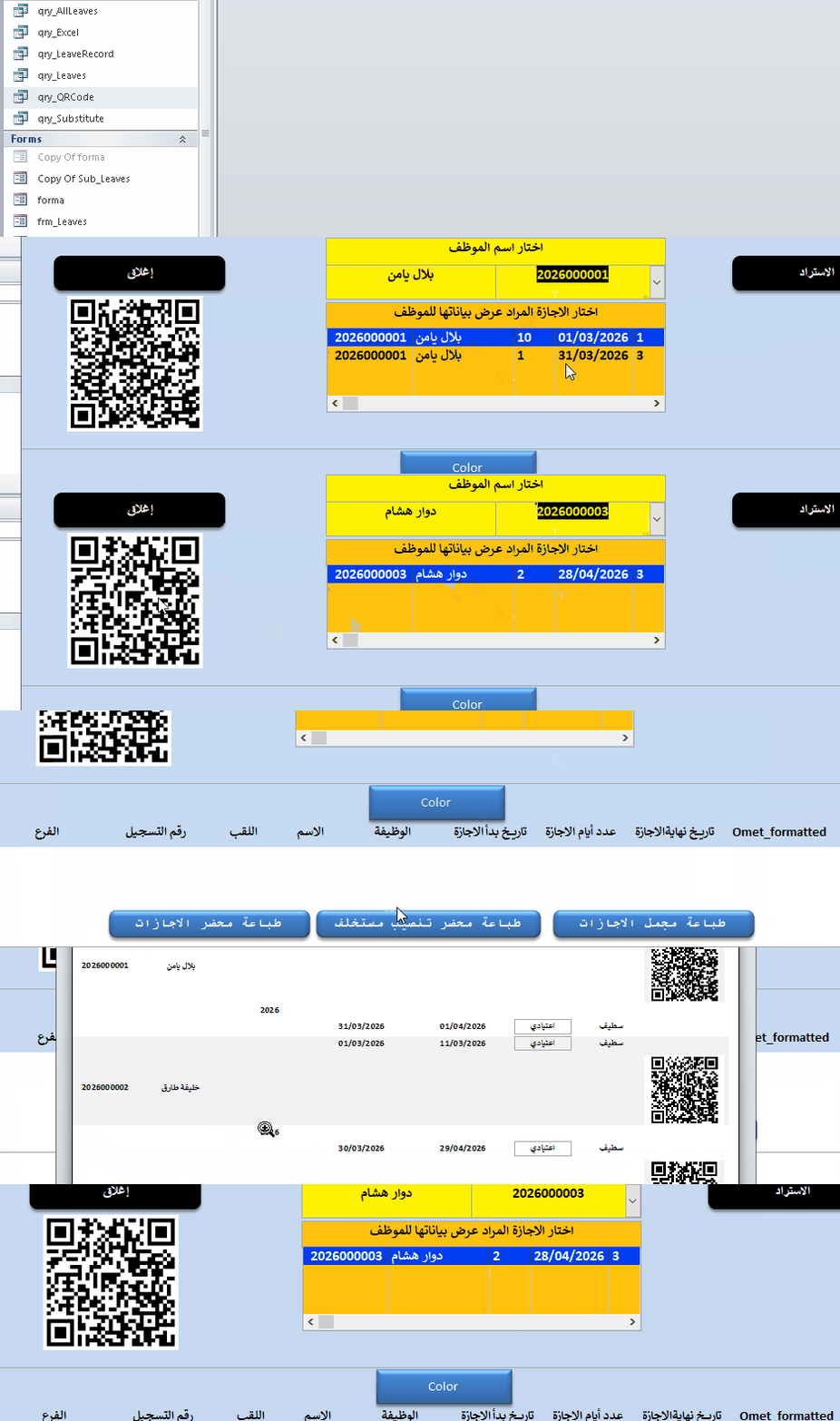
تفضل استاذ @بلال بلال طلبك مع الشرح . ووافني بالرد . Yamen-QRCode.rar
 1 point
 -
تم تنقيح الكود لتسهيل التعديل عليه Private Sub Worksheet_Change(ByVal Target As Range) Dim Row As Integer, Col As Integer Dim fRow As Integer, fCol As Integer, fdd As Integer Dim yy As Integer, mm As Integer, dd As Integer Dim cellDate As Date, DateRange As String, m m = Array("", "يناير", "فبراير", "مارس", "أبريل", "مايو", "يونيو", _ "يوليو", "أغسطس", "سبتمبر", "أكتوبر", "نوفمبر", "ديسمبر") With Target DateRange = Replace(.Address, "$", "") If DateRange <> "M1" Then 'تبديل عنوان خلية التاريخ عند الحاجة' Beep 'MsgBox Exit Sub End If If Not IsDate(Range(DateRange)) Then Beep 'MsgBox Exit Sub End If Application.EnableEvents = False Application.ScreenUpdating = False yy = Year(.Value) mm = Month(.Value) For fdd = 1 To 7 If Weekday(DateSerial(yy, mm, fdd)) = vbSunday Then Exit For Next fdd End With Cells.Find(What:="الأحد", After:=ActiveCell, LookIn:=xlFormulas, _ LookAt:=xlPart, SearchOrder:=xlByRows, SearchDirection:=xlNext, _ MatchCase:=False, SearchFormat:=False).Activate fRow = ActiveCell.Row fCol = ActiveCell.Column + 1 Cells(fRow - 2, fCol + 5) = m(mm) dd = fdd - 3 For Col = fCol To fCol + 9 Step 2 dd = dd + 2 For Row = fRow To fRow + 4 dd = dd + 1 cellDate = DateSerial(yy, mm, dd) If Month(cellDate) = mm Then Cells(Row, Col + 0) = cellDate Cells(Row, Col + 1) = 1 Else Cells(Row, Col + 0) = "" Cells(Row, Col + 1) = "" End If Next Row Next Col Application.EnableEvents = True Application.ScreenUpdating = True End Sub حساب_التاريخ_06.xlsm1 point
-
لو اجريت عملية بحث بسيطة كنت ستجد أكثر من موضوع خاص بـ QRCode وهذا أول موضوع ظهر لي1 point
-
استاذ الفاضل جازاك الله كل خير على المساعدة1 point
-
نعم الامر هكذا واضح وقمت بحذف التعليق السابق لعدم اهميته بعد ارفاق ملفك الاخير وبه التوضيح جرب الكود Sub تجميع() Dim ws As Worksheet Dim آخرصف As Long Dim c As Long, r As Long Dim صف_الاخراج As Long Set ws = ActiveSheet صف_الاخراج = 1 ws.Columns(16).ClearContents For c = 1 To 13 آخرصف = ws.Cells(ws.Rows.Count, c).End(xlUp).Row For r = 1 To آخرصف If ws.Cells(r, c).Value <> "" Then ws.Cells(صف_الاخراج, 16).Value = ws.Cells(r, c).Value صف_الاخراج = صف_الاخراج + 1 End If Next r Next c End Sub1 point
-
لامانع .. وان كنت افضل كما هي في القائمة المنسدله وشكرا لحضرتك والقائمين على المنتدى العظيم1 point
-
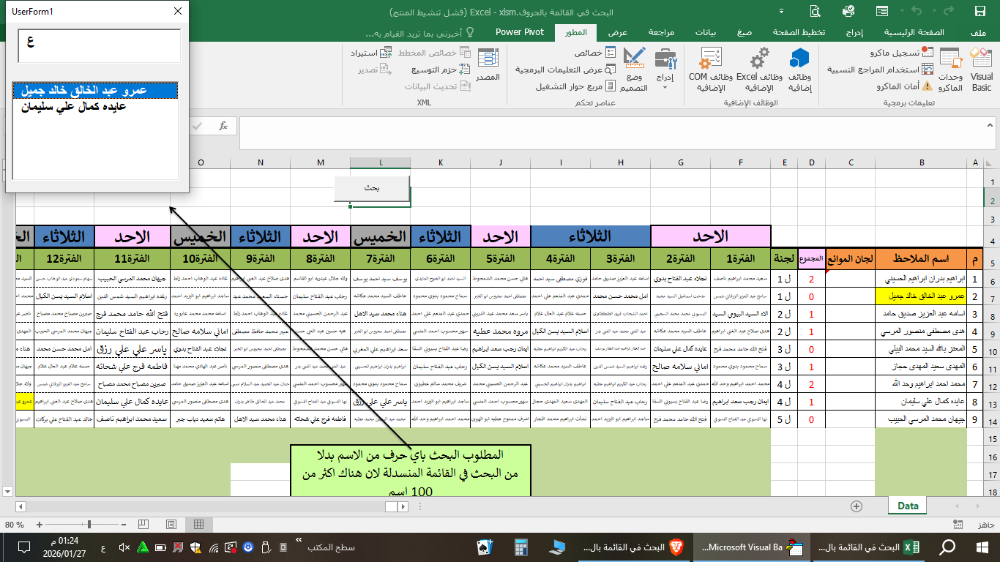
السلام عليكم تحية لك ولاستاذنا ابو عيد هناك حل عن طريق الفورم كما في الصورة لا ادرى ان كانت تناسبك او لا
 1 point
 -
وهناك طريقة أخرى أسهل نرتب الأسماء في القائمة المنسدلة أبجديا حتى يسهل عليك البحث عن أي أسم بالحرف الأول1 point
-
جرب التعديل التالي test2.xlsm1 point
-
السلام عليكم جرب التعديل التالي Sub sav_PDFall() Dim i As Integer Dim folderPath As String Dim mainSheet As Worksheet Dim tempWorkbook As Workbook Dim firstRun As Boolean Set mainSheet = ThisWorkbook.ActiveSheet folderPath = ThisWorkbook.Path & "\ملاحظةالثانوية 2026" firstRun = True If Dir(folderPath, vbDirectory) = "" Then MkDir folderPath End If Application.ScreenUpdating = False For i = 1 To mainSheet.Range("j3").Value mainSheet.Range("j2") = i If firstRun Then mainSheet.Copy Set tempWorkbook = ActiveWorkbook firstRun = False Else mainSheet.Copy After:=tempWorkbook.Sheets(tempWorkbook.Sheets.Count) End If Next i tempWorkbook.ExportAsFixedFormat Type:=xlTypePDF, _ Filename:=folderPath & "\كشف_جامع_" & mainSheet.Cells(2, 4).Text & ".pdf", _ Quality:=xlQualityStandard, _ IncludeDocProperties:=True, _ IgnorePrintAreas:=False, _ OpenAfterPublish:=True tempWorkbook.Close SaveChanges:=False Application.ScreenUpdating = True End Sub1 point
-
وعليكم السلام ورحمة الله وبركاته الى جانب الحلول التي ارفقها استاذنا الفاضل hegazee اليك حل اخر بالكود في حدث الورقة Private Sub Worksheet_Change(ByVal Target As Range) Dim rngF As Range, rngG As Range Dim rngB As Range, rngC As Range Dim pos As Variant Set rngF = Me.Range("F2") ' Set rngG = Me.Range("G2") Set rngB = Me.Range("B2:B1000") Set rngC = Me.Range("C2:C1000") If Not Intersect(Target, rngF) Is Nothing Then Application.EnableEvents = False pos = Application.Match(rngF.Value, rngB, 0) If Not IsError(pos) Then rngG.Value = Application.Index(rngC, pos) Else rngG.Value = "" End If Application.EnableEvents = True End If rngG.Select End Sub data.xlsb1 point
-
وعليكم السلام تفضل هذا الملف ربما يفيدك ويكون به المطلوب ان شاء الله وبالتوفيق المحطة.xlsm1 point
-
جرب هذا التعديل أخي الكريم :- Sub Observer222() Dim ws As Worksheet Dim lastRowObservers As Long, lastRowCommittees As Long, lastCol As Long Dim maxObserversPerCommittee As Integer, attempts As Integer Dim row As Long, col As Long, observerRow As Long Dim observerID As Variant, isValid As Boolean Dim startTime As Double, retryCount As Integer Const maxAttempts As Integer = 200 Const password As String = "0" Const sheetName As String = "Sheet1" On Error GoTo ErrorHandler If Application.InputBox("أدخل كلمة المرور", "تسجيل الدخول") <> password Then MsgBox "كلمة المرور غير صحيحة", vbExclamation, "خطأ" Exit Sub End If startTime = Timer Application.ScreenUpdating = False Application.Calculation = xlCalculationManual Application.EnableEvents = False Set ws = ThisWorkbook.Worksheets(sheetName) ws.Unprotect password lastRowObservers = ws.Cells(ws.Rows.Count, 2).End(xlUp).row lastRowCommittees = ws.Cells(ws.Rows.Count, 3).End(xlUp).row lastCol = ws.Cells(2, ws.Columns.Count).End(xlToLeft).Column If lastCol >= 4 Then ws.Range(ws.Cells(3, 4), ws.Cells(lastRowCommittees, lastCol)).ClearContents End If For retryCount = 1 To 3 Dim emptyCells As Integer emptyCells = 0 For row = 3 To lastRowCommittees For col = 4 To lastCol If ws.Cells(row, col).Value = "" Then attempts = 0 isValid = False Do While attempts < maxAttempts And Not isValid attempts = attempts + 1 observerRow = Application.RandBetween(3, lastRowObservers) observerID = ws.Cells(observerRow, 2).Value If Not IsEmpty(observerID) Then If Application.CountIf(ws.Range(ws.Cells(row, 4), ws.Cells(row, col - 1)), observerID) = 0 And _ Application.CountIf(ws.Range(ws.Cells(3, col), ws.Cells(row - 1, col)), observerID) = 0 Then isValid = True End If End If Loop If isValid Then ws.Cells(row, col).Value = observerID Else emptyCells = emptyCells + 1 End If End If Next col Next row If emptyCells = 0 Then Exit For Next retryCount For row = 3 To lastRowCommittees For col = 4 To lastCol If ws.Cells(row, col).Value = "" Then For observerRow = 3 To lastRowObservers observerID = ws.Cells(observerRow, 2).Value If Not IsEmpty(observerID) Then If Application.CountIf(ws.Range(ws.Cells(row, 4), ws.Cells(row, col - 1)), observerID) = 0 Then ws.Cells(row, col).Value = observerID Exit For End If End If Next observerRow End If Next col Next row CleanExit: Application.ScreenUpdating = True Application.Calculation = xlCalculationAutomatic Application.EnableEvents = True ws.Protect password Dim emptyCount As Integer emptyCount = Application.CountBlank(ws.Range(ws.Cells(3, 4), ws.Cells(lastRowCommittees, lastCol))) If emptyCount > 0 Then MsgBox "تم التوزيع مع وجود " & emptyCount & " قيم فارغة بسبب عدم توفر ملاحظين متاحين", vbExclamation + vbMsgBoxRight, "تنبيه" Else MsgBox "تم التوزيع بنجاح", vbInformation + vbMsgBoxRight, "تم" End If Exit Sub ErrorHandler: MsgBox " : حدث خطأ" & Err.Description, vbCritical + vbMsgBoxRight, "خطأ" Resume CleanExit End Sub1 point
-
الملف المرسل في مشاركة سابقة ممتاز و يعمل بكفاءة و يوزع عدد 2 ملاحظين في كل لجنة برجاء تجربتة و كتابة ملاحظاتك. قمت بتعديل عدد اللجان و الملاحظين ليتوافق مع اللجان عندك توزيع الملاحظين .xlsm1 point
-
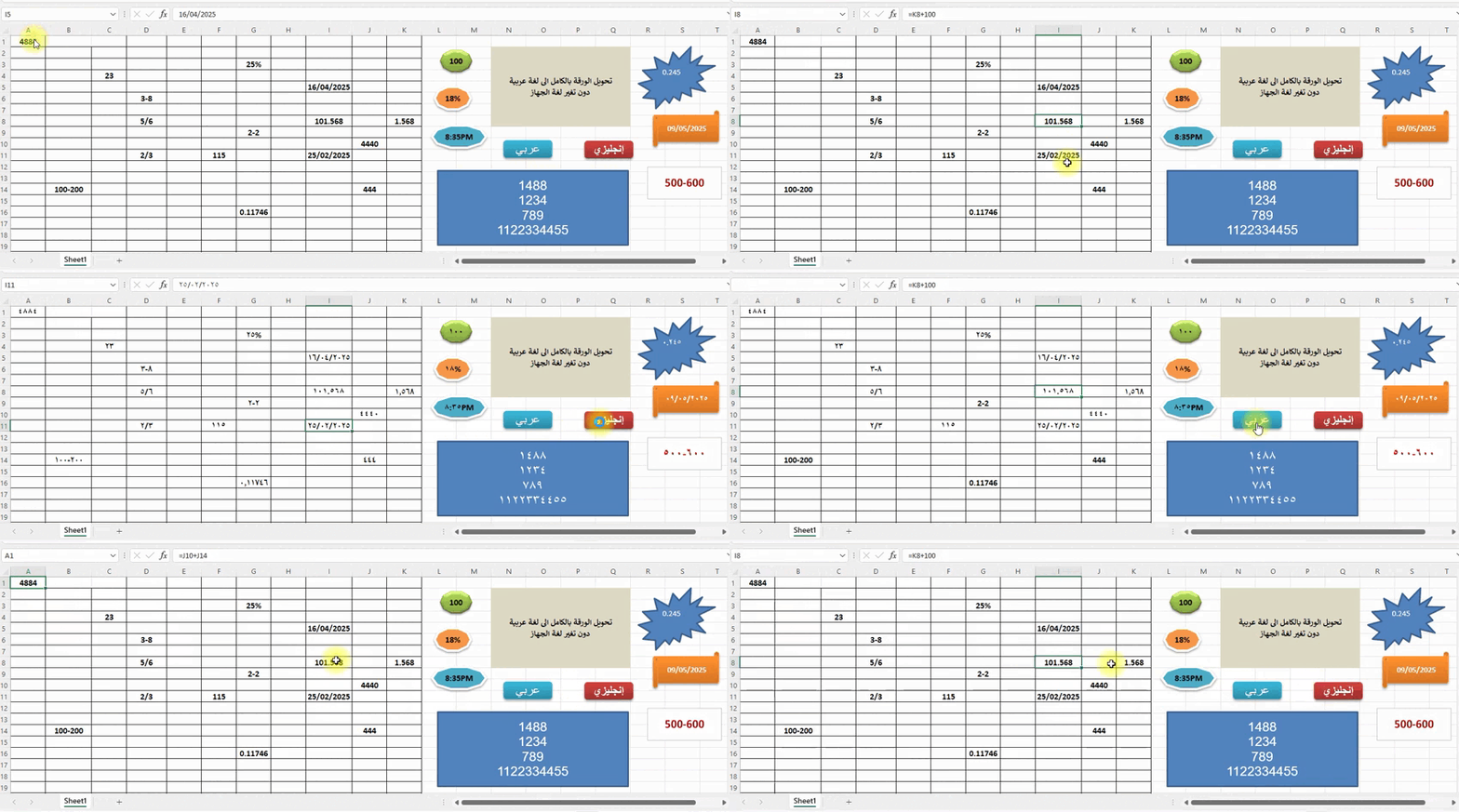
الكود الذي عملنا عليه سابقا يقوم بتحويل الأرقام إلى عربية أو إنجليزية لكن يتم ذلك عن طريق تغيير محتوى الخلية مباشرة وهذا يؤدي إلى فقدان أي صيغة كانت موجودة في الخلية للأسف الإكسيل لا يدعم تغيير عرض الأرقام من إنجليزية إلى عربية أو العكس داخل نفس الخلية بدون التأثير على محتواها بمعنى: لا يمكنك تحويل الأرقام داخل الخلية إلى العربية دون تعديل المحتوى نفسه مجرد اقتراح قد يكون مناسبا لتنفيذ طلبك مع الحفاظ على الصيغ: يمكن إظهار الأرقام العربية بصريا فقط وذلك عبر إضافة شكل شفاف (Textbox) فوق الخلية بهذا الأسلوب تبقى الصيغ تعمل كما هي والخلية الأصلية لا تتغير لاكن يمكنك محاكاة المظهر العربي للأرقام بصريا فقط دون التأثير على الصيغ أو البيانات كما في المثال التالي تحويل الورقة بالكامل الى لغة عربية دون تغير لغة الجهاز -v4.xlsb
 1 point
 -
السلام عليكم جرب الملف تعديل كود.xlsm1 point
-
اتفضل اخى الكريم ضع هذه المعادلة فى التحقق من الصحة =OFFSET($B$1:$B$17;MATCH($E$2;$A$1:$A$17;0)-1;;COUNTIF($A$1:$A$17;$E$2)) حمل الملف المرفق New Microsoft Excel Worksheet (2).rar1 point
(1).thumb.gif.3369bc21e7688379f05218e4ca64e807.gif)