نجوم المشاركات


(1).thumb.gif.3369bc21e7688379f05218e4ca64e807.gif)

Popular Content
Showing content with the highest reputation on 04/29/26 in all areas
-
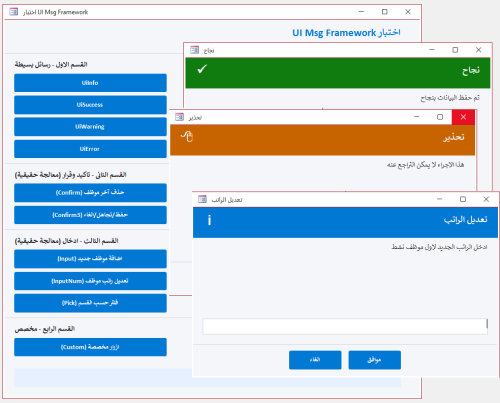
اعرض الملف UiMsg Framework - نظام رسائل احترافي استبدال صندوق الرسائل فى الاكسس بنموذج رسائل احترافى بسطر واحد بس كل حاجة جاهزة مش محتاج تفكر في تصميم نموذج مش محتاج نموذج الرسائل يكون موجود اساسا مش محتاج تكتب كود كبير بعد كده لصندوق الرسائل استدعي الدالة وخلاص والنظام يعمل كل شئ النظام يقدم 4 أنواع رسائل جاهزة : { معلومة - نجاح - تحذير - خطأ } كل نوع بتصميمه ولونه وأيقونته معلومة : من خلال : UiInfo اللون : أزرق نجاح : من خلال : UiSuccess اللون : أخضر تحذير : من خلال : UiWarning اللون : برتقالي خطأ : من خلال : UiError اللون : أحمر 3 أنواع إدخال : { نص حر - رقم مع تحقق تلقائي - اختيار من قائمة } نص حر : من خلال : UiInput رقم مع تحقق تلقائي: من خلال : UiInputNum يرفض الحروف بدون ما تكتب سطر واحد اختيار من قائمة : من خلال : UiPick قرارات متعددة : { تأكيد نعم/لا - ثلاثة خيارات أزرار مخصصة بأسماء ترجعها النتيجة مباشرة } نعم / لا : من خلال : BlnUiConfirm يرجع True أو False مباشرة ثلاثة خيارات : من خلال :IntUiConfirm3 يرجع 1 أو 2 أو 0 أزرار مخصصة : من خلال :UiCustom يرجع اسم الزر اللي اتضغط مش رقمه دعم كامل للعربية والإنجليزية : { اتجاه النص RTL/LTR تلقائي - الأزرار والعناوين بالغتين من خلال معامل UiLangEn يكفي لتبديل كل شيء } أضف UiLangEn كآخر parameter وكل شيء يتبدل : اتجاه النص - الأزرار - العناوين الافتراضية ثيم موحد قابل للتخصيص : { ألوان الهيدر والأيقونات والأزرار كلها من UiTheme غير لون الـ Accent في مكان واحد وكل الرسائل تتغير } كل ألوان النظام مجمعة في UiTheme مناسب لأي مشروع قاعدة بيانات صغير أو كبير - عربي أو إنجليزي - مبتدئ أو محترف يبني نفسه : لا تثبيت ولا إعداد كل إجراء أو وظيفة واضحة الاسم - واضحة الـ return - واضحة الاستخدام اسم الوحدة النمطية : modUIMsgFramework كود الوحدة النمطية.. Option Explicit Option Compare Database Public Enum UiIcon UiIconInfo = 0 UiIconSuccess = 1 UiIconWarning = 2 UiIconError = 3 UiIconQuestion = 4 End Enum Public Enum UiMode UiModeAlert = 0 UiModeInput = 1 UiModeNumber = 2 UiModeList = 3 End Enum Public Enum UiLang UiLangAr = 0 UiLangEn = 1 End Enum Public Type UiParams strMessage As String strTitle As String strButtons As String strDefault As String strList As String strDetails As String strResult As String enuIcon As UiIcon enuMode As UiMode enuLang As UiLang End Type Public Type UiTheme lngAccent As Long lngHeader As Long lngBg As Long lngText As Long lngMuted As Long lngBorder As Long lngSuccess As Long lngWarning As Long lngError As Long lngInfo As Long lngQuestion As Long End Type Private Const STRFORMNAME As String = "frmUiMsg" Private Const STRMODNAME As String = "modUICore" Private Const MAX_BUTTONS As Integer = 5 Private Const FRM_W As Long = 9000 Private m_typParams As UiParams Public Function TypDefaultTheme() As UiTheme Dim typT As UiTheme typT.lngAccent = RGB(0, 120, 212) typT.lngHeader = RGB(32, 32, 38) typT.lngBg = RGB(245, 246, 250) typT.lngText = RGB(30, 30, 35) typT.lngMuted = RGB(120, 120, 130) typT.lngBorder = RGB(210, 212, 220) typT.lngSuccess = RGB(16, 124, 16) typT.lngWarning = RGB(200, 100, 0) typT.lngError = RGB(196, 43, 28) typT.lngInfo = RGB(0, 120, 212) typT.lngQuestion = RGB(104, 33, 122) TypDefaultTheme = typT End Function Private Function BlnFormExists(ByVal strName As String) As Boolean On Error Resume Next Dim objFrm As Object Set objFrm = CurrentProject.AllForms(strName) BlnFormExists = Not (objFrm Is Nothing) Set objFrm = Nothing On Error GoTo 0 End Function Private Sub LogError(ByVal strProc As String, _ ByVal lngNum As Long, _ ByVal strDesc As String) Debug.Print "[" & STRMODNAME & "." & strProc & "] " & _ "Err " & lngNum & ": " & strDesc & _ " @ " & Now() End Sub Public Function TypGetParams() As UiParams TypGetParams = m_typParams End Function Public Sub SetResult(ByVal strResult As String) m_typParams.strResult = strResult End Sub Private Sub ResetParams() Dim typEmpty As UiParams m_typParams = typEmpty End Sub Private Function StrDefaultTitle(ByVal enuIcon As UiIcon, _ ByVal enuLang As UiLang) As String If enuLang = UiLangAr Then Select Case enuIcon Case UiIconSuccess: StrDefaultTitle = "تم بنجاح" Case UiIconWarning: StrDefaultTitle = "تحذير" Case UiIconError: StrDefaultTitle = "خطأ" Case UiIconQuestion: StrDefaultTitle = "تأكيد" Case Else: StrDefaultTitle = "معلومة" End Select Else Select Case enuIcon Case UiIconSuccess: StrDefaultTitle = "Success" Case UiIconWarning: StrDefaultTitle = "Warning" Case UiIconError: StrDefaultTitle = "Error" Case UiIconQuestion: StrDefaultTitle = "Confirm" Case Else: StrDefaultTitle = "Information" End Select End If End Function Private Function StrValidateButtons(ByVal strBtns As String) As String Dim arrB() As String Dim intCnt As Integer Dim intI As Integer Dim strOut As String arrB = Split(strBtns, ",") intCnt = UBound(arrB) + 1 If intCnt > MAX_BUTTONS Then LogError "StrValidateButtons", 0, _ "تجاوز الحد الأقصى للأزرار (" & intCnt & "). سيتم اقتصارها على " & MAX_BUTTONS intCnt = MAX_BUTTONS End If For intI = 0 To intCnt - 1 If Len(strOut) > 0 Then strOut = strOut & "," strOut = strOut & Trim(arrB(intI)) Next intI StrValidateButtons = strOut End Function Private Function BlnBuildMsgForm() As Boolean On Error GoTo ErrHandler Dim typT As UiTheme Dim objFrm As Object Dim objCtl As Object Dim strTemp As String Dim intI As Integer Dim lngLeft As Long typT = TypDefaultTheme() Const HDR_H As Long = 900 Const ICON_L As Long = 200 Const ICON_T As Long = 150 Const ICON_W As Long = 600 Const ICON_H As Long = 600 Const TITLE_L As Long = 900 Const TITLE_T As Long = 200 Const TITLE_W As Long = 7800 Const TITLE_H As Long = 500 Const MSG_L As Long = 300 Const MSG_T As Long = 1050 Const MSG_W As Long = 8400 Const MSG_H As Long = 1400 Const DET_L As Long = 300 Const DET_T As Long = 2500 Const DET_W As Long = 8400 Const DET_H As Long = 700 Const INP_L As Long = 300 Const INP_T As Long = 3300 Const INP_W As Long = 8400 Const INP_H As Long = 450 Const DIV_T As Long = 4050 Const BTN_T As Long = 4250 Const BTN_W As Long = 1550 Const BTN_H As Long = 550 Const FRM_H As Long = 5000 Set objFrm = CreateForm strTemp = objFrm.Name With objFrm .Caption = "" .ScrollBars = 0 .RecordSelectors = False .NavigationButtons = False .DividingLines = False .BorderStyle = 1 .AutoCenter = True .PopUp = True .Modal = True .Width = FRM_W .Section(0).Height = FRM_H .Section(0).BackColor = typT.lngBg End With Set objCtl = CreateControl(strTemp, acRectangle, acDetail) With objCtl .Name = "recHeader": .Left = 0: .Top = 0 .Width = FRM_W: .Height = HDR_H .BackColor = typT.lngHeader: .BackStyle = 1 .BorderStyle = 0: .SpecialEffect = 0 End With Set objCtl = CreateControl(strTemp, acRectangle, acDetail) With objCtl .Name = "recIcon": .Left = ICON_L: .Top = ICON_T .Width = ICON_W: .Height = ICON_H .BackColor = typT.lngInfo: .BackStyle = 1 .BorderStyle = 0: .SpecialEffect = 0 End With Set objCtl = CreateControl(strTemp, acLabel, acDetail) With objCtl .Name = "lblIcon": .Caption = "i" .Left = ICON_L: .Top = ICON_T .Width = ICON_W: .Height = ICON_H .FontSize = 20: .FontBold = True .ForeColor = vbWhite: .BackStyle = 0: .TextAlign = 2 End With Set objCtl = CreateControl(strTemp, acLabel, acDetail) With objCtl .Name = "lblTitle": .Caption = "" .Left = TITLE_L: .Top = TITLE_T .Width = TITLE_W: .Height = TITLE_H .FontSize = 14: .FontBold = True .ForeColor = vbWhite: .BackStyle = 0: .TextAlign = 1 End With Set objCtl = CreateControl(strTemp, acLabel, acDetail) With objCtl .Name = "lblMessage": .Caption = "" .Left = MSG_L: .Top = MSG_T .Width = MSG_W: .Height = MSG_H .FontSize = 11: .ForeColor = typT.lngText .BackStyle = 0: .TextAlign = 1 End With Set objCtl = CreateControl(strTemp, acLabel, acDetail) With objCtl .Name = "lblDetails": .Caption = "" .Left = DET_L: .Top = DET_T .Width = DET_W: .Height = DET_H .FontSize = 9: .ForeColor = typT.lngMuted .BackStyle = 0: .Visible = False End With Set objCtl = CreateControl(strTemp, acTextBox, acDetail) With objCtl .Name = "txtInput" .Left = INP_L: .Top = INP_T .Width = INP_W: .Height = INP_H .FontSize = 11 .BorderColor = typT.lngBorder: .BackColor = vbWhite .Visible = False End With Set objCtl = CreateControl(strTemp, acComboBox, acDetail) With objCtl .Name = "cboList" .Left = INP_L: .Top = INP_T .Width = INP_W: .Height = INP_H .FontSize = 11 .BorderColor = typT.lngBorder: .BackColor = vbWhite .RowSourceType = "Value List" .LimitToList = True: .AllowValueListEdits = False .Visible = False End With Set objCtl = CreateControl(strTemp, acLine, acDetail) With objCtl .Name = "linDivider": .Left = 0: .Top = DIV_T .Width = FRM_W: .Height = 0 .BorderColor = typT.lngBorder: .BorderWidth = 1 End With For intI = 1 To MAX_BUTTONS lngLeft = 200 + ((intI - 1) * 1760) Set objCtl = CreateControl(strTemp, acCommandButton, acDetail) With objCtl .Name = "btn" & intI: .Caption = "btn" & intI .Left = lngLeft: .Top = BTN_T .Width = BTN_W: .Height = BTN_H .FontSize = 10: .FontBold = True .BackColor = typT.lngAccent: .ForeColor = vbWhite .BorderStyle = 0: .Visible = False .OnClick = "=ProcBtnClick(" & intI & ")" End With Next intI DoCmd.Save acForm, strTemp DoCmd.Close acForm, strTemp, acSaveYes DoCmd.Rename STRFORMNAME, acForm, strTemp BlnBuildMsgForm = True Set objCtl = Nothing: Set objFrm = Nothing Exit Function ErrHandler: LogError "BlnBuildMsgForm", Err.Number, Err.Description BlnBuildMsgForm = False Set objCtl = Nothing: Set objFrm = Nothing End Function Private Function BlnInjectMsgCode() As Boolean On Error GoTo ErrHandler Dim objMdl As Object Dim strCode As String Dim strOldCode As String DoCmd.OpenForm STRFORMNAME, acDesign, , , , acHidden Set objMdl = Forms(STRFORMNAME).Module If objMdl.CountOfLines > 0 Then strOldCode = objMdl.Lines(1, objMdl.CountOfLines) objMdl.DeleteLines 1, objMdl.CountOfLines End If strCode = StrFormCodeHeader() & _ StrFormCodeApplyIcon() & _ StrFormCodeApplyLang() & _ StrFormCodeSetupBtns() & _ StrFormCodeFillList() & _ StrFormCodeOpen() & _ StrFormCodeBtn() & _ StrFormCodeUnload() objMdl.AddFromString strCode If objMdl.CountOfLines < 10 Then If Len(strOldCode) > 0 Then objMdl.DeleteLines 1, objMdl.CountOfLines objMdl.AddFromString strOldCode End If LogError "BlnInjectMsgCode", 0, "AddFromString أنتج كوداً فارغاً، تم استعادة الكود القديم" BlnInjectMsgCode = False GoTo Cleanup End If DoCmd.Save acForm, STRFORMNAME DoCmd.Close acForm, STRFORMNAME, acSaveYes BlnInjectMsgCode = True Cleanup: Set objMdl = Nothing Exit Function ErrHandler: LogError "BlnInjectMsgCode", Err.Number, Err.Description BlnInjectMsgCode = False Set objMdl = Nothing End Function Private Function StrFormCodeHeader() As String Dim s As String s = "Option Explicit" & vbCrLf s = s & "Option Compare Database" & vbCrLf & vbCrLf s = s & "Private mintMode As Integer" & vbCrLf s = s & "Private mintLang As Integer" & vbCrLf & vbCrLf StrFormCodeHeader = s End Function Private Function StrFormCodeApplyIcon() As String Dim s As String s = "Private Sub ProcApplyIcon(ByVal intIcon As Integer)" & vbCrLf s = s & " Select Case intIcon" & vbCrLf s = s & " Case 1" & vbCrLf s = s & " Me.recHeader.BackColor = RGB(16,124,16)" & vbCrLf s = s & " Me.recIcon.BackColor = RGB(16,124,16)" & vbCrLf s = s & " Me.lblIcon.Caption = Chr(252)" & vbCrLf s = s & " Me.lblIcon.FontName = ""Wingdings""" & vbCrLf s = s & " Case 2" & vbCrLf s = s & " Me.recHeader.BackColor = RGB(200,100,0)" & vbCrLf s = s & " Me.recIcon.BackColor = RGB(200,100,0)" & vbCrLf s = s & " Me.lblIcon.Caption = Chr(56)" & vbCrLf s = s & " Me.lblIcon.FontName = ""Wingdings""" & vbCrLf s = s & " Case 3" & vbCrLf s = s & " Me.recHeader.BackColor = RGB(196,43,28)" & vbCrLf s = s & " Me.recIcon.BackColor = RGB(196,43,28)" & vbCrLf s = s & " Me.lblIcon.Caption = Chr(251)" & vbCrLf s = s & " Me.lblIcon.FontName = ""Wingdings""" & vbCrLf s = s & " Case 4" & vbCrLf s = s & " Me.recHeader.BackColor = RGB(104,33,122)" & vbCrLf s = s & " Me.recIcon.BackColor = RGB(104,33,122)" & vbCrLf s = s & " Me.lblIcon.Caption = Chr(63)" & vbCrLf s = s & " Me.lblIcon.FontName = ""Wingdings""" & vbCrLf s = s & " Case Else" & vbCrLf s = s & " Me.recHeader.BackColor = RGB(0,120,212)" & vbCrLf s = s & " Me.recIcon.BackColor = RGB(0,120,212)" & vbCrLf s = s & " Me.lblIcon.Caption = Chr(105)" & vbCrLf s = s & " Me.lblIcon.FontName = ""Arial""" & vbCrLf s = s & " End Select" & vbCrLf s = s & "End Sub" & vbCrLf & vbCrLf StrFormCodeApplyIcon = s End Function Private Function StrFormCodeApplyLang() As String Dim s As String s = "Private Sub ProcApplyLang(ByVal intLang As Integer)" & vbCrLf s = s & " Dim intAlign As Integer" & vbCrLf s = s & " intAlign = IIf(intLang = 0, 3, 1)" & vbCrLf s = s & " Me.lblTitle.TextAlign = intAlign" & vbCrLf s = s & " Me.lblMessage.TextAlign = intAlign" & vbCrLf s = s & " Me.lblDetails.TextAlign = intAlign" & vbCrLf s = s & " Me.txtInput.TextAlign = intAlign" & vbCrLf s = s & " Me.cboList.TextAlign = intAlign" & vbCrLf s = s & "End Sub" & vbCrLf & vbCrLf StrFormCodeApplyLang = s End Function Private Function StrFormCodeSetupBtns() As String Dim s As String s = "Private Sub ProcSetupBtns(ByVal strBtns As String, ByVal intLang As Integer)" & vbCrLf s = s & " Dim arrBtns() As String" & vbCrLf s = s & " Dim intTotal As Integer" & vbCrLf s = s & " Dim intI As Integer" & vbCrLf s = s & " Dim lngBtnW As Long" & vbCrLf s = s & " Dim lngBtnH As Long" & vbCrLf s = s & " Dim lngGap As Long" & vbCrLf s = s & " Dim lngTotalW As Long" & vbCrLf s = s & " Dim lngStartX As Long" & vbCrLf s = s & " Dim blnIsRtl As Boolean" & vbCrLf s = s & " arrBtns = Split(strBtns, "","")" & vbCrLf s = s & " intTotal = UBound(arrBtns) + 1" & vbCrLf s = s & " If intTotal > 5 Then intTotal = 5" & vbCrLf s = s & " blnIsRtl = (intLang = 0)" & vbCrLf s = s & " lngBtnW = 1550" & vbCrLf s = s & " lngBtnH = 550" & vbCrLf s = s & " lngGap = 200" & vbCrLf s = s & " lngTotalW = (intTotal * lngBtnW) + ((intTotal - 1) * lngGap)" & vbCrLf s = s & " lngStartX = (Me.Width - lngTotalW) \ 2" & vbCrLf s = s & " For intI = 1 To 5" & vbCrLf s = s & " Me(""btn"" & intI).Visible = False" & vbCrLf s = s & " Next intI" & vbCrLf s = s & " For intI = 1 To intTotal" & vbCrLf s = s & " With Me(""btn"" & intI)" & vbCrLf s = s & " .Caption = Trim(arrBtns(intI - 1))" & vbCrLf s = s & " If blnIsRtl Then" & vbCrLf s = s & " .Left = lngStartX + ((intTotal - intI) * (lngBtnW + lngGap))" & vbCrLf s = s & " Else" & vbCrLf s = s & " .Left = lngStartX + ((intI - 1) * (lngBtnW + lngGap))" & vbCrLf s = s & " End If" & vbCrLf s = s & " .Top = 4250: .Width = lngBtnW: .Height = lngBtnH" & vbCrLf s = s & " .Visible = True" & vbCrLf s = s & " End With" & vbCrLf s = s & " Next intI" & vbCrLf s = s & "End Sub" & vbCrLf & vbCrLf StrFormCodeSetupBtns = s End Function Private Function StrFormCodeFillList() As String Dim s As String s = "Private Sub ProcFillList(ByVal strItems As String, ByVal strDefault As String)" & vbCrLf s = s & " Dim arrItems() As String" & vbCrLf s = s & " Dim strSource As String" & vbCrLf s = s & " Dim intI As Integer" & vbCrLf s = s & " arrItems = Split(strItems, "","")" & vbCrLf s = s & " For intI = 0 To UBound(arrItems)" & vbCrLf s = s & " strSource = strSource & Trim(arrItems(intI)) & "";""" & vbCrLf s = s & " Next intI" & vbCrLf s = s & " Me.cboList.RowSource = strSource" & vbCrLf s = s & " If Len(Trim(strDefault)) > 0 Then" & vbCrLf s = s & " Me.cboList.Value = strDefault" & vbCrLf s = s & " ElseIf UBound(arrItems) >= 0 Then" & vbCrLf s = s & " Me.cboList.Value = Trim(arrItems(0))" & vbCrLf s = s & " End If" & vbCrLf s = s & "End Sub" & vbCrLf & vbCrLf StrFormCodeFillList = s End Function Private Function StrFormCodeOpen() As String Dim s As String s = "Private Sub Form_Open(Cancel As Integer)" & vbCrLf s = s & " On Error GoTo ErrHandler" & vbCrLf s = s & " Dim typP As UiParams" & vbCrLf s = s & " typP = TypGetParams()" & vbCrLf s = s & " mintMode = CInt(typP.enuMode)" & vbCrLf s = s & " mintLang = CInt(typP.enuLang)" & vbCrLf s = s & " Me.Caption = typP.strTitle" & vbCrLf s = s & " Me.lblTitle.Caption = typP.strTitle" & vbCrLf s = s & " Me.lblMessage.Caption = typP.strMessage" & vbCrLf s = s & " Me.lblDetails.Visible = (Len(Trim(typP.strDetails)) > 0)" & vbCrLf s = s & " If Me.lblDetails.Visible Then Me.lblDetails.Caption = typP.strDetails" & vbCrLf s = s & " ProcApplyIcon CInt(typP.enuIcon)" & vbCrLf s = s & " ProcApplyLang mintLang" & vbCrLf s = s & " ProcSetupBtns typP.strButtons, mintLang" & vbCrLf s = s & " Me.txtInput.Visible = (mintMode = 1 Or mintMode = 2)" & vbCrLf s = s & " Me.cboList.Visible = (mintMode = 3)" & vbCrLf s = s & " If mintMode = 1 Or mintMode = 2 Then" & vbCrLf s = s & " Me.txtInput.Value = typP.strDefault" & vbCrLf s = s & " Me.txtInput.SetFocus" & vbCrLf s = s & " End If" & vbCrLf s = s & " If mintMode = 3 Then" & vbCrLf s = s & " ProcFillList typP.strList, typP.strDefault" & vbCrLf s = s & " Me.cboList.SetFocus" & vbCrLf s = s & " End If" & vbCrLf s = s & " Exit Sub" & vbCrLf s = s & "ErrHandler:" & vbCrLf s = s & " Debug.Print ""Form_Open Err: "" & Err.Number & "" - "" & Err.Description" & vbCrLf s = s & " DoCmd.Close acForm, Me.Name" & vbCrLf s = s & "End Sub" & vbCrLf & vbCrLf StrFormCodeOpen = s End Function Private Function StrFormCodeBtn() As String Dim s As String s = "Public Function ProcBtnClick(ByVal intNum As Integer)" & vbCrLf s = s & " On Error GoTo ErrHandler" & vbCrLf s = s & " Dim strResult As String" & vbCrLf s = s & " Dim strWarn As String" & vbCrLf s = s & " Select Case mintMode" & vbCrLf s = s & " Case 1" & vbCrLf s = s & " If intNum = 1 Then" & vbCrLf s = s & " strResult = Nz(Me.txtInput.Value, """")" & vbCrLf s = s & " Else" & vbCrLf s = s & " strResult = ""__CANCEL__""" & vbCrLf s = s & " End If" & vbCrLf s = s & " Case 2" & vbCrLf s = s & " If intNum = 1 Then" & vbCrLf s = s & " If Len(Nz(Me.txtInput.Value, """")) > 0 Then" & vbCrLf s = s & " If Not IsNumeric(Me.txtInput.Value) Then" & vbCrLf s = s & " strWarn = IIf(mintLang = 0, ""أدخل رقماً صحيحاً"", ""Enter a valid number"")" & vbCrLf s = s & " MsgBox strWarn, vbExclamation" & vbCrLf s = s & " Me.txtInput.SetFocus" & vbCrLf s = s & " Exit Function" & vbCrLf s = s & " End If" & vbCrLf s = s & " End If" & vbCrLf s = s & " strResult = Nz(Me.txtInput.Value, """")" & vbCrLf s = s & " Else" & vbCrLf s = s & " strResult = ""__CANCEL__""" & vbCrLf s = s & " End If" & vbCrLf s = s & " Case 3" & vbCrLf s = s & " If intNum = 1 Then" & vbCrLf s = s & " strResult = Nz(Me.cboList.Value, """")" & vbCrLf s = s & " Else" & vbCrLf s = s & " strResult = ""__CANCEL__""" & vbCrLf s = s & " End If" & vbCrLf s = s & " Case Else" & vbCrLf s = s & " strResult = Me(""btn"" & intNum).Caption" & vbCrLf s = s & " End Select" & vbCrLf s = s & " SetResult strResult" & vbCrLf s = s & " DoCmd.Close acForm, Me.Name" & vbCrLf s = s & " Exit Function" & vbCrLf s = s & "ErrHandler:" & vbCrLf s = s & " Debug.Print ""ProcBtnClick Err: "" & Err.Number & "" - "" & Err.Description" & vbCrLf s = s & "End Function" & vbCrLf & vbCrLf StrFormCodeBtn = s End Function Private Function StrFormCodeUnload() As String Dim s As String s = "Private Sub Form_Unload(Cancel As Integer)" & vbCrLf s = s & " Dim typP As UiParams" & vbCrLf s = s & " typP = TypGetParams()" & vbCrLf s = s & " If Len(Nz(typP.strResult, """")) = 0 Then" & vbCrLf s = s & " SetResult ""__CANCEL__""" & vbCrLf s = s & " End If" & vbCrLf s = s & "End Sub" & vbCrLf StrFormCodeUnload = s End Function Private Function BlnEnsureForm() As Boolean On Error GoTo ErrHandler If BlnFormExists(STRFORMNAME) Then BlnEnsureForm = True Exit Function End If If Not BlnBuildMsgForm() Then LogError "BlnEnsureForm", 0, "BlnBuildMsgForm failed" Exit Function End If If Not BlnInjectMsgCode() Then LogError "BlnEnsureForm", 0, "BlnInjectMsgCode failed" Exit Function End If BlnEnsureForm = True Exit Function ErrHandler: LogError "BlnEnsureForm", Err.Number, Err.Description BlnEnsureForm = False End Function Private Function StrShowMsg(ByVal strMsg As String, _ ByVal enuIcon As UiIcon, _ ByVal strBtns As String, _ ByVal strTitle As String, _ ByVal enuMode As UiMode, _ ByVal strDef As String, _ ByVal strList As String, _ ByVal strDet As String, _ ByVal enuLang As UiLang) As String On Error GoTo ErrHandler If Not BlnEnsureForm() Then LogError "StrShowMsg", 0, "EnsureForm failed" StrShowMsg = "__CANCEL__" Exit Function End If If Len(Trim(strTitle)) = 0 Then strTitle = StrDefaultTitle(enuIcon, enuLang) End If ResetParams With m_typParams .strMessage = strMsg .strTitle = strTitle .strButtons = StrValidateButtons(strBtns) .enuIcon = enuIcon .enuMode = enuMode .strDefault = strDef .strList = strList .strDetails = strDet .enuLang = enuLang .strResult = "" End With DoCmd.OpenForm STRFORMNAME, acNormal, , , , acDialog StrShowMsg = m_typParams.strResult If Len(StrShowMsg) = 0 Then StrShowMsg = "__CANCEL__" ResetParams Exit Function ErrHandler: LogError "StrShowMsg", Err.Number, Err.Description ResetParams StrShowMsg = "__CANCEL__" End Function Public Sub UiInfo(ByVal strMsg As String, _ Optional ByVal strTitle As String = "", _ Optional ByVal enuLang As UiLang = UiLangAr) Dim strBtns As String strBtns = IIf(enuLang = UiLangAr, "موافق", "OK") StrShowMsg strMsg, UiIconInfo, strBtns, strTitle, UiModeAlert, "", "", "", enuLang End Sub Public Sub UiSuccess(ByVal strMsg As String, _ Optional ByVal strTitle As String = "", _ Optional ByVal enuLang As UiLang = UiLangAr) Dim strBtns As String strBtns = IIf(enuLang = UiLangAr, "موافق", "OK") StrShowMsg strMsg, UiIconSuccess, strBtns, strTitle, UiModeAlert, "", "", "", enuLang End Sub Public Sub UiWarning(ByVal strMsg As String, _ Optional ByVal strTitle As String = "", _ Optional ByVal enuLang As UiLang = UiLangAr) Dim strBtns As String strBtns = IIf(enuLang = UiLangAr, "موافق", "OK") StrShowMsg strMsg, UiIconWarning, strBtns, strTitle, UiModeAlert, "", "", "", enuLang End Sub Public Sub UiError(ByVal strMsg As String, _ Optional ByVal strTitle As String = "", _ Optional ByVal strDetails As String = "", _ Optional ByVal enuLang As UiLang = UiLangAr) Dim strBtns As String strBtns = IIf(enuLang = UiLangAr, "موافق", "OK") StrShowMsg strMsg, UiIconError, strBtns, strTitle, UiModeAlert, "", "", strDetails, enuLang End Sub Public Function BlnUiConfirm(ByVal strMsg As String, _ Optional ByVal strTitle As String = "", _ Optional ByVal enuLang As UiLang = UiLangAr) As Boolean Dim strBtns As String Dim strYes As String Dim strResult As String strBtns = IIf(enuLang = UiLangAr, "نعم,لا", "Yes,No") strYes = IIf(enuLang = UiLangAr, "نعم", "Yes") strResult = StrShowMsg(strMsg, UiIconQuestion, strBtns, strTitle, UiModeAlert, "", "", "", enuLang) BlnUiConfirm = (strResult = strYes) End Function Public Function IntUiConfirm3(ByVal strMsg As String, _ Optional ByVal strTitle As String = "", _ Optional ByVal enuLang As UiLang = UiLangAr) As Integer Dim strBtns As String Dim strYes As String Dim strNo As String Dim strResult As String strBtns = IIf(enuLang = UiLangAr, "نعم,لا,إلغاء", "Yes,No,Cancel") strYes = IIf(enuLang = UiLangAr, "نعم", "Yes") strNo = IIf(enuLang = UiLangAr, "لا", "No") strResult = StrShowMsg(strMsg, UiIconQuestion, strBtns, strTitle, UiModeAlert, "", "", "", enuLang) Select Case strResult Case strYes: IntUiConfirm3 = 1 Case strNo: IntUiConfirm3 = 2 Case Else: IntUiConfirm3 = 0 End Select End Function Public Function UiInput(ByVal strMsg As String, _ Optional ByVal strTitle As String = "", _ Optional ByVal strDefault As String = "", _ Optional ByVal enuLang As UiLang = UiLangAr) As String Dim strBtns As String Dim strResult As String strBtns = IIf(enuLang = UiLangAr, "موافق,إلغاء", "OK,Cancel") strResult = StrShowMsg(strMsg, UiIconInfo, strBtns, strTitle, UiModeInput, strDefault, "", "", enuLang) UiInput = IIf(strResult = "__CANCEL__", "", strResult) End Function Public Function UiInputNum(ByVal strMsg As String, _ Optional ByVal strTitle As String = "", _ Optional ByVal strDefault As String = "", _ Optional ByVal enuLang As UiLang = UiLangAr) As String Dim strBtns As String Dim strResult As String strBtns = IIf(enuLang = UiLangAr, "موافق,إلغاء", "OK,Cancel") strResult = StrShowMsg(strMsg, UiIconInfo, strBtns, strTitle, UiModeNumber, strDefault, "", "", enuLang) Select Case strResult Case "__CANCEL__", "": UiInputNum = "" Case Else UiInputNum = IIf(IsNumeric(strResult), strResult, "") End Select End Function Public Function UiPick(ByVal strMsg As String, _ ByVal strItems As String, _ Optional ByVal strTitle As String = "", _ Optional ByVal strDefault As String = "", _ Optional ByVal enuLang As UiLang = UiLangAr) As String Dim strBtns As String Dim strResult As String strBtns = IIf(enuLang = UiLangAr, "موافق,إلغاء", "OK,Cancel") strResult = StrShowMsg(strMsg, UiIconQuestion, strBtns, strTitle, UiModeList, strDefault, strItems, "", enuLang) UiPick = IIf(strResult = "__CANCEL__", "", strResult) End Function Public Function UiCustom(ByVal strMsg As String, _ ByVal strBtns As String, _ Optional ByVal enuIcon As UiIcon = UiIconQuestion, _ Optional ByVal strTitle As String = "", _ Optional ByVal enuLang As UiLang = UiLangAr) As String Dim strResult As String strResult = StrShowMsg(strMsg, enuIcon, strBtns, strTitle, UiModeAlert, "", "", "", enuLang) UiCustom = IIf(strResult = "__CANCEL__", "", strResult) End Function ' ===================================== ' أمثلة الاستخدام ' ===================================== ' UiSuccess "تم انشاء النظام بنجاح" ' UiInfo "رسالة معلومة" ' UiWarning "تحذير: لا يمكن التراجع" ' UiError "حدث خطأ", "", "تفاصيل الخطأ" ' ' If BlnUiConfirm("هل تريد الحذف؟") Then ... ' ' Select Case IntUiConfirm3("حفظ التغييرات؟") ' Case 1: ' نعم ' Case 2: ' لا ' Case 0: ' إلغاء ' End Select ' ' Dim s As String ' s = StrUiInput("أدخل اسمك", "", "محمد") ' If Len(s) > 0 Then ... ' ' Dim n As String ' n = StrUiInputNum("أدخل العمر", "", "25") ' ' Dim pick As String ' pick = StrUiPick("اختر قسم", "مبيعات,محاسبة,مخازن,إدارة") ' ' Dim choice As String ' choice = StrUiCustom("اختر خيار", "حفظ,تجاهل,إلغاء") ' Select Case choice ' Case "حفظ": ... ' Case "تجاهل": ... ' Case "": ' أُغلق بدون اختيار ' End Select طريقة الاعداد و التشغيل : بعد اضافة الوحدة النمطية: modUIMsgFramework الى قاعدة بياناتك استدعي من أي زر أمر داخل أى نموذج أو من النافذة الفورية مباشرة UiSuccess "تم انشاء النظام بنجاح" للتجربة الفورية فى المرفق تم اضافة ما يلى : وحدة نمطية باسم : modBuildTestUI ماكرو باسم : BuildTestUI شغل الماكرو BuildTestUI على الفور هيتم عمل جدول tblEmployees يحتوى على بيانات افتراضية غير حقيقية للتجربة وهيتم عمل نموذج اختبار متكامل وفتحة بشكل مباشر صاحب الملف عسل قليل الدسم تمت الاضافه 04/29/26 الاقسام قسم الأكسيس3 points
-
في مساء يوم ، جاءني ضيف لحوح اسمه ( الملل ) ، وجلسنا نتسامر ونتحاور ونتشاور ، حتى خرجنا بالفكرة الموضحة في الصورة التالية :- وفي الحقيقة أطمع بأن يشاركني أحد أفكار أضيفها للعمل ، مع العلم أن العمل كاملاً مصمم في نموذج آكسيس واحد حالياً . وكما ترون في الصورة وهي تجسيد للعبة الثعبان التي كثير منا قد تسللت أنامله لها سابقاً ممن استخدموا هواتف نوكيا قديماً .. ولهذا أبحث عن أفكار أضيفها للتنفيذ بشكل عام وليس في التصميم فقط . سيتم طرح لعبة الثعبان كما لم تعرفوها من قبل وشكراً لكل من شارك أو مر من هنا


 1 point
 -
وهذا نفس الكلام الذي قلته شوف أخ @jo_2010 الحل مش صعب وانا ارفقت لك ملفك بعد التعديل إنما طريقة تصميم قاعدة البيانات مش صح TEST -2.rar1 point
-
تفضل جرب هذا من الذكاء الاصطناع ============== Sub sale_m_Optimized() Dim wsItemOut As Worksheet, wsPerform As Worksheet, wsAccMove As Worksheet Dim wsAccMoveD As Worksheet, wsItemMove As Worksheet Dim lastRow As Long, i As Long, nRows As Long Dim dataArr As Variant Dim performArr As Variant, accMoveDArr As Variant Dim itemMoveArr As Variant, accMoveArr As Variant Dim docType As String, isReturn As Boolean Dim performStart As Long, accMoveDStart As Long Dim itemMoveStart As Long, accMoveStart As Long On Error GoTo CleanUp ' ═══════════════════════════════════════ ' إيقاف كل ما يبطئ التنفيذ ' ═══════════════════════════════════════ Application.ScreenUpdating = False Application.EnableEvents = False Application.Calculation = xlCalculationManual ' ═══════════════════════════════════════ ' تعريف الأوراق (مرة واحدة فقط) ' ═══════════════════════════════════════ Set wsItemOut = ThisWorkbook.Sheets("itemout") Set wsPerform = ThisWorkbook.Sheets("perform") Set wsAccMove = ThisWorkbook.Sheets("accmove") Set wsAccMoveD = ThisWorkbook.Sheets("AccMove D") Set wsItemMove = ThisWorkbook.Sheets("itemmove") ' ═══════════════════════════════════════ ' فك الحماية ' ═══════════════════════════════════════ wsPerform.Unprotect Password:="m" wsAccMove.Unprotect Password:="m" wsAccMoveD.Unprotect Password:="m" wsItemMove.Unprotect Password:="m" wsItemOut.Unprotect Password:="m" ' إيقاف الفلاتر On Error Resume Next wsPerform.Rows("4:4").AutoFilter wsAccMoveD.Rows("4:4").AutoFilter wsAccMove.Rows("3:3").AutoFilter wsItemMove.Rows("4:4").AutoFilter wsItemOut.Rows("7:7").AutoFilter On Error GoTo CleanUp ' ═══════════════════════════════════════ ' التحقق من البيانات الإلزامية ' ═══════════════════════════════════════ With wsItemOut If .Cells(2, 2) = "" Or .Cells(5, 2) = "" Or .Cells(8, 2) = "" Or .Cells(2, 5) = "" Then MsgBox "أكمل البيانات: نوع الحركة, كود العميل, كود الصنف, الإذن اليدوي" .Range("B8").Select GoTo CleanUp End If End With ' ═══════════════════════════════════════ ' قراءة القيم الثابتة مرة واحدة ' ═══════════════════════════════════════ docType = wsItemOut.Cells(2, 2).Value isReturn = (docType = "مردودات مبيعات") ' ═══════════════════════════════════════ ' حساب عدد صفوف البيانات ' ═══════════════════════════════════════ lastRow = wsItemOut.Cells(wsItemOut.Rows.Count, 2).End(xlUp).Row If lastRow < 8 Then GoTo CleanUp nRows = lastRow - 7 ' قراءة كل بيانات المصدر في مصفوفة واحدة (B8:M...) dataArr = wsItemOut.Range("B8:M" & lastRow).Value ' ═══════════════════════════════════════ ' حساب صف البداية في كل شيت (مرة واحدة) ' ═══════════════════════════════════════ performStart = wsPerform.Cells(wsPerform.Rows.Count, 1).End(xlUp).Row + 1 accMoveDStart = wsAccMoveD.Cells(wsAccMoveD.Rows.Count, 1).End(xlUp).Row + 1 itemMoveStart = wsItemMove.Cells(wsItemMove.Rows.Count, 1).End(xlUp).Row + 1 accMoveStart = wsAccMove.Cells(wsAccMove.Rows.Count, 1).End(xlUp).Row + 1 ' ═══════════════════════════════════════ ' تهيئة المصفوفات للشيتات الأربعة ' ═══════════════════════════════════════ ReDim performArr(1 To nRows, 1 To 21) ' B:V ReDim accMoveDArr(1 To nRows, 1 To 21) ' B:V ReDim itemMoveArr(1 To nRows, 1 To 14) ' B:O ReDim accMoveArr(1 To nRows, 1 To 19) ' B:T ' ═══════════════════════════════════════ ' حلقة واحدة فقط لملء المصفوفات الأربع ' ═══════════════════════════════════════ For i = 1 To nRows ' ═══ شيت perform (أعمدة B:V) ═══ performArr(i, 1) = wsItemOut.Cells(3, 2).Value ' B performArr(i, 2) = wsItemOut.Cells(4, 2).Value ' C performArr(i, 3) = wsItemOut.Cells(5, 2).Value ' D performArr(i, 4) = wsItemOut.Cells(6, 2).Value ' E performArr(i, 5) = wsItemOut.Cells(2, 5).Value ' F performArr(i, 6) = dataArr(i, 1) ' G (من B) performArr(i, 7) = dataArr(i, 2) ' H (من C) performArr(i, 😎 = dataArr(i, 3) ' I (من D) performArr(i, 9) = dataArr(i, 4) ' J (من E) ' K: الكمية (سالب إذا لم يكن مردود) If Not isReturn Then performArr(i, 10) = dataArr(i, 5) * -1 Else performArr(i, 10) = dataArr(i, 5) End If performArr(i, 11) = dataArr(i, 6) ' L (من G) performArr(i, 15) = "no" ' P performArr(i, 21) = docType ' V ' ═══ شيت AccMove D (أعمدة B:V) ═══ accMoveDArr(i, 1) = wsItemOut.Cells(3, 2).Value ' B accMoveDArr(i, 2) = wsItemOut.Cells(4, 2).Value ' C accMoveDArr(i, 3) = wsItemOut.Cells(5, 2).Value ' D accMoveDArr(i, 4) = wsItemOut.Cells(6, 2).Value ' E accMoveDArr(i, 5) = wsItemOut.Cells(2, 5).Value ' F accMoveDArr(i, 6) = dataArr(i, 1) ' G accMoveDArr(i, 7) = dataArr(i, 2) ' H accMoveDArr(i, 😎 = dataArr(i, 3) ' I accMoveDArr(i, 9) = dataArr(i, 4) ' J accMoveDArr(i, 10) = dataArr(i, 5) ' K accMoveDArr(i, 11) = dataArr(i, 6) ' L accMoveDArr(i, 15) = "no" ' P accMoveDArr(i, 21) = docType ' V ' ═══ شيت itemmove (أعمدة B:O) ═══ itemMoveArr(i, 1) = dataArr(i, 1) ' B itemMoveArr(i, 2) = dataArr(i, 2) ' C itemMoveArr(i, 3) = dataArr(i, 3) ' D itemMoveArr(i, 4) = dataArr(i, 4) ' E itemMoveArr(i, 5) = docType ' F itemMoveArr(i, 6) = wsItemOut.Cells(3, 2).Value ' G itemMoveArr(i, 7) = wsItemOut.Cells(2, 5).Value ' H ' I/J: نفس المنطق الأصلي (أعمدة مختلفة حسب نوع الحركة) If Not isReturn Then itemMoveArr(i, 9) = dataArr(i, 10) ' J (من K في المصدر) Else itemMoveArr(i, 😎 = dataArr(i, 10) ' I (من K في المصدر) End If itemMoveArr(i, 11) = wsItemOut.Cells(5, 2).Value ' L itemMoveArr(i, 12) = dataArr(i, 12) ' M (من M في المصدر) itemMoveArr(i, 14) = wsItemOut.Cells(4, 2).Value ' O ' ═══ شيت accmove (أعمدة B:T) ═══ accMoveArr(i, 1) = wsItemOut.Cells(5, 2).Value ' B accMoveArr(i, 2) = wsItemOut.Cells(6, 2).Value ' C accMoveArr(i, 4) = wsItemOut.Cells(3, 2).Value ' E accMoveArr(i, 5) = wsItemOut.Cells(2, 5).Value ' F accMoveArr(i, 6) = wsItemOut.Cells(4, 2).Value ' G ' H/I: نفس المنطق الأصلي If Not isReturn Then accMoveArr(i, 7) = wsItemOut.Cells(36, 8).Value ' H Else accMoveArr(i, 😎 = wsItemOut.Cells(36, 8).Value ' I End If accMoveArr(i, 10) = dataArr(i, 5) ' K accMoveArr(i, 11) = wsItemOut.Cells(34, 8).Value ' L accMoveArr(i, 13) = wsItemOut.Cells(35, 8).Value ' N accMoveArr(i, 15) = docType ' P accMoveArr(i, 18) = wsItemOut.Cells(5, 3).Value ' S Next i ' ═══════════════════════════════════════ ' كتابة المصفوفات دفعة واحدة (أسرع بـ 100 مرة) ' ═══════════════════════════════════════ wsPerform.Range("B" & performStart & ":V" & performStart + nRows - 1).Value = performArr wsAccMoveD.Range("B" & accMoveDStart & ":V" & accMoveDStart + nRows - 1).Value = accMoveDArr wsItemMove.Range("B" & itemMoveStart & ":O" & itemMoveStart + nRows - 1).Value = itemMoveArr wsAccMove.Range("B" & accMoveStart & ":T" & accMoveStart + nRows - 1).Value = accMoveArr ' ═══════════════════════════════════════ ' كتابة الصيغ دفعة واحدة لكل نطاق ' ═══════════════════════════════════════ ' --- perform --- With wsPerform .Range("A" & performStart & ":A" & performStart + nRows - 1).FormulaR1C1 = "=IF((R[-1]C)<>""م"",(R[-1]C)+1,1)" .Range("N" & performStart & ":N" & performStart + nRows - 1).FormulaR1C1 = "=(RC[-3]*RC[-2])" .Range("Z" & performStart & ":Z" & performStart + nRows - 1).FormulaR1C1 = "=IF(RC[-13]>0,RC[-13]*-1,RC[-15])" .Range("AA" & performStart & ":AA" & performStart + nRows - 1).FormulaR1C1 = "=IF(RC[-14]>0,(RC[-16]+RC[-14])/RC[-16],0)" .Range("AB" & performStart & ":AB" & performStart + nRows - 1).FormulaR1C1 = "=MONTH(RC[-25])" End With ' --- AccMove D --- With wsAccMoveD .Range("A" & accMoveDStart & ":A" & accMoveDStart + nRows - 1).FormulaR1C1 = "=ROW()-4" .Range("N" & accMoveDStart & ":N" & accMoveDStart + nRows - 1).FormulaR1C1 = "=(RC[-3]*RC[-2])" .Range("W" & accMoveDStart & ":W" & accMoveDStart + nRows - 1).FormulaR1C1 = "=IF(RC[-21]<>R[-1]C[-21],SUMIFS(C[-9],C[-21],RC[-21],C[-1],RC[-1]),0)" If isReturn Then .Range("Y" & accMoveDStart & ":Y" & accMoveDStart + nRows - 1).FormulaR1C1 = "=IF(OR(RC[-3]<>R[-1]C[-3],RC[-23]<>R[-1]C[-23]),SUMIFS(C[-11],C[-23],RC[-23],C[-3],RC[-3]),0)" Else .Range("X" & accMoveDStart & ":X" & accMoveDStart + nRows - 1).FormulaR1C1 = "=IF(OR(RC[-2]<>R[-1]C[-2],RC[-22]<>R[-1]C[-22]),SUMIFS(C[-10],C[-22],RC[-22],C[-2],RC[-2]),0)" End If .Range("Z" & accMoveDStart & ":Z" & accMoveDStart + nRows - 1).FormulaR1C1 = "=SUMIFS(R4C[-2]:RC[-2],R4C[-22]:RC[-22],RC[-22])-SUMIFS(R4C[-1]:RC[-1],R4C[-22]:RC[-22],RC[-22])" End With ' --- itemmove --- With wsItemMove .Range("A" & itemMoveStart & ":A" & itemMoveStart + nRows - 1).FormulaR1C1 = "=IF((R[-1]C)<>""م"",(R[-1]C)+1,1)" .Range("K" & itemMoveStart & ":K" & itemMoveStart + nRows - 1).FormulaR1C1 = "=SUMIFS(R5C[-2]:RC[-2],R5C[-9]:RC[-9],RC[-9])-SUMIFS(R5C[-1]:RC[-1],R5C[-9]:RC[-9],RC[-9])" End With ' --- accmove --- With wsAccMove .Range("A" & accMoveStart & ":A" & accMoveStart + nRows - 1).FormulaR1C1 = "=ROW()-3" .Range("J" & accMoveStart & ":J" & accMoveStart + nRows - 1).FormulaR1C1 = "=SUMIFS(R4C[-2]:RC[-2],R4C[-8]:RC[-8],RC[-8])-SUMIFS(R4C[-1]:RC[-1],R4C[-8]:RC[-8],RC[-8])" .Range("T" & accMoveStart & ":T" & accMoveStart + nRows - 1).FormulaR1C1 = "=MONTH(RC[-13])" End With ' ═══════════════════════════════════════ ' تصفية itemout ' ═══════════════════════════════════════ wsItemOut.Range("A7:H40").AutoFilter Field:=2, Criteria1:="<>" CleanUp: ' ═══════════════════════════════════════ ' إعادة الحماية والإعدادات (دائماً تنفذ) ' ═══════════════════════════════════════ On Error Resume Next wsPerform.Protect Password:="m", DrawingObjects:=True, Contents:=True, Scenarios:=True, AllowFiltering:=True wsItemMove.Protect Password:="m", DrawingObjects:=True, Contents:=True, Scenarios:=True, AllowFiltering:=True wsAccMove.Protect Password:="m", DrawingObjects:=True, Contents:=True, Scenarios:=True, AllowFiltering:=True wsAccMoveD.Protect Password:="m", DrawingObjects:=True, Contents:=True, Scenarios:=True, AllowFiltering:=True wsItemOut.Protect Password:="m", DrawingObjects:=True, Contents:=True, Scenarios:=True, AllowFiltering:=True Application.ScreenUpdating = True Application.EnableEvents = True Application.Calculation = xlCalculationAutomatic End Sub1 point
-
بماذا يرتبط الجدول Tbl_Lab_All مع الجدول Tbl_Mobile ؟ إذا كان عن طريق إسم المريض فأنصحك التراجع من الان فمجرد إضافة همزة لإسم المريض أو تبديل التاء المربوطة بالهاء سيتم إعتباره مريض آخر لذلك من الأفضل إنشاء جدول خاص لبيانات المريض يتم فيه إدخال أي بيانات شخصية تخص المريض (رقم المريض - إسم المريض - تاريخ الميلاد - العنوان .... إلخ) ثم ربط هذا الجدول مع الجدولين Tbl_Lab_All و Tbl_Mobile بحقل رقم المريض1 point
-
وجهة نظر برضو اصل بصراحة شكيت ان ممكن يكون فى اى تعقيدات او شئ من هذا القبيل انا حكاية الاعجاب او كلمات الشكر كل ذلك لن يفرق عندى فى شئ ولا انتظر ايا منهما انا فقط اسال لتفادى اى صعوبات على المستخدمين او مشاكل فى المستقبل أو لحل أى مشاكل لم الاحظها شاكر افضال حضرتك للاهتمام1 point
-
ليس بالضرورة أي شيئ مما سبق فالمواضيع الخاصة بالمكتبة عادة تكون على سبيل الهدية من قبل العضو لبقية أعضاء المنتدى للإستفادة منها بعكس المواضيع التي يتم نشرها في المنتدى والتي تكون إما مشاكل أو إستفسارات مطلوب الرد عليها بل بالعكس قد يكون عدم التفاعل هو نتيجة لسهولة العمل بالملف وعدم الإحتياج لأي إستفسار حوله فمن خلال تجربتي مع {سلسلة الادوات المساعدة المخصصة} الخاصة بي ورغم ندرة التفاعل فيها إلا أني أجد أن الكثير قد قامو بتحميلها والاستفادة منها في تطبيقاتهم وتكون سعادتي أكبر عندما تصلني كلمات والشكر والاعجاب لاحقاً وفي مواضيع أخرى وهذا هو المردود الحقيقي الذي يبتغيه صاحب العمل أن يشعر بأن عمله له التأثير الإيجابي لدى الآخرين .1 point
-
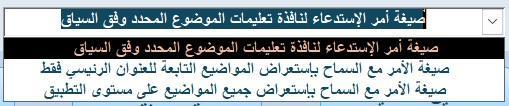
لم اقصد أنك قللت من شأن العمل بل إعتقدت أني أكون قد أغفلت شيئ بدون قصد وأردت معرفته إذا كنت قد جهزت العمل في القالب ما عليك الا إستيراد الجدولين (ztblHelpSubjects و ztblHelpText) والنموذج (zfrmHelp) والوحدة النمطية (zmdlHelpFile) ولإستدعاء التعليمات المذكورة في الصورة المرفقة في ردك ستنشئ زر أمر في نموذج (بيانات الموظف) ثم قم بنسخ الصيغة المذكورة في الصورة أأدناه وألصقها في حدث النقر لهذا الزر أو أي صيغة وفقاً للخيار الذي تختاره من القائمة وتم توضيح وظيفة كل خيار في (العرض التوضيحي) وتوضيح النتيجة في المثال العملي
 1 point
 -
حلوة ... ابدعت فأحسنت .. شكرا لك يا سيد منتصر الانسي1 point
-
غريب انت يا بروفيسور والله ماشاء الله عليك ابداع غريب من نوعه بتفكرنا باغلب الالعاب اللي كنا بنعشها زمان ولها ذاكريات معانا جميعا1 point
-
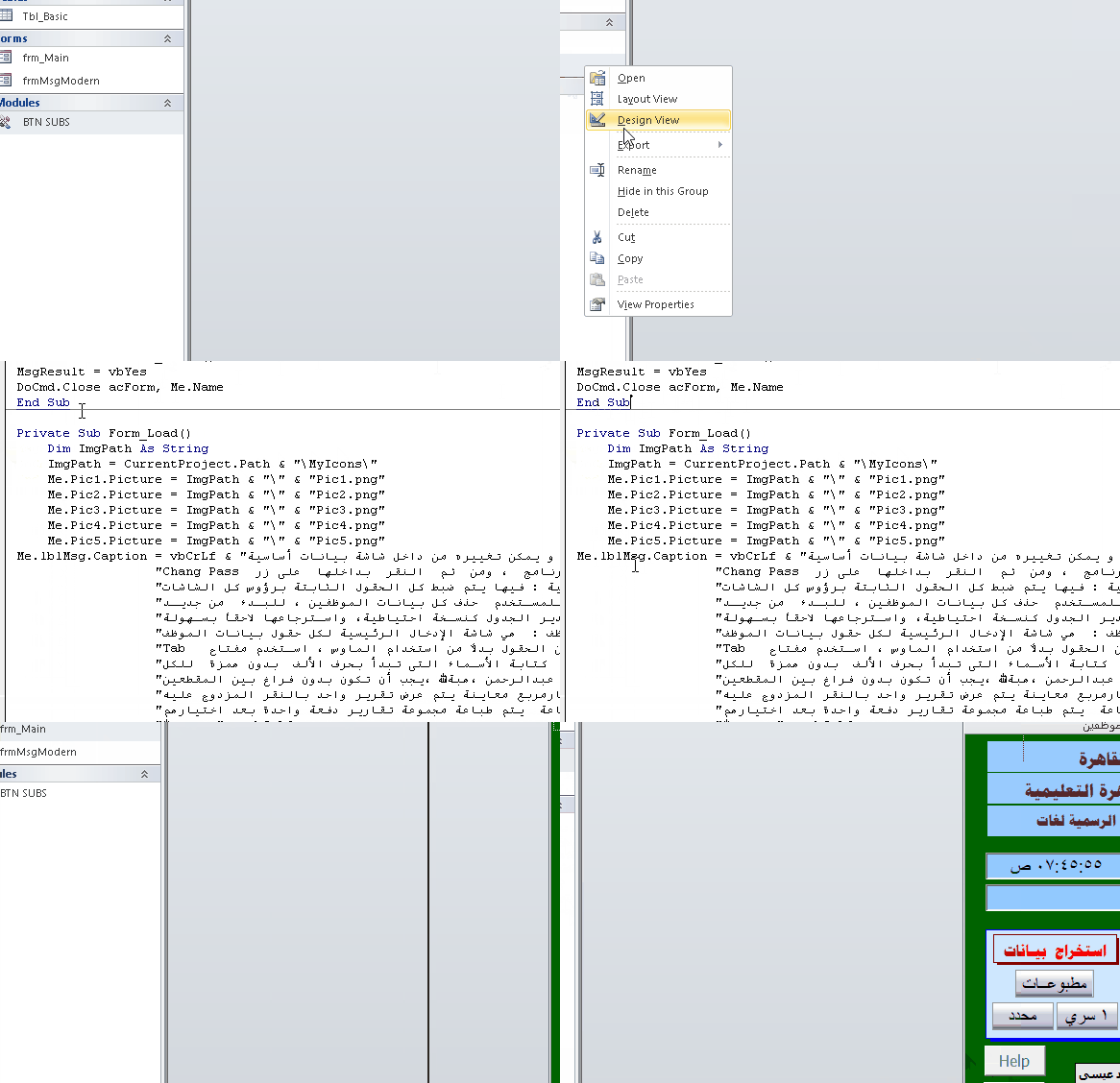
تفضل استاذ @أحمد العيسى مع انك مايعجبك العجب لكني مصر ارضيك . هل هذا يعجبك . ماسج احترافي . ولو تريد ماسج بمحتويات ملف pdf ارفق استعلامه . الشرح والمرفق .ووافني بالرد احمد العيسى.rar
 1 point
 -
Version 1.0.0
65 تنزيل
استبدال صندوق الرسائل فى الاكسس بنموذج رسائل احترافى بسطر واحد بس كل حاجة جاهزة مش محتاج تفكر في تصميم نموذج مش محتاج نموذج الرسائل يكون موجود اساسا مش محتاج تكتب كود كبير بعد كده لصندوق الرسائل استدعي الدالة وخلاص والنظام يعمل كل شئ النظام يقدم 4 أنواع رسائل جاهزة : { معلومة - نجاح - تحذير - خطأ } كل نوع بتصميمه ولونه وأيقونته معلومة : من خلال : UiInfo اللون : أزرق نجاح : من خلال : UiSuccess اللون : أخضر تحذير : من خلال : UiWarning اللون : برتقالي خطأ : من خلال : UiError اللون : أحمر 3 أنواع إدخال : { نص حر - رقم مع تحقق تلقائي - اختيار من قائمة } نص حر : من خلال : UiInput رقم مع تحقق تلقائي: من خلال : UiInputNum يرفض الحروف بدون ما تكتب سطر واحد اختيار من قائمة : من خلال : UiPick قرارات متعددة : { تأكيد نعم/لا - ثلاثة خيارات أزرار مخصصة بأسماء ترجعها النتيجة مباشرة } نعم / لا : من خلال : BlnUiConfirm يرجع True أو False مباشرة ثلاثة خيارات : من خلال :IntUiConfirm3 يرجع 1 أو 2 أو 0 أزرار مخصصة : من خلال :UiCustom يرجع اسم الزر اللي اتضغط مش رقمه دعم كامل للعربية والإنجليزية : { اتجاه النص RTL/LTR تلقائي - الأزرار والعناوين بالغتين من خلال معامل UiLangEn يكفي لتبديل كل شيء } أضف UiLangEn كآخر parameter وكل شيء يتبدل : اتجاه النص - الأزرار - العناوين الافتراضية ثيم موحد قابل للتخصيص : { ألوان الهيدر والأيقونات والأزرار كلها من UiTheme غير لون الـ Accent في مكان واحد وكل الرسائل تتغير } كل ألوان النظام مجمعة في UiTheme مناسب لأي مشروع قاعدة بيانات صغير أو كبير - عربي أو إنجليزي - مبتدئ أو محترف يبني نفسه : لا تثبيت ولا إعداد كل إجراء أو وظيفة واضحة الاسم - واضحة الـ return - واضحة الاستخدام اسم الوحدة النمطية : modUIMsgFramework كود الوحدة النمطية.. Option Explicit Option Compare Database Public Enum UiIcon UiIconInfo = 0 UiIconSuccess = 1 UiIconWarning = 2 UiIconError = 3 UiIconQuestion = 4 End Enum Public Enum UiMode UiModeAlert = 0 UiModeInput = 1 UiModeNumber = 2 UiModeList = 3 End Enum Public Enum UiLang UiLangAr = 0 UiLangEn = 1 End Enum Public Type UiParams strMessage As String strTitle As String strButtons As String strDefault As String strList As String strDetails As String strResult As String enuIcon As UiIcon enuMode As UiMode enuLang As UiLang End Type Public Type UiTheme lngAccent As Long lngHeader As Long lngBg As Long lngText As Long lngMuted As Long lngBorder As Long lngSuccess As Long lngWarning As Long lngError As Long lngInfo As Long lngQuestion As Long End Type Private Const STRFORMNAME As String = "frmUiMsg" Private Const STRMODNAME As String = "modUICore" Private Const MAX_BUTTONS As Integer = 5 Private Const FRM_W As Long = 9000 Private m_typParams As UiParams Public Function TypDefaultTheme() As UiTheme Dim typT As UiTheme typT.lngAccent = RGB(0, 120, 212) typT.lngHeader = RGB(32, 32, 38) typT.lngBg = RGB(245, 246, 250) typT.lngText = RGB(30, 30, 35) typT.lngMuted = RGB(120, 120, 130) typT.lngBorder = RGB(210, 212, 220) typT.lngSuccess = RGB(16, 124, 16) typT.lngWarning = RGB(200, 100, 0) typT.lngError = RGB(196, 43, 28) typT.lngInfo = RGB(0, 120, 212) typT.lngQuestion = RGB(104, 33, 122) TypDefaultTheme = typT End Function Private Function BlnFormExists(ByVal strName As String) As Boolean On Error Resume Next Dim objFrm As Object Set objFrm = CurrentProject.AllForms(strName) BlnFormExists = Not (objFrm Is Nothing) Set objFrm = Nothing On Error GoTo 0 End Function Private Sub LogError(ByVal strProc As String, _ ByVal lngNum As Long, _ ByVal strDesc As String) Debug.Print "[" & STRMODNAME & "." & strProc & "] " & _ "Err " & lngNum & ": " & strDesc & _ " @ " & Now() End Sub Public Function TypGetParams() As UiParams TypGetParams = m_typParams End Function Public Sub SetResult(ByVal strResult As String) m_typParams.strResult = strResult End Sub Private Sub ResetParams() Dim typEmpty As UiParams m_typParams = typEmpty End Sub Private Function StrDefaultTitle(ByVal enuIcon As UiIcon, _ ByVal enuLang As UiLang) As String If enuLang = UiLangAr Then Select Case enuIcon Case UiIconSuccess: StrDefaultTitle = "تم بنجاح" Case UiIconWarning: StrDefaultTitle = "تحذير" Case UiIconError: StrDefaultTitle = "خطأ" Case UiIconQuestion: StrDefaultTitle = "تأكيد" Case Else: StrDefaultTitle = "معلومة" End Select Else Select Case enuIcon Case UiIconSuccess: StrDefaultTitle = "Success" Case UiIconWarning: StrDefaultTitle = "Warning" Case UiIconError: StrDefaultTitle = "Error" Case UiIconQuestion: StrDefaultTitle = "Confirm" Case Else: StrDefaultTitle = "Information" End Select End If End Function Private Function StrValidateButtons(ByVal strBtns As String) As String Dim arrB() As String Dim intCnt As Integer Dim intI As Integer Dim strOut As String arrB = Split(strBtns, ",") intCnt = UBound(arrB) + 1 If intCnt > MAX_BUTTONS Then LogError "StrValidateButtons", 0, _ "تجاوز الحد الأقصى للأزرار (" & intCnt & "). سيتم اقتصارها على " & MAX_BUTTONS intCnt = MAX_BUTTONS End If For intI = 0 To intCnt - 1 If Len(strOut) > 0 Then strOut = strOut & "," strOut = strOut & Trim(arrB(intI)) Next intI StrValidateButtons = strOut End Function Private Function BlnBuildMsgForm() As Boolean On Error GoTo ErrHandler Dim typT As UiTheme Dim objFrm As Object Dim objCtl As Object Dim strTemp As String Dim intI As Integer Dim lngLeft As Long typT = TypDefaultTheme() Const HDR_H As Long = 900 Const ICON_L As Long = 200 Const ICON_T As Long = 150 Const ICON_W As Long = 600 Const ICON_H As Long = 600 Const TITLE_L As Long = 900 Const TITLE_T As Long = 200 Const TITLE_W As Long = 7800 Const TITLE_H As Long = 500 Const MSG_L As Long = 300 Const MSG_T As Long = 1050 Const MSG_W As Long = 8400 Const MSG_H As Long = 1400 Const DET_L As Long = 300 Const DET_T As Long = 2500 Const DET_W As Long = 8400 Const DET_H As Long = 700 Const INP_L As Long = 300 Const INP_T As Long = 3300 Const INP_W As Long = 8400 Const INP_H As Long = 450 Const DIV_T As Long = 4050 Const BTN_T As Long = 4250 Const BTN_W As Long = 1550 Const BTN_H As Long = 550 Const FRM_H As Long = 5000 Set objFrm = CreateForm strTemp = objFrm.Name With objFrm .Caption = "" .ScrollBars = 0 .RecordSelectors = False .NavigationButtons = False .DividingLines = False .BorderStyle = 1 .AutoCenter = True .PopUp = True .Modal = True .Width = FRM_W .Section(0).Height = FRM_H .Section(0).BackColor = typT.lngBg End With Set objCtl = CreateControl(strTemp, acRectangle, acDetail) With objCtl .Name = "recHeader": .Left = 0: .Top = 0 .Width = FRM_W: .Height = HDR_H .BackColor = typT.lngHeader: .BackStyle = 1 .BorderStyle = 0: .SpecialEffect = 0 End With Set objCtl = CreateControl(strTemp, acRectangle, acDetail) With objCtl .Name = "recIcon": .Left = ICON_L: .Top = ICON_T .Width = ICON_W: .Height = ICON_H .BackColor = typT.lngInfo: .BackStyle = 1 .BorderStyle = 0: .SpecialEffect = 0 End With Set objCtl = CreateControl(strTemp, acLabel, acDetail) With objCtl .Name = "lblIcon": .Caption = "i" .Left = ICON_L: .Top = ICON_T .Width = ICON_W: .Height = ICON_H .FontSize = 20: .FontBold = True .ForeColor = vbWhite: .BackStyle = 0: .TextAlign = 2 End With Set objCtl = CreateControl(strTemp, acLabel, acDetail) With objCtl .Name = "lblTitle": .Caption = "" .Left = TITLE_L: .Top = TITLE_T .Width = TITLE_W: .Height = TITLE_H .FontSize = 14: .FontBold = True .ForeColor = vbWhite: .BackStyle = 0: .TextAlign = 1 End With Set objCtl = CreateControl(strTemp, acLabel, acDetail) With objCtl .Name = "lblMessage": .Caption = "" .Left = MSG_L: .Top = MSG_T .Width = MSG_W: .Height = MSG_H .FontSize = 11: .ForeColor = typT.lngText .BackStyle = 0: .TextAlign = 1 End With Set objCtl = CreateControl(strTemp, acLabel, acDetail) With objCtl .Name = "lblDetails": .Caption = "" .Left = DET_L: .Top = DET_T .Width = DET_W: .Height = DET_H .FontSize = 9: .ForeColor = typT.lngMuted .BackStyle = 0: .Visible = False End With Set objCtl = CreateControl(strTemp, acTextBox, acDetail) With objCtl .Name = "txtInput" .Left = INP_L: .Top = INP_T .Width = INP_W: .Height = INP_H .FontSize = 11 .BorderColor = typT.lngBorder: .BackColor = vbWhite .Visible = False End With Set objCtl = CreateControl(strTemp, acComboBox, acDetail) With objCtl .Name = "cboList" .Left = INP_L: .Top = INP_T .Width = INP_W: .Height = INP_H .FontSize = 11 .BorderColor = typT.lngBorder: .BackColor = vbWhite .RowSourceType = "Value List" .LimitToList = True: .AllowValueListEdits = False .Visible = False End With Set objCtl = CreateControl(strTemp, acLine, acDetail) With objCtl .Name = "linDivider": .Left = 0: .Top = DIV_T .Width = FRM_W: .Height = 0 .BorderColor = typT.lngBorder: .BorderWidth = 1 End With For intI = 1 To MAX_BUTTONS lngLeft = 200 + ((intI - 1) * 1760) Set objCtl = CreateControl(strTemp, acCommandButton, acDetail) With objCtl .Name = "btn" & intI: .Caption = "btn" & intI .Left = lngLeft: .Top = BTN_T .Width = BTN_W: .Height = BTN_H .FontSize = 10: .FontBold = True .BackColor = typT.lngAccent: .ForeColor = vbWhite .BorderStyle = 0: .Visible = False .OnClick = "=ProcBtnClick(" & intI & ")" End With Next intI DoCmd.Save acForm, strTemp DoCmd.Close acForm, strTemp, acSaveYes DoCmd.Rename STRFORMNAME, acForm, strTemp BlnBuildMsgForm = True Set objCtl = Nothing: Set objFrm = Nothing Exit Function ErrHandler: LogError "BlnBuildMsgForm", Err.Number, Err.Description BlnBuildMsgForm = False Set objCtl = Nothing: Set objFrm = Nothing End Function Private Function BlnInjectMsgCode() As Boolean On Error GoTo ErrHandler Dim objMdl As Object Dim strCode As String Dim strOldCode As String DoCmd.OpenForm STRFORMNAME, acDesign, , , , acHidden Set objMdl = Forms(STRFORMNAME).Module If objMdl.CountOfLines > 0 Then strOldCode = objMdl.Lines(1, objMdl.CountOfLines) objMdl.DeleteLines 1, objMdl.CountOfLines End If strCode = StrFormCodeHeader() & _ StrFormCodeApplyIcon() & _ StrFormCodeApplyLang() & _ StrFormCodeSetupBtns() & _ StrFormCodeFillList() & _ StrFormCodeOpen() & _ StrFormCodeBtn() & _ StrFormCodeUnload() objMdl.AddFromString strCode If objMdl.CountOfLines < 10 Then If Len(strOldCode) > 0 Then objMdl.DeleteLines 1, objMdl.CountOfLines objMdl.AddFromString strOldCode End If LogError "BlnInjectMsgCode", 0, "AddFromString أنتج كوداً فارغاً، تم استعادة الكود القديم" BlnInjectMsgCode = False GoTo Cleanup End If DoCmd.Save acForm, STRFORMNAME DoCmd.Close acForm, STRFORMNAME, acSaveYes BlnInjectMsgCode = True Cleanup: Set objMdl = Nothing Exit Function ErrHandler: LogError "BlnInjectMsgCode", Err.Number, Err.Description BlnInjectMsgCode = False Set objMdl = Nothing End Function Private Function StrFormCodeHeader() As String Dim s As String s = "Option Explicit" & vbCrLf s = s & "Option Compare Database" & vbCrLf & vbCrLf s = s & "Private mintMode As Integer" & vbCrLf s = s & "Private mintLang As Integer" & vbCrLf & vbCrLf StrFormCodeHeader = s End Function Private Function StrFormCodeApplyIcon() As String Dim s As String s = "Private Sub ProcApplyIcon(ByVal intIcon As Integer)" & vbCrLf s = s & " Select Case intIcon" & vbCrLf s = s & " Case 1" & vbCrLf s = s & " Me.recHeader.BackColor = RGB(16,124,16)" & vbCrLf s = s & " Me.recIcon.BackColor = RGB(16,124,16)" & vbCrLf s = s & " Me.lblIcon.Caption = Chr(252)" & vbCrLf s = s & " Me.lblIcon.FontName = ""Wingdings""" & vbCrLf s = s & " Case 2" & vbCrLf s = s & " Me.recHeader.BackColor = RGB(200,100,0)" & vbCrLf s = s & " Me.recIcon.BackColor = RGB(200,100,0)" & vbCrLf s = s & " Me.lblIcon.Caption = Chr(56)" & vbCrLf s = s & " Me.lblIcon.FontName = ""Wingdings""" & vbCrLf s = s & " Case 3" & vbCrLf s = s & " Me.recHeader.BackColor = RGB(196,43,28)" & vbCrLf s = s & " Me.recIcon.BackColor = RGB(196,43,28)" & vbCrLf s = s & " Me.lblIcon.Caption = Chr(251)" & vbCrLf s = s & " Me.lblIcon.FontName = ""Wingdings""" & vbCrLf s = s & " Case 4" & vbCrLf s = s & " Me.recHeader.BackColor = RGB(104,33,122)" & vbCrLf s = s & " Me.recIcon.BackColor = RGB(104,33,122)" & vbCrLf s = s & " Me.lblIcon.Caption = Chr(63)" & vbCrLf s = s & " Me.lblIcon.FontName = ""Wingdings""" & vbCrLf s = s & " Case Else" & vbCrLf s = s & " Me.recHeader.BackColor = RGB(0,120,212)" & vbCrLf s = s & " Me.recIcon.BackColor = RGB(0,120,212)" & vbCrLf s = s & " Me.lblIcon.Caption = Chr(105)" & vbCrLf s = s & " Me.lblIcon.FontName = ""Arial""" & vbCrLf s = s & " End Select" & vbCrLf s = s & "End Sub" & vbCrLf & vbCrLf StrFormCodeApplyIcon = s End Function Private Function StrFormCodeApplyLang() As String Dim s As String s = "Private Sub ProcApplyLang(ByVal intLang As Integer)" & vbCrLf s = s & " Dim intAlign As Integer" & vbCrLf s = s & " intAlign = IIf(intLang = 0, 3, 1)" & vbCrLf s = s & " Me.lblTitle.TextAlign = intAlign" & vbCrLf s = s & " Me.lblMessage.TextAlign = intAlign" & vbCrLf s = s & " Me.lblDetails.TextAlign = intAlign" & vbCrLf s = s & " Me.txtInput.TextAlign = intAlign" & vbCrLf s = s & " Me.cboList.TextAlign = intAlign" & vbCrLf s = s & "End Sub" & vbCrLf & vbCrLf StrFormCodeApplyLang = s End Function Private Function StrFormCodeSetupBtns() As String Dim s As String s = "Private Sub ProcSetupBtns(ByVal strBtns As String, ByVal intLang As Integer)" & vbCrLf s = s & " Dim arrBtns() As String" & vbCrLf s = s & " Dim intTotal As Integer" & vbCrLf s = s & " Dim intI As Integer" & vbCrLf s = s & " Dim lngBtnW As Long" & vbCrLf s = s & " Dim lngBtnH As Long" & vbCrLf s = s & " Dim lngGap As Long" & vbCrLf s = s & " Dim lngTotalW As Long" & vbCrLf s = s & " Dim lngStartX As Long" & vbCrLf s = s & " Dim blnIsRtl As Boolean" & vbCrLf s = s & " arrBtns = Split(strBtns, "","")" & vbCrLf s = s & " intTotal = UBound(arrBtns) + 1" & vbCrLf s = s & " If intTotal > 5 Then intTotal = 5" & vbCrLf s = s & " blnIsRtl = (intLang = 0)" & vbCrLf s = s & " lngBtnW = 1550" & vbCrLf s = s & " lngBtnH = 550" & vbCrLf s = s & " lngGap = 200" & vbCrLf s = s & " lngTotalW = (intTotal * lngBtnW) + ((intTotal - 1) * lngGap)" & vbCrLf s = s & " lngStartX = (Me.Width - lngTotalW) \ 2" & vbCrLf s = s & " For intI = 1 To 5" & vbCrLf s = s & " Me(""btn"" & intI).Visible = False" & vbCrLf s = s & " Next intI" & vbCrLf s = s & " For intI = 1 To intTotal" & vbCrLf s = s & " With Me(""btn"" & intI)" & vbCrLf s = s & " .Caption = Trim(arrBtns(intI - 1))" & vbCrLf s = s & " If blnIsRtl Then" & vbCrLf s = s & " .Left = lngStartX + ((intTotal - intI) * (lngBtnW + lngGap))" & vbCrLf s = s & " Else" & vbCrLf s = s & " .Left = lngStartX + ((intI - 1) * (lngBtnW + lngGap))" & vbCrLf s = s & " End If" & vbCrLf s = s & " .Top = 4250: .Width = lngBtnW: .Height = lngBtnH" & vbCrLf s = s & " .Visible = True" & vbCrLf s = s & " End With" & vbCrLf s = s & " Next intI" & vbCrLf s = s & "End Sub" & vbCrLf & vbCrLf StrFormCodeSetupBtns = s End Function Private Function StrFormCodeFillList() As String Dim s As String s = "Private Sub ProcFillList(ByVal strItems As String, ByVal strDefault As String)" & vbCrLf s = s & " Dim arrItems() As String" & vbCrLf s = s & " Dim strSource As String" & vbCrLf s = s & " Dim intI As Integer" & vbCrLf s = s & " arrItems = Split(strItems, "","")" & vbCrLf s = s & " For intI = 0 To UBound(arrItems)" & vbCrLf s = s & " strSource = strSource & Trim(arrItems(intI)) & "";""" & vbCrLf s = s & " Next intI" & vbCrLf s = s & " Me.cboList.RowSource = strSource" & vbCrLf s = s & " If Len(Trim(strDefault)) > 0 Then" & vbCrLf s = s & " Me.cboList.Value = strDefault" & vbCrLf s = s & " ElseIf UBound(arrItems) >= 0 Then" & vbCrLf s = s & " Me.cboList.Value = Trim(arrItems(0))" & vbCrLf s = s & " End If" & vbCrLf s = s & "End Sub" & vbCrLf & vbCrLf StrFormCodeFillList = s End Function Private Function StrFormCodeOpen() As String Dim s As String s = "Private Sub Form_Open(Cancel As Integer)" & vbCrLf s = s & " On Error GoTo ErrHandler" & vbCrLf s = s & " Dim typP As UiParams" & vbCrLf s = s & " typP = TypGetParams()" & vbCrLf s = s & " mintMode = CInt(typP.enuMode)" & vbCrLf s = s & " mintLang = CInt(typP.enuLang)" & vbCrLf s = s & " Me.Caption = typP.strTitle" & vbCrLf s = s & " Me.lblTitle.Caption = typP.strTitle" & vbCrLf s = s & " Me.lblMessage.Caption = typP.strMessage" & vbCrLf s = s & " Me.lblDetails.Visible = (Len(Trim(typP.strDetails)) > 0)" & vbCrLf s = s & " If Me.lblDetails.Visible Then Me.lblDetails.Caption = typP.strDetails" & vbCrLf s = s & " ProcApplyIcon CInt(typP.enuIcon)" & vbCrLf s = s & " ProcApplyLang mintLang" & vbCrLf s = s & " ProcSetupBtns typP.strButtons, mintLang" & vbCrLf s = s & " Me.txtInput.Visible = (mintMode = 1 Or mintMode = 2)" & vbCrLf s = s & " Me.cboList.Visible = (mintMode = 3)" & vbCrLf s = s & " If mintMode = 1 Or mintMode = 2 Then" & vbCrLf s = s & " Me.txtInput.Value = typP.strDefault" & vbCrLf s = s & " Me.txtInput.SetFocus" & vbCrLf s = s & " End If" & vbCrLf s = s & " If mintMode = 3 Then" & vbCrLf s = s & " ProcFillList typP.strList, typP.strDefault" & vbCrLf s = s & " Me.cboList.SetFocus" & vbCrLf s = s & " End If" & vbCrLf s = s & " Exit Sub" & vbCrLf s = s & "ErrHandler:" & vbCrLf s = s & " Debug.Print ""Form_Open Err: "" & Err.Number & "" - "" & Err.Description" & vbCrLf s = s & " DoCmd.Close acForm, Me.Name" & vbCrLf s = s & "End Sub" & vbCrLf & vbCrLf StrFormCodeOpen = s End Function Private Function StrFormCodeBtn() As String Dim s As String s = "Public Function ProcBtnClick(ByVal intNum As Integer)" & vbCrLf s = s & " On Error GoTo ErrHandler" & vbCrLf s = s & " Dim strResult As String" & vbCrLf s = s & " Dim strWarn As String" & vbCrLf s = s & " Select Case mintMode" & vbCrLf s = s & " Case 1" & vbCrLf s = s & " If intNum = 1 Then" & vbCrLf s = s & " strResult = Nz(Me.txtInput.Value, """")" & vbCrLf s = s & " Else" & vbCrLf s = s & " strResult = ""__CANCEL__""" & vbCrLf s = s & " End If" & vbCrLf s = s & " Case 2" & vbCrLf s = s & " If intNum = 1 Then" & vbCrLf s = s & " If Len(Nz(Me.txtInput.Value, """")) > 0 Then" & vbCrLf s = s & " If Not IsNumeric(Me.txtInput.Value) Then" & vbCrLf s = s & " strWarn = IIf(mintLang = 0, ""أدخل رقماً صحيحاً"", ""Enter a valid number"")" & vbCrLf s = s & " MsgBox strWarn, vbExclamation" & vbCrLf s = s & " Me.txtInput.SetFocus" & vbCrLf s = s & " Exit Function" & vbCrLf s = s & " End If" & vbCrLf s = s & " End If" & vbCrLf s = s & " strResult = Nz(Me.txtInput.Value, """")" & vbCrLf s = s & " Else" & vbCrLf s = s & " strResult = ""__CANCEL__""" & vbCrLf s = s & " End If" & vbCrLf s = s & " Case 3" & vbCrLf s = s & " If intNum = 1 Then" & vbCrLf s = s & " strResult = Nz(Me.cboList.Value, """")" & vbCrLf s = s & " Else" & vbCrLf s = s & " strResult = ""__CANCEL__""" & vbCrLf s = s & " End If" & vbCrLf s = s & " Case Else" & vbCrLf s = s & " strResult = Me(""btn"" & intNum).Caption" & vbCrLf s = s & " End Select" & vbCrLf s = s & " SetResult strResult" & vbCrLf s = s & " DoCmd.Close acForm, Me.Name" & vbCrLf s = s & " Exit Function" & vbCrLf s = s & "ErrHandler:" & vbCrLf s = s & " Debug.Print ""ProcBtnClick Err: "" & Err.Number & "" - "" & Err.Description" & vbCrLf s = s & "End Function" & vbCrLf & vbCrLf StrFormCodeBtn = s End Function Private Function StrFormCodeUnload() As String Dim s As String s = "Private Sub Form_Unload(Cancel As Integer)" & vbCrLf s = s & " Dim typP As UiParams" & vbCrLf s = s & " typP = TypGetParams()" & vbCrLf s = s & " If Len(Nz(typP.strResult, """")) = 0 Then" & vbCrLf s = s & " SetResult ""__CANCEL__""" & vbCrLf s = s & " End If" & vbCrLf s = s & "End Sub" & vbCrLf StrFormCodeUnload = s End Function Private Function BlnEnsureForm() As Boolean On Error GoTo ErrHandler If BlnFormExists(STRFORMNAME) Then BlnEnsureForm = True Exit Function End If If Not BlnBuildMsgForm() Then LogError "BlnEnsureForm", 0, "BlnBuildMsgForm failed" Exit Function End If If Not BlnInjectMsgCode() Then LogError "BlnEnsureForm", 0, "BlnInjectMsgCode failed" Exit Function End If BlnEnsureForm = True Exit Function ErrHandler: LogError "BlnEnsureForm", Err.Number, Err.Description BlnEnsureForm = False End Function Private Function StrShowMsg(ByVal strMsg As String, _ ByVal enuIcon As UiIcon, _ ByVal strBtns As String, _ ByVal strTitle As String, _ ByVal enuMode As UiMode, _ ByVal strDef As String, _ ByVal strList As String, _ ByVal strDet As String, _ ByVal enuLang As UiLang) As String On Error GoTo ErrHandler If Not BlnEnsureForm() Then LogError "StrShowMsg", 0, "EnsureForm failed" StrShowMsg = "__CANCEL__" Exit Function End If If Len(Trim(strTitle)) = 0 Then strTitle = StrDefaultTitle(enuIcon, enuLang) End If ResetParams With m_typParams .strMessage = strMsg .strTitle = strTitle .strButtons = StrValidateButtons(strBtns) .enuIcon = enuIcon .enuMode = enuMode .strDefault = strDef .strList = strList .strDetails = strDet .enuLang = enuLang .strResult = "" End With DoCmd.OpenForm STRFORMNAME, acNormal, , , , acDialog StrShowMsg = m_typParams.strResult If Len(StrShowMsg) = 0 Then StrShowMsg = "__CANCEL__" ResetParams Exit Function ErrHandler: LogError "StrShowMsg", Err.Number, Err.Description ResetParams StrShowMsg = "__CANCEL__" End Function Public Sub UiInfo(ByVal strMsg As String, _ Optional ByVal strTitle As String = "", _ Optional ByVal enuLang As UiLang = UiLangAr) Dim strBtns As String strBtns = IIf(enuLang = UiLangAr, "موافق", "OK") StrShowMsg strMsg, UiIconInfo, strBtns, strTitle, UiModeAlert, "", "", "", enuLang End Sub Public Sub UiSuccess(ByVal strMsg As String, _ Optional ByVal strTitle As String = "", _ Optional ByVal enuLang As UiLang = UiLangAr) Dim strBtns As String strBtns = IIf(enuLang = UiLangAr, "موافق", "OK") StrShowMsg strMsg, UiIconSuccess, strBtns, strTitle, UiModeAlert, "", "", "", enuLang End Sub Public Sub UiWarning(ByVal strMsg As String, _ Optional ByVal strTitle As String = "", _ Optional ByVal enuLang As UiLang = UiLangAr) Dim strBtns As String strBtns = IIf(enuLang = UiLangAr, "موافق", "OK") StrShowMsg strMsg, UiIconWarning, strBtns, strTitle, UiModeAlert, "", "", "", enuLang End Sub Public Sub UiError(ByVal strMsg As String, _ Optional ByVal strTitle As String = "", _ Optional ByVal strDetails As String = "", _ Optional ByVal enuLang As UiLang = UiLangAr) Dim strBtns As String strBtns = IIf(enuLang = UiLangAr, "موافق", "OK") StrShowMsg strMsg, UiIconError, strBtns, strTitle, UiModeAlert, "", "", strDetails, enuLang End Sub Public Function BlnUiConfirm(ByVal strMsg As String, _ Optional ByVal strTitle As String = "", _ Optional ByVal enuLang As UiLang = UiLangAr) As Boolean Dim strBtns As String Dim strYes As String Dim strResult As String strBtns = IIf(enuLang = UiLangAr, "نعم,لا", "Yes,No") strYes = IIf(enuLang = UiLangAr, "نعم", "Yes") strResult = StrShowMsg(strMsg, UiIconQuestion, strBtns, strTitle, UiModeAlert, "", "", "", enuLang) BlnUiConfirm = (strResult = strYes) End Function Public Function IntUiConfirm3(ByVal strMsg As String, _ Optional ByVal strTitle As String = "", _ Optional ByVal enuLang As UiLang = UiLangAr) As Integer Dim strBtns As String Dim strYes As String Dim strNo As String Dim strResult As String strBtns = IIf(enuLang = UiLangAr, "نعم,لا,إلغاء", "Yes,No,Cancel") strYes = IIf(enuLang = UiLangAr, "نعم", "Yes") strNo = IIf(enuLang = UiLangAr, "لا", "No") strResult = StrShowMsg(strMsg, UiIconQuestion, strBtns, strTitle, UiModeAlert, "", "", "", enuLang) Select Case strResult Case strYes: IntUiConfirm3 = 1 Case strNo: IntUiConfirm3 = 2 Case Else: IntUiConfirm3 = 0 End Select End Function Public Function UiInput(ByVal strMsg As String, _ Optional ByVal strTitle As String = "", _ Optional ByVal strDefault As String = "", _ Optional ByVal enuLang As UiLang = UiLangAr) As String Dim strBtns As String Dim strResult As String strBtns = IIf(enuLang = UiLangAr, "موافق,إلغاء", "OK,Cancel") strResult = StrShowMsg(strMsg, UiIconInfo, strBtns, strTitle, UiModeInput, strDefault, "", "", enuLang) UiInput = IIf(strResult = "__CANCEL__", "", strResult) End Function Public Function UiInputNum(ByVal strMsg As String, _ Optional ByVal strTitle As String = "", _ Optional ByVal strDefault As String = "", _ Optional ByVal enuLang As UiLang = UiLangAr) As String Dim strBtns As String Dim strResult As String strBtns = IIf(enuLang = UiLangAr, "موافق,إلغاء", "OK,Cancel") strResult = StrShowMsg(strMsg, UiIconInfo, strBtns, strTitle, UiModeNumber, strDefault, "", "", enuLang) Select Case strResult Case "__CANCEL__", "": UiInputNum = "" Case Else UiInputNum = IIf(IsNumeric(strResult), strResult, "") End Select End Function Public Function UiPick(ByVal strMsg As String, _ ByVal strItems As String, _ Optional ByVal strTitle As String = "", _ Optional ByVal strDefault As String = "", _ Optional ByVal enuLang As UiLang = UiLangAr) As String Dim strBtns As String Dim strResult As String strBtns = IIf(enuLang = UiLangAr, "موافق,إلغاء", "OK,Cancel") strResult = StrShowMsg(strMsg, UiIconQuestion, strBtns, strTitle, UiModeList, strDefault, strItems, "", enuLang) UiPick = IIf(strResult = "__CANCEL__", "", strResult) End Function Public Function UiCustom(ByVal strMsg As String, _ ByVal strBtns As String, _ Optional ByVal enuIcon As UiIcon = UiIconQuestion, _ Optional ByVal strTitle As String = "", _ Optional ByVal enuLang As UiLang = UiLangAr) As String Dim strResult As String strResult = StrShowMsg(strMsg, enuIcon, strBtns, strTitle, UiModeAlert, "", "", "", enuLang) UiCustom = IIf(strResult = "__CANCEL__", "", strResult) End Function ' ===================================== ' أمثلة الاستخدام ' ===================================== ' UiSuccess "تم انشاء النظام بنجاح" ' UiInfo "رسالة معلومة" ' UiWarning "تحذير: لا يمكن التراجع" ' UiError "حدث خطأ", "", "تفاصيل الخطأ" ' ' If BlnUiConfirm("هل تريد الحذف؟") Then ... ' ' Select Case IntUiConfirm3("حفظ التغييرات؟") ' Case 1: ' نعم ' Case 2: ' لا ' Case 0: ' إلغاء ' End Select ' ' Dim s As String ' s = StrUiInput("أدخل اسمك", "", "محمد") ' If Len(s) > 0 Then ... ' ' Dim n As String ' n = StrUiInputNum("أدخل العمر", "", "25") ' ' Dim pick As String ' pick = StrUiPick("اختر قسم", "مبيعات,محاسبة,مخازن,إدارة") ' ' Dim choice As String ' choice = StrUiCustom("اختر خيار", "حفظ,تجاهل,إلغاء") ' Select Case choice ' Case "حفظ": ... ' Case "تجاهل": ... ' Case "": ' أُغلق بدون اختيار ' End Select طريقة الاعداد و التشغيل : بعد اضافة الوحدة النمطية: modUIMsgFramework الى قاعدة بياناتك استدعي من أي زر أمر داخل أى نموذج أو من النافذة الفورية مباشرة UiSuccess "تم انشاء النظام بنجاح" للتجربة الفورية فى المرفق تم اضافة ما يلى : وحدة نمطية باسم : modBuildTestUI ماكرو باسم : BuildTestUI شغل الماكرو BuildTestUI على الفور هيتم عمل جدول tblEmployees يحتوى على بيانات افتراضية غير حقيقية للتجربة وهيتم عمل نموذج اختبار متكامل وفتحة بشكل مباشر1 point -
Version 1.0.0
124 تنزيل
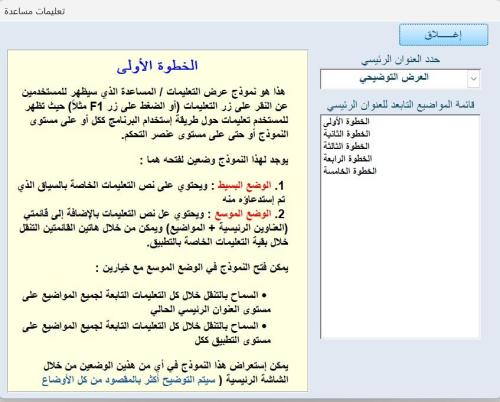
تواصلاً لهذه السلسلة أقدم لكم اليوم أداة رائعة تقوم بإضافة التعليمات المساعدة لتطبيقات الأكسس لتظهر بمظهر البرامج الإحترافية حيث تسمح لكم الأداة بإنشاء ملف تعليمات مقسم إلى عناوين رئيسية تحتوي على مواضيع فرعية بحيث يكون لكل موضوع فرعي التعليمات الخاصة به مرفق لكم مجلد يحتوي على ثلاثة ملفات 1 - القالب وهو نسخة فارغة تحتوي على الكائنات الضرورية والتي يتم إستيرادها إلى التطبيق الخاص بكم (ويمكن إستخدامه في إنشاء التعليمات لأي تطبيق وإستيراد الكائنات المطلوبة بعد الإنتهاء كتابة كل التعليمات الخاصة بالتطبيق حيث يوجد هناك ثلاثة نماذج لن تحتاجونها إلى في نسخة التطوير ويمكن الإستغناء عنها في الإصدار المخصص للمستخدم النهائي) 2 - عرض توضيحي يوضح لكم طريقة العمل بالأداة والذي أرجو أن يتم التركيز على الخطوات الموضحة فيه 3 - مثال عملي قمت فيه بتوضيح الطرق المختلفة للإستفادة من الأداة في مثال مشابه للواقع أرجو أن تكون هذه الأداة إضافة مفيدة لكل الإعضاء تحياتي1 point -
جرب هذا الملف الكود Option Explicit Sub Ashwaii() Dim my_rg As Range Dim My_min%, My_max%: My_min = [c1]: My_max = [d1] Dim lra%: lra = Cells(Rows.Count, 1).End(3).Row If lra < 2 Then lra = 2 Range("a2:a" & lra).ClearContents Dim Nb%: Nb = My_max - My_min + 1 Range("a2").FormulaArray = "=IF(ROWS($A$1:A1)>$D$1-$C$1+1,"""",LARGE((COUNTIF($A$1:A1,ROW(INDIRECT($C$1&"":""&$D$1)))=0)*ROW(INDIRECT($C$1&"":""&$D$1)),RANDBETWEEN(1,SUM(--(COUNTIF($A$1:A1,ROW(INDIRECT($C$1&"":""&$D$1)))=0)))))" Range("a2").AutoFill Destination:=Range("a2:a" & Nb + 1) Range("a2:a" & Nb + 1).Value = Range("a2:a" & Nb + 1).Value End Sub الملف مرفق Fix_rand.xlsm1 point

.thumb.jpg.b124d26c2863db72dbed5b90b81fdfb8.jpg)
