بحث مخصص من جوجل فى أوفيسنا

Custom Search
|
نجوم المشاركات




Popular Content
Showing content with the highest reputation on 09/06/26 in all areas
-
أضم صوتي لصوتك ماشاء الله ولا أروع تمت التجربة بعد التعديل وتمت العملية بنجاح باهر1 point
-
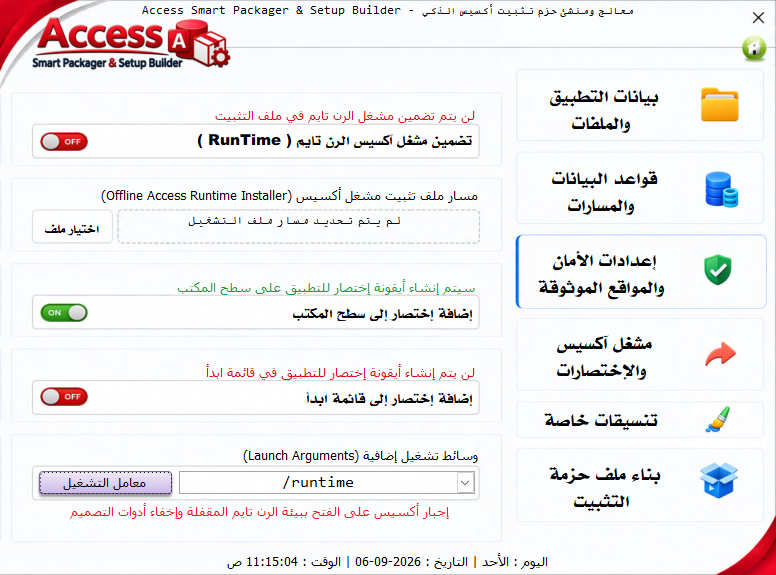
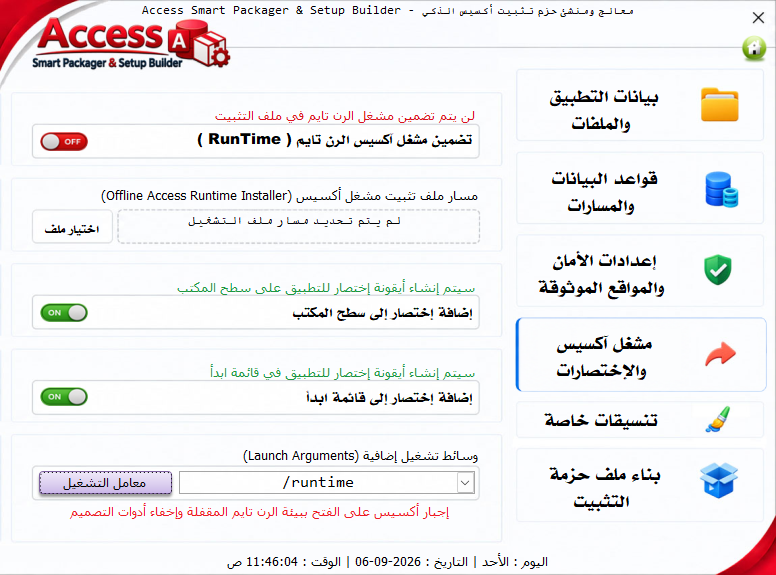
وعليكم السلام ورحمة الله وبركاته ,, أخي أبا المعتصم ، شكراً لك على مرورك العطر .. وأهلاً بتلك الملاحظات ، التي سألخص لك ردي على مجملها :- هنا فعلياً لاحظت أن الخيار يأتي مضمناً فعلاً بمعالج التثبيت ، ويبدو أن السبب في تمرير الأوامر دون تعديل القيمة الافتراضية . إلا أنه فعلياً لا يضيف التطبيق في قائمة ابدأ .. وتمت ملاحقة المجرم في هذا الإنذار الكاذب وهو سطر بسيط إن شاء الله . يبدو من الصورة انك اخترت التجربة هنا على ملف قاعدة بياناتي نفسها 😁 ، ولكن حتى مع تجربتي عليها على إصدار آكسيس 2010 - 32 ، لم تظهر لدي هذه الرسالة ولا بأي مرحلة من مراحل التجارب .. ولكن على العموم سأقوم بالتحقق منها . خيار تضمين مشغل أكسس رن تايم مع الحزمة ، هذا الخيار مخصص فقط في حال كنت تريد دمج حزمة تثبيت أوفيس رن تايم دون اتصال ( Offline Installer مثل AccessRuntime_x86.exe بحجم تقريب من 50 إلى 200 ميجابايت ) ليقوم ملف التنصيب بتثبيتها تلقائياً على الأجهزة التي لا تحتوي على أوفيس . وإذا لم تكن تملك هذا الملف ، يقوم بإلغاء تحديده ببساطة ، وقد أحاول أيضاً إضافة خيار مستقل بتحميل المشغل من خلال روابط موثوقة من مايكروسوفت - في إصدار وتعديل آخر - إن شا ءالله . أيضاً خيار تشغيل التطبيق في وضع الرن تايم (/runtime) ، هذا الخيار مستقل تماماً ولا يتطلب تحميل أي ملف ! فعند تفعيله ، يتم تمرير المعامل /runtime لأكسس العميل المثبت أصلاً في جهازه ، مما يجبر أكسس الكامل على العمل ببيئة الرن تايم المقيدة ( إخفاء أشرطة الأدوات ، منع فتح التصميم ، وعرض النماذج فقط ) . وسأوضح أين نجد نتيجة هذه الميزة عند تفعيلها .. في اختصار سطح المكتب الذي يتم انشاؤه بعد التثبيت ، ادخل على خصائص هذا الاختصار ، وانظر لمسار الملف 😁 ونهايته .. ستلاحظ انه ينتهي كمثال بـ :- .accde" /runtime أو حسب نوع المعامل الذي تم تمريره .. وقد قمت بضبط تعطيل المفاتيح الخاصة كاملة في الإصدار المحدّث إن شاء الله ، فقد كنت في تجاربي قد أوقفت بعض الوظائف ، وتاهت بي التجارب بعدم إعادة تفعيلها . فيما يخص هذه الإضافة ، والتي فعلاً قد سبق لي التفكير بها + مجموعة من الأفكار الكثيرة التي قمت بالتوقف عندها وعدم إضافتها 😅 .. فبإذن الله تعالى سيكون لها تطبيق وتنفيذ مناسب ومحكم ..1 point
-
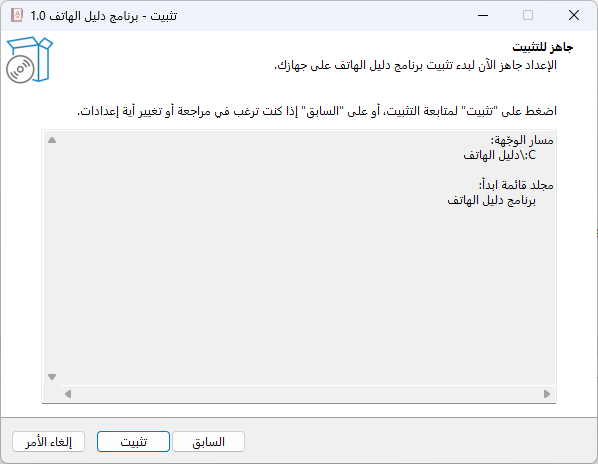
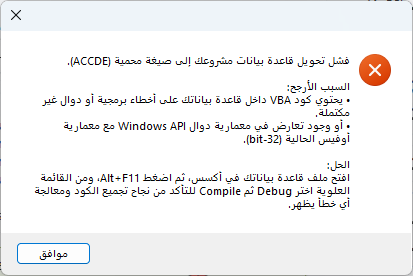
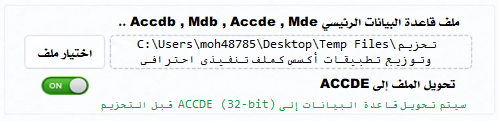
وعليكم السلام ورحمة الله وبركاته 🙂 إبداع حقيقي بجد ما شاء الله .. >>> يدخل حيز الاعتماد مباشرة بوركت يمناك أبا وسام .. طريقتك في التنفيذ بحد ذاتها مميزة ما شاء الله .. ⭐ بعد التجربة هي كم ملاحظة بسيطة إن شاء الله .. 🖐️ الأولى : هنا اخترت عدم إنشاء أيقونة في قائمة إبدأ .. إلا أنه تأتي منضمن الخيارات عند التنصيب ! >>> الثانية : عندما أختار التحويل إلى Accde تظهر رسالة الخطأ التالية مع تأكدي من عدم وجود أي من الأسباب المذكورة .. >>> الثالثة : في صفحة مشغل أكسس والإخصارات ، هل علي أن أحمل الأكسس رنتايم لكي يضمنه في الحزمة ؟ وهل خيارات وسائط التشغيل مقرونة بوجود الأكسس رن تايم فقط ؟ لأنني أردت تقفيل البرنامج عن طريق الأداة بمنع الشفت وإخفاء الأكس ولكن كل ذالك لم يحصل 😅 .. الرابعة ( وهي مجرد مقترح أو إضافة ) : كانت هناك ميزة في الوينرار عند استخدامه للتحزيم وهي : تشغيل (ملف معين/ملفات معينة) من ضمن الحزمة (قبل / أو بعد ) عملية التنصيب .. وهذه قد تفيد في تشغيل أوامر مخصصة قبل فتح البرنامج أو عرض تعليمات معينة للمستخدم أو .. أو .. وتطبيق هذه راجع إليك طبعا وسلامة راسك 😊
 1 point
 -
تم التعامل مع هذه النقطة ، واعتماد السماح بإنشاء المجلدات الفارغة أثناء عملية التنصيب .. مع أن لي وجهة نظر محايدة بخصوص هذه النقطة تحديداً ، وهي أن تجعل مشروع قاعدة البيانات نفسه هو من ينشئ المجلدات الخدمية التي يحتاجها المشروع ، ولكن تم الحل بإذن الله . أيضاً تم التعامل مع نقاط أخرى تمت ملاحظتها أثناء تجارب بشكل موسع أكثر ... شكراً لملاحظتك أخي @منتصر الانسي1 point
-
يمكنك استخدام الدالة Application.OnTime لتشغيل إجراء آخر بعد دقيقة من استدعاء الكود: Sub StartTimer() 'تشغيل الإجراء SaveAndClose بعد دقيقة Application.OnTime Now + TimeValue("00:01:00"), "SaveAndClose" End Sub Sub SaveAndClose() ThisWorkbook.Save 'حفظ الملف Application.Quit 'إغلاق Excel End Sub طريقة العمل عند تشغيل StartTimer يبدأ المؤقت. ينتظر Excel دقيقة واحدة. يتم استدعاء الإجراء SaveAndClose. يتم حفظ المصنف ثم إغلاق برنامج Excel. إذا كنت تريد إغلاق المصنف فقط دون إغلاق برنامج Excel بالكامل: Sub StartTimer() Application.OnTime Now + TimeValue("00:01:00"), "SaveAndCloseWorkbook" End Sub Sub SaveAndCloseWorkbook() ThisWorkbook.Save ThisWorkbook.Close SaveChanges:=True End Sub وإذا أردت تغيير المدة إلى 5 دقائق مثلاً: Application.OnTime Now + TimeValue("00:05:00"), "SaveAndClose" بهذه الطريقة يتم التنفيذ في الخلفية بعد المدة المحددة دون استخدام حلقات انتظار (Loop) أو Application.Wait.1 point
-
في هذاه الحالة يلزم هذا الكود Option Explicit Private Sub Worksheet_Activate() Application.EnableEvents = False fil_data_val Application.EnableEvents = True End Sub Private Sub Worksheet_Change(ByVal Target As Range) Application.EnableEvents = False If Target.Address = "$A$2" And Target.Count = 1 Then Call find_Please(Me, Range("a2")) End If Application.EnableEvents = True End Sub '++++++++++++++++++++++++++++ Sub find_Please(SH As Worksheet, Rg) Dim Principal As Worksheet Dim Ro% 'first found row Dim Ro_Atc% 'All Others found rows Dim m%: m = 4 Dim My_rg As Range 'find range with Criteria in cell(A2) SH.Range("A4:E" & Rows.Count).Clear Set Principal = Sheets("serch") For Each SH In Sheets If SH.Name <> Principal.Name Then Set My_rg = SH.Range("C:C").Find(Rg, lookat:=1) If My_rg Is Nothing Then GoTo Next_sh Ro = My_rg.Row: Ro_Atc = Ro Do Principal.Cells(m, 1).Resize(, 5).Value = _ SH.Cells(Ro_Atc, 1).Resize(, 5).Value m = m + 1 Set My_rg = SH.Range("C:C").FindNext(My_rg) Ro_Atc = My_rg.Row If Ro_Atc = Ro Then Exit Do Loop End If Next_sh: Next If m = 4 Then _ MsgBox "Current Account Not Found": Exit Sub With Principal.Range("A4:E" & m - 1) .Borders.LineStyle = 1 .Font.Bold = True .Font.Size = 24 .HorizontalAlignment = 2 .VerticalAlignment = 2 .Interior.ColorIndex = 24 .InsertIndent 1 End With End Sub '++++++++++++++++++++++++++++ Sub fil_data_val() Dim S As Worksheet, T As Worksheet Dim dic As Object Dim i% Set S = Sheets("serch") Set dic = CreateObject("Scripting.Dictionary") For Each T In Sheets If T.Name = S.Name Then GoTo Next_T i = 2 Do Until T.Range("c" & i) = vbNullString dic(T.Range("C" & i).Value) = vbNullString i = i + 1 Loop Next_T: Next T With S.Range("A2").Validation .Delete .Add 3, Formula1:=Application.Transpose(Join(dic.keys, ",")) End With dic.RemoveAll: Set dic = Nothing Set T = Nothing: Set S = Nothing End Sub الملف مرفق Search_Account _repetitions.xlsm1 point
-
السلام عليكم أخي في الله قم بتنصيب أوفيس 2010 و استخدم اكسل 2010 لفتح الملف ثم قم بحفظ الملف بصيغة xlsb وسوف تدعو لي ان شاء الله1 point