نجوم المشاركات



Popular Content
Showing content with the highest reputation on 11/28/25 in all areas
-
نعم ملاحظتك صحيحة يوجد خلل في الدالة .. سوف اعالجه وحقيقة لم اجرب بعدما انهيت التعديلات في نقاشنا الأخير1 point
-
السلام عليكم : من رخصة استاذنا المحترم Foksh وهذه مشاركة بسيطة تتضمن اربع ارقام يمكنك اختيار احدها 222.accdb1 point
-
تم المطلوب في الملف المرفق... حافز.xlsx1 point
-
اخي الكريم محمد حسن جرب الآن ووافني بنتيجة التجربة ChkInOut_NetUp5.rar1 point
-
شكرا استاذة على التعدبل1 point
-
السلام عليكم ورحمة الله إليك هذا الحل باستعمال "الذكاء الاصطناعي" (بالمعادلات وبالأكواد -بتصرف-) أرجو أن يفي الغرض المطلوب... ملف العمل.xlsm1 point
-
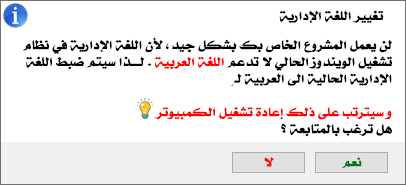
تم التخلص من المديول ، ودمج الفكرة داخل نموذج البداية ، والذي اعتمدت في تصميمه على ما يلي :- ⏱️ جعلته يبدو كرسالة بمحتوى عربي بدلاً من الرسائل الإنجليزية والتي قد تربك المستخدم أو من كانت خبرته باللغة الإنجليزية ليست بالقوية . ⏱️ من خلال الكود أصبح بإمكان المبرمج اختيار البلد الذي يريد أن تكون له اللغة العربية في اللغة الإدارية ( Unicode ) . arabicSettings = GetArabicCountrySettings("Jo") ⏱️ من خلال التعديل الجديد عندما يفتح النموذج اذا كانت اللغة الإدارية تدعم العربية فسيتم اغلاق النموذج المرفق وفتح النموذج الخاص بالمشروع بك ( التعديل من الكود ) ⏱️ تم دعم بلدان الدول العربية ( كافة إلى حد ما وما استطعت من الحصول على LocalID الخاص بها .. ) الكود الكامل للنموذج بعد التحديث :- '********************************************** '*** *** '*** FFFFFF OOO KK KK SSSS HH HH *** '*** FF O O KK KK SS HH HH *** '*** FFFFF O O KKK SS HHHHHH *** '*** FF O O KK KK SS HH HH *** '*** FF OOO KK KK SSSSS HH HH *** '*** *** '********************************************** Option Compare Database Option Explicit #If VBA7 Then Private Declare PtrSafe Function GetUserDefaultUILanguage Lib "kernel32" () As Long Private Declare PtrSafe Function GetACP Lib "kernel32" () As Long #Else Private Declare Function GetUserDefaultUILanguage Lib "kernel32" () As Long Private Declare Function GetACP Lib "kernel32" () As Long #End If Private Type ArabicCountry LocaleName As String LocaleID As String CountryName As String countryCode As String End Type Private Const MSG_RESTART_SOON As String = "The computer will restart in 15 seconds" Private Const MSG_SAVE_FILES As String = "Please save all open files" Private Const MSG_CANT_RUN As String = "Your project cannot run without changing the system local to Arabic" Private arabicSettings As ArabicCountry Private Function IsArabicLanguage() As Boolean Dim CodePage As Long CodePage = GetACP() IsArabicLanguage = (CodePage = 1256) End Function Private Function GetArabicCountrySettings(ByVal countryCode As String) As ArabicCountry Select Case UCase(countryCode) Case "AE", "UAE", "EMIRATES" With GetArabicCountrySettings .LocaleName = "ar-AE" .LocaleID = "00003801" .CountryName = "United Arab Emirates" .countryCode = "971" End With Case "BH", "BAHRAIN" With GetArabicCountrySettings .LocaleName = "ar-BH" .LocaleID = "00003C01" .CountryName = "Bahrain" .countryCode = "973" End With Case "DZ", "ALGERIA" With GetArabicCountrySettings .LocaleName = "ar-DZ" .LocaleID = "00001401" .CountryName = "Algeria" .countryCode = "213" End With Case "EG", "EGYPT" With GetArabicCountrySettings .LocaleName = "ar-EG" .LocaleID = "00000C01" .CountryName = "Egypt" .countryCode = "20" End With Case "IQ", "IRAQ" With GetArabicCountrySettings .LocaleName = "ar-IQ" .LocaleID = "00000801" .CountryName = "Iraq" .countryCode = "964" End With Case "JO", "JORDAN" With GetArabicCountrySettings .LocaleName = "ar-JO" .LocaleID = "00000409" .CountryName = "Jordan" .countryCode = "962" End With Case "KW", "KUWAIT" With GetArabicCountrySettings .LocaleName = "ar-KW" .LocaleID = "00003401" .CountryName = "Kuwait" .countryCode = "965" End With Case "LB", "LEBANON" With GetArabicCountrySettings .LocaleName = "ar-LB" .LocaleID = "00003001" .CountryName = "Lebanon" .countryCode = "961" End With Case "LY", "LIBYA" With GetArabicCountrySettings .LocaleName = "ar-LY" .LocaleID = "00001001" .CountryName = "Libya" .countryCode = "218" End With Case "MA", "MOROCCO" With GetArabicCountrySettings .LocaleName = "ar-MA" .LocaleID = "00001801" .CountryName = "Morocco" .countryCode = "212" End With Case "OM", "OMAN" With GetArabicCountrySettings .LocaleName = "ar-OM" .LocaleID = "00002001" .CountryName = "Oman" .countryCode = "968" End With Case "QA", "QATAR" With GetArabicCountrySettings .LocaleName = "ar-QA" .LocaleID = "00004001" .CountryName = "Qatar" .countryCode = "974" End With Case "SA", "SAUDI" With GetArabicCountrySettings .LocaleName = "ar-SA" .LocaleID = "00000401" .CountryName = "Saudi Arabia" .countryCode = "966" End With Case "SD", "SUDAN" With GetArabicCountrySettings .LocaleName = "ar-SD" .LocaleID = "00002C01" .CountryName = "Sudan" .countryCode = "249" End With Case "SY", "SYRIA" With GetArabicCountrySettings .LocaleName = "ar-SY" .LocaleID = "00002801" .CountryName = "Syria" .countryCode = "963" End With Case "TN", "TUNISIA" With GetArabicCountrySettings .LocaleName = "ar-TN" .LocaleID = "00001C01" .CountryName = "Tunisia" .countryCode = "216" End With Case "YE", "YEMEN" With GetArabicCountrySettings .LocaleName = "ar-YE" .LocaleID = "00002401" .CountryName = "Yemen" .countryCode = "967" End With Case Else With GetArabicCountrySettings .LocaleName = "ar-SA" .LocaleID = "00000401" .CountryName = "Saudi Arabia" .countryCode = "966" End With End Select End Function Private Sub ChangeLanguage() On Error GoTo ErrorHandler Dim fso As Object Dim txtFile As Object Dim filePath As String filePath = Environ$("TEMP") & "\ChangeToArabic.bat" Set fso = CreateObject("Scripting.FileSystemObject") Set txtFile = fso.CreateTextFile(filePath, True) With txtFile .WriteLine "@echo off" .WriteLine "chcp 1256" .WriteLine "reg add ""HKLM\SYSTEM\CurrentControlSet\Control\Nls\Language"" /v Default /t REG_SZ /d " & arabicSettings.LocaleID & " /f" .WriteLine "reg add ""HKLM\SYSTEM\CurrentControlSet\Control\Nls\Language"" /v InstallLanguage /t REG_SZ /d " & arabicSettings.LocaleID & " /f" .WriteLine "reg add ""HKCU\Control Panel\International"" /v LocaleName /t REG_SZ /d " & arabicSettings.LocaleName & " /f" .WriteLine "reg add ""HKCU\Control Panel\International"" /v Locale /t REG_SZ /d " & arabicSettings.LocaleID & " /f" .WriteLine "reg add ""HKCU\Control Panel\International"" /v sLanguage /t REG_SZ /d ARA /f" .WriteLine "reg add ""HKCU\Control Panel\International"" /v sCountry /t REG_SZ /d " & arabicSettings.CountryName & " /f" .WriteLine "reg add ""HKCU\Control Panel\International"" /v iCountry /t REG_SZ /d " & arabicSettings.countryCode & " /f" .WriteLine "reg add ""HKLM\SYSTEM\CurrentControlSet\Control\Nls\CodePage"" /v ACP /t REG_SZ /d 1256 /f" .WriteLine "reg add ""HKLM\SYSTEM\CurrentControlSet\Control\Nls\CodePage"" /v OEMCP /t REG_SZ /d 1256 /f" .WriteLine "reg add ""HKLM\SYSTEM\CurrentControlSet\Control\Nls\CodePage"" /v MACCP /t REG_SZ /d 10004 /f" .WriteLine "reg add ""HKCU\Keyboard Layout\Preload"" /v 1 /t REG_SZ /d " & arabicSettings.LocaleID & " /f" .WriteLine "control.exe intl.cpl,, /f:""C:\Windows\System32\intl.cpl""" .WriteLine "timeout /t 5" .WriteLine "shutdown /r /t 15 /c ""سيتم إعادة تشغيل الجهاز بعد ( 15 ثانية ) لتطبيق إعدادات اللغة العربية"" /f" End With txtFile.Close Dim shellApp As Object Set shellApp = CreateObject("Shell.Application") shellApp.ShellExecute filePath, "", "", "runas", 0 ' MsgBox MSG_RESTART_SOON & vbCrLf & MSG_SAVE_FILES, vbInformation Exit Sub ErrorHandler: Resume Next End Sub Private Sub Btn_Yes_Click() If Not IsArabicLanguage() Then ChangeLanguage Else MsgBox "اللغة الإدارية الحالية في جهازك هي فعلاً اللغة العربية", vbInformation, arabicSettings.CountryName & " : اللغة العربية الحالية" End If End Sub Private Sub Btn_No_Click() MsgBox MSG_CANT_RUN, vbCritical DoCmd.Close acForm, Me.Name End Sub Private Sub Form_Load() arabicSettings = GetArabicCountrySettings("Jo") Txt_ConteryName.Value = arabicSettings.CountryName If IsArabicLanguage() Then DoCmd.Close acForm, Me.Name MsgBox "استبدل هذه الرسالة بكود فتح النموذج الرئيسي", , "عندما تكون اللغة = العربية" Else Btn_Yes.Visible = True Btn_No.Visible = True End If End Sub PALESTINE الملف المرفق مفتوح المصدر 👈 [ LanguageCheck V 2.0.accdb ]
 1 point